


Codex 應用案例
在 CI/CD 中管理供應鏈風險
調查相依套件警示,並檢查套件更新是否帶來安全風險。
使用 Codex Security CLI 評估第三方相依套件對應用程式安全性的影響。判斷 Dependabot 警示的處理優先順序,驗證警示內容,並在引入或更新套件時執行安全掃描。
最適合的對象
- 負責判斷哪些相依套件警示需要處理的應用程式安全團隊。
- 負責評估新引入的套件或相依套件更新的開發人員。
- 在 CI/CD 管線中加入安全掃描,讓相依套件變更觸發掃描的平台團隊。
目錄
在 CI/CD 中管理供應鏈風險
調查相依套件警示,並檢查套件更新是否帶來安全風險。
使用 Codex Security CLI 評估第三方相依套件對應用程式安全性的影響。判斷 Dependabot 警示的處理優先順序,驗證警示內容,並在引入或更新套件時執行安全掃描。
使用 Codex Security CLI 評估第三方相依套件對應用程式安全性的影響。判斷 Dependabot 警示的處理優先順序,驗證警示內容,並在引入或更新套件時執行安全掃描。
最適合的對象
- 負責判斷哪些相依套件警示需要處理的應用程式安全團隊。
- 負責評估新引入的套件或相依套件更新的開發人員。
- 在 CI/CD 管線中加入安全掃描,讓相依套件變更觸發掃描的平台團隊。
你可以使用 Codex Security CLI 評估程式碼庫中的相依套件,例如在引入新套件或升級套件版本時進行評估。這能有效防範有漏洞的套件帶來供應鏈風險。若要在自訂工作流程中執行這項評估,只要在流程中加入 Codex Security CLI 指令即可。
驗證 Dependabot 警示
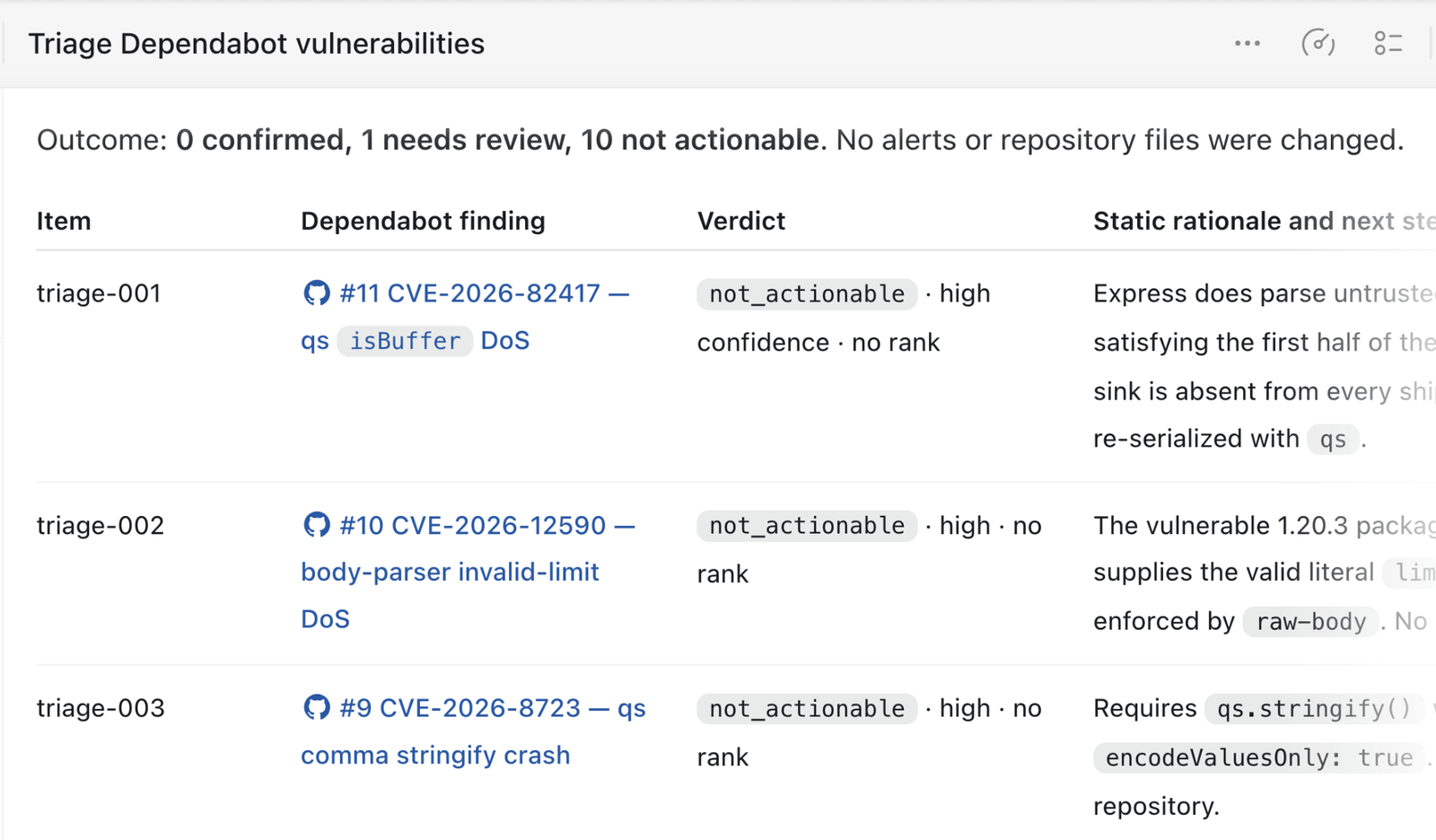
Codex Security 提供一項技能,可用來驗證已知的第三方套件漏洞,包括 Dependabot 通報的漏洞。這項技能會檢查程式執行時是否可能觸及有漏洞的程式碼,以及攻擊者是否能利用該漏洞。你可以直接在使用者介面中或透過 CLI 呼叫這項技能。
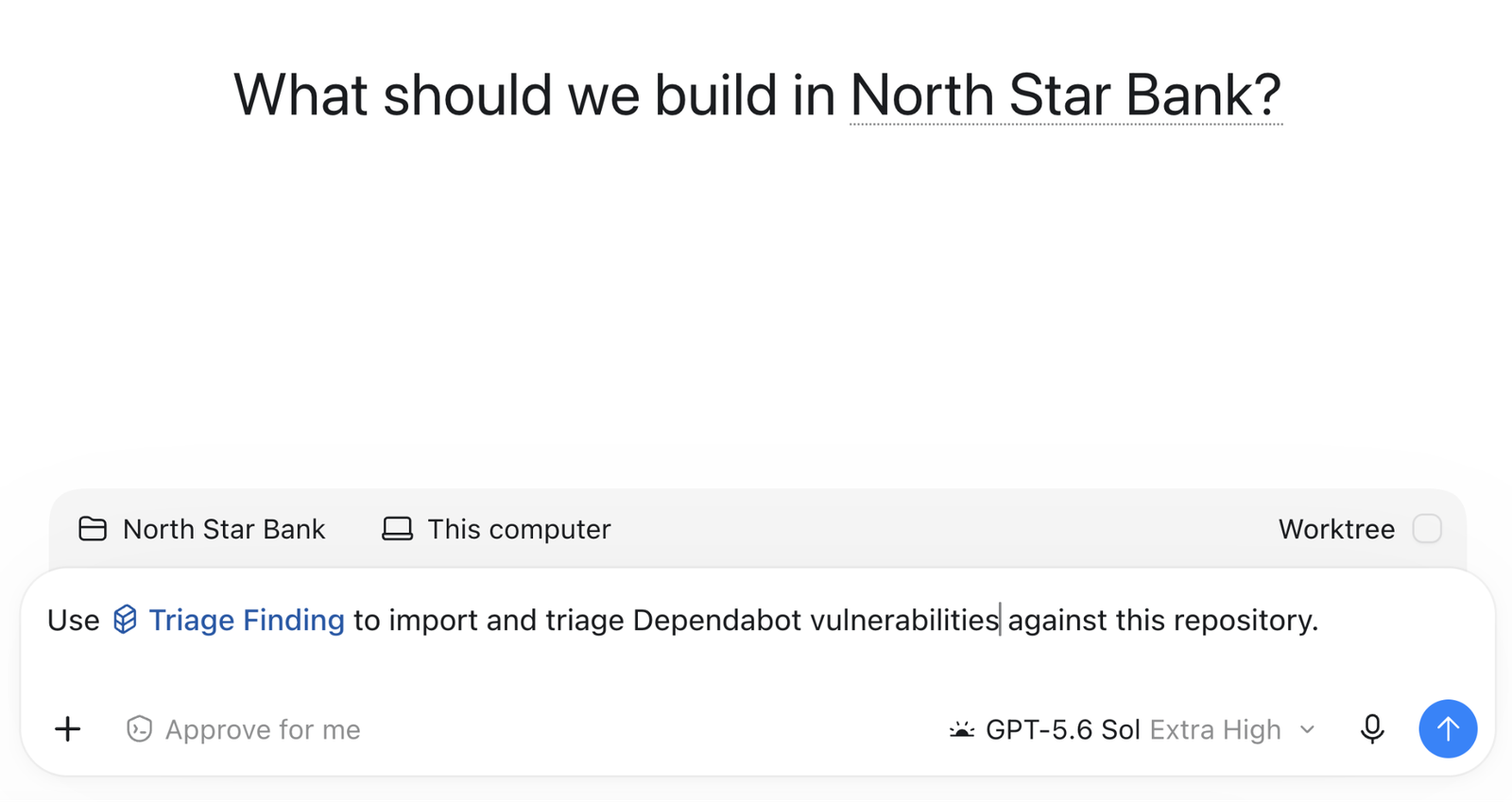
Codex 會逐一分析 Dependabot 警示,再列出每項警示所指出的風險,並說明判定警示成立或不成立的理由。
在套件版本變更時執行掃描
相依套件的版本變更時,你也可以針對該套件的最新版本執行安全性掃描。
name: Codex Security dependency scan

on:
  pull_request:
    paths:
      - package.json
      - package-lock.json

permissions:
  contents: read

jobs:
  scan:
    name: Scan dependency changes
    if: github.event.pull_request.head.repo.full_name == github.repository
    runs-on: ubuntu-24.04
    timeout-minutes: 45
    steps:
      - name: Set up the Ubuntu sandbox
        run: |
          sudo apt-get update
          sudo apt-get install --yes bubblewrap apparmor-profiles
          sudo apparmor_parser -r /usr/share/apparmor/extra-profiles/bwrap-userns-restrict

      - name: Set up Node.js
        uses: actions/setup-node@820762786026740c76f36085b0efc47a31fe5020 # v7
        with:
          node-version: "26"

      - name: Set up Python
        uses: actions/setup-python@5fda3b95a4ea91299a34e894583c3862153e4b97 # v7
        with:
          python-version: "3.14"

      - name: Install Codex Security
        run: |
          set -euo pipefail
          npm install \
            --prefix "$RUNNER_TEMP/codex-security" \
            --ignore-scripts \
            --no-audit \
            --no-fund \
            @openai/codex-security

      - name: Verify Codex Security
        env:
          CODEX_SECURITY_BIN: ${{ runner.temp }}/codex-security/node_modules/.bin/codex-security
        run: |
          set -euo pipefail
          test -x "$CODEX_SECURITY_BIN"
          "$CODEX_SECURITY_BIN" --version

      - name: Check out the pull request
        uses: actions/checkout@3d3c42e5aac5ba805825da76410c181273ba90b1 # v7
        with:
          ref: ${{ github.event.pull_request.head.sha }}
          fetch-depth: 0
          persist-credentials: false

      - name: Install project dependencies
        run: |
          set -euo pipefail
          npm ci --ignore-scripts --no-audit --no-fund

      - name: Run full repository scan
        env:
          OPENAI_API_KEY: ${{ secrets.CODEX_SECURITY_API_KEY }}
          CODEX_SECURITY_BIN: ${{ runner.temp }}/codex-security/node_modules/.bin/codex-security
          CODEX_SECURITY_STATE_DIR: ${{ runner.temp }}/codex-security-state
          SCAN_DIR: ${{ runner.temp }}/codex-security-results
        run: |
          set -euo pipefail
          "$CODEX_SECURITY_BIN" scan . \
            --auth api-key \
            --output-dir "$SCAN_DIR" \
            --fail-on-severity high \
            --json > "$RUNNER_TEMP/codex-security.json"

      - name: Preserve scan results
        if: always()
        uses: actions/upload-artifact@043fb46d1a93c77aae656e7c1c64a875d1fc6a0a # v7
        with:
          name: codex-security-dependency-results
          path: |
            ${{ runner.temp }}/codex-security-results
            ${{ runner.temp }}/codex-security.json
          if-no-files-found: warn
          retention-days: 7
相關應用案例
使用 GitHub Actions 建立自訂審查工作流程
將安全審查納入開發流程,讓團隊能重複執行。設定 GitHub Actions 工作流程,使用 Codex Security 檢查提議的變更,並儲存結果供團隊檢視。
在 CI 中自動執行安全掃描
將 Codex Security CLI 加入 CI 管線。選擇掃描時機與要審查的程式碼,保留掃描發現與涵蓋範圍的紀錄,並決定如何依據掃描結果調整交付流程。
在 Codex 桌面版審查程式碼變更
從 Codex 或程式碼庫對應的 Codex 專案啟動安全審查。