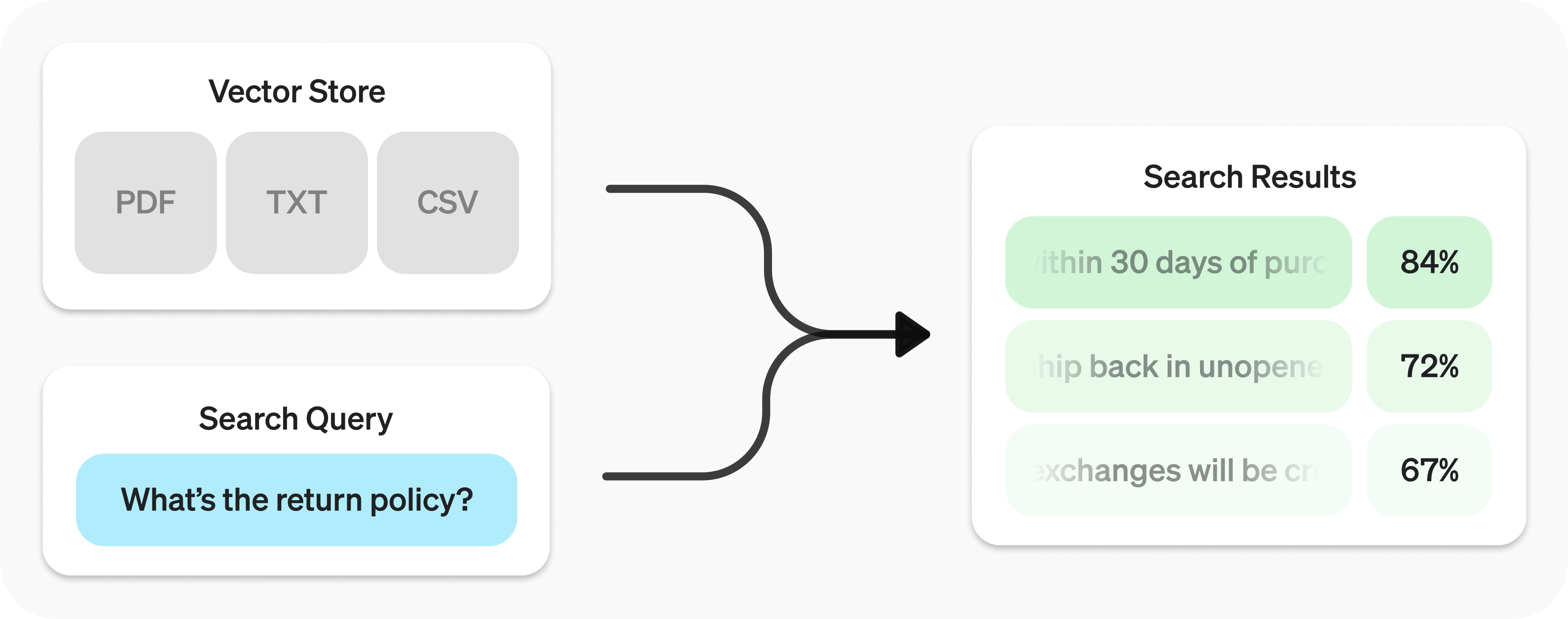
Retrieval API を使うと、データに対して セマンティック検索
Retrieval API は、データのインデックスとして機能するベクトルストア
ベクトルストアを作成 し、ファイルをアップロードします。
1
2
3
4
5
6
7
8
9
10
11
12
13 import OpenAI from "openai";
const client = new OpenAI();
const vector_store = await client.vectorStores.create({
// Create vector store
name: "Support FAQ",
});
await client.vectorStores.files.uploadAndPoll(
vector_store.id,
// Upload file
fs.createReadStream("customer_policies.txt")
); 1
2
3
4
5
6
7
8
9
10
11
12 from openai import OpenAI
client = OpenAI()
vector_store = client.vector_stores.create( # Create vector store
name = "Support FAQ" ,
)
client.vector_stores.files.upload_and_poll( # Upload file
vector_store_id = vector_store.id,
file = open ( "customer_policies.txt" , "rb" )
) 1
2
3
4
5
6
7
8
9
10
11
12
13
14
15
16
17
18
19
20
21
22
23
24
25
26
27
28
29
30 package main
import (
"context"
"fmt"
"os"
"github.com/openai/openai-go/v3"
)
func main() {
client := openai.NewClient()
vectorStore, err := client.VectorStores.New(context.Background(), openai.VectorStoreNewParams{Name: openai.String("Support FAQ")})
if err != nil {
panic(err)
}
file, err := os.Open("customer_policies.txt")
if err != nil {
panic(err)
}
defer file.Close()
_, err = client.VectorStores.Files.UploadAndPoll(context.Background(), vectorStore.ID, openai.FileNewParams{
File: openai.File(file, "customer_policies.txt", "text/plain"),
Purpose: openai.FilePurposeAssistants,
}, 1000)
if err != nil {
panic(err)
}
fmt.Println(vectorStore.ID)
} 1
2
3
4
5
6
7
8
9
10
11
12
13
14
15
16
17
18
19
20
21
22
23
24
25
26
27
28
29
30
31
32
33
34
35
36
37 import com.openai.client.OpenAIClient;
import com.openai.client.okhttp.OpenAIOkHttpClient;
import com.openai.models.files.FileCreateParams;
import com.openai.models.files.FilePurpose;
import com.openai.models.vectorstores.VectorStoreCreateParams;
import com.openai.models.vectorstores.files.FileRetrieveParams;
import com.openai.models.vectorstores.files.VectorStoreFile;
import java.nio.file.Path;
var store =
client.vectorStores().create(VectorStoreCreateParams.builder().name("Support FAQ").build());
var uploaded =
client
.files()
.create(
FileCreateParams.builder()
.file(Path.of(System.getenv("OPENAI_EXAMPLE_FILE_PATH")))
.purpose(FilePurpose.ASSISTANTS)
.build());
var file =
client
.vectorStores()
.files()
.create(
store.id(),
com.openai.models.vectorstores.files.FileCreateParams.builder()
.fileId(uploaded.id())
.build());
while (file.status().equals(VectorStoreFile.Status.IN_PROGRESS)) {
Thread.sleep(1000);
file =
client
.vectorStores()
.files()
.retrieve(file.id(), FileRetrieveParams.builder().vectorStoreId(store.id()).build());
}
System.out.println(store.id()); 1
2
3
4
5
6
7
8
9
10
11
12
13 require "openai"
require "pathname"
client = OpenAI::Client.new
store = client.vector_stores.create(name: "Support FAQ")
file = client.vector_stores.files.upload_and_poll(
store.id,
file: Pathname("customer_policies.txt"),
timeout: 600
)
raise "File ingestion ended with status: #{file.status}" unless file.status == OpenAI::VectorStores::VectorStoreFile::Status::COMPLETED
puts(store.id) 検索クエリを送信 して、関連性の高い結果を取得します。
1
2
3
4
5 const userQuery = "What is the return policy?";
const results = await client.vectorStores.search(vector_store.id, {
query: userQuery,
}); 1
2
3
4
5
6 user_query = "What is the return policy?"
results = client.vector_stores.search(
vector_store_id = vector_store.id,
query = user_query,
) 1
2
3
4
5
6
7
8
9
10
11
12
13
14
15
16
17
18
19 package main
import (
"context"
"fmt"
"github.com/openai/openai-go/v3"
)
func main() {
client := openai.NewClient()
results, err := client.VectorStores.Search(context.Background(), "vs_123", openai.VectorStoreSearchParams{
Query: openai.VectorStoreSearchParamsQueryUnion{OfString: openai.String("What is the return policy?")},
})
if err != nil {
panic(err)
}
fmt.Println(results.Data)
} 1
2
3
4
5
6
7
8
9
10
11
12
13
14 import com.openai.client.OpenAIClient;
import com.openai.client.okhttp.OpenAIOkHttpClient;
import com.openai.models.vectorstores.VectorStoreSearchParams;
String vectorStoreId = "vs_123";
var results =
client
.vectorStores()
.search(
vectorStoreId,
VectorStoreSearchParams.builder().query("What is the return policy?").build());
System.out.println(results.data()); 1
2
3
4
5 require "openai"
client = OpenAI::Client.new
results = client.vector_stores.search("vs_123", query: "What is the return policy?")
puts(results.data&.first&.content) 検索結果を OpenAI のモデルで活用する方法については、応答の
生成 のセクションを参照してください。
セマンティック検索 は、ベクトル埋め込み を使って、意味的に関連する結果を見つける手法です。特に、共通のキーワードがほとんどない場合やまったくない場合でも、従来の検索手法では見逃される可能性のある結果を見つけられます。
例として、"When did we go to the moon?" に対してどのような結果が得られるか見てみましょう。
テキスト キーワードの類似度 意味的な類似度 初めての月面着陸は 1969 年 7 月でした。 0% 65% 初めて月面に降り立った人はニール・アームストロングでした。 27% 43% 月餅を食べたら、おいしかったです。 40% 28%
(キーワードの類似度には共通集合と和集合の比 を使い、意味的な類似度には text-embedding-3-small によるコサイン類似度 を使っています。)
最も関連性の高い結果には、検索クエリに含まれる単語が 1 つもないことに注目してください。この柔軟性により、セマンティック検索は規模を問わずナレッジベースを検索するための強力な手法となります。
セマンティック検索はベクトルストア を基盤としています。ベクトルストアについては、このガイドの後半で詳しく説明します。このセクションでは、セマンティック検索の仕組みに焦点を当てます。
search 関数を使い、query を自然言語で指定することで、ベクトルストアを検索できます。結果はリストとして返され、各結果には関連するチャンク、類似度スコア、元のファイルが含まれます。
1
2
3 const results = await client.vectorStores.search(vector_store.id, {
query: "How many woodchucks are allowed per passenger?",
}); 1
2
3
4 results = client.vector_stores.search(
vector_store_id = vector_store.id,
query = "How many woodchucks are allowed per passenger?" ,
) 1
2
3
4
5
6
7
8
9
10
11
12
13
14
15
16
17
18
19 package main
import (
"context"
"fmt"
"github.com/openai/openai-go/v3"
)
func main() {
client := openai.NewClient()
results, err := client.VectorStores.Search(context.Background(), "vs_123", openai.VectorStoreSearchParams{
Query: openai.VectorStoreSearchParamsQueryUnion{OfString: openai.String("How many woodchucks are allowed per passenger?")},
})
if err != nil {
panic(err)
}
fmt.Println(results.Data)
} 1
2
3
4
5
6
7
8
9
10
11
12
13
14
15
16 import com.openai.client.OpenAIClient;
import com.openai.client.okhttp.OpenAIOkHttpClient;
import com.openai.models.vectorstores.VectorStoreSearchParams;
String vectorStoreId = "vs_123";
var results =
client
.vectorStores()
.search(
vectorStoreId,
VectorStoreSearchParams.builder()
.query("How many woodchucks are allowed per passenger?")
.build());
System.out.println(results.data()); 1
2
3
4
5
6
7
8 require "openai"
client = OpenAI::Client.new
results = client.vector_stores.search(
"vs_123",
query: "How many woodchucks are allowed per passenger?"
)
puts(results.data&.first&.content) 1
2
3
4
5
6
7
8
9
10
11
12
13
14
15
16
17
18
19
20
21
22
23
24
25
26
27
28
29
30
31
32
33
34
35
36
37
38
39
40
41
42 {
"object" : "vector_store.search_results.page" ,
"search_query" : "How many woodchucks are allowed per passenger?" ,
"data" : [
{
"file_id" : "file-12345" ,
"filename" : "woodchuck_policy.txt" ,
"score" : 0.85 ,
"attributes" : {
"region" : "North America" ,
"author" : "Wildlife Department"
},
"content" : [
{
"type" : "text" ,
"text" : "According to the latest regulations, each passenger is allowed to carry up to two woodchucks."
},
{
"type" : "text" ,
"text" : "Ensure that the woodchucks are properly contained during transport."
}
]
},
{
"file_id" : "file-67890" ,
"filename" : "transport_guidelines.txt" ,
"score" : 0.75 ,
"attributes" : {
"region" : "North America" ,
"author" : "Transport Authority"
},
"content" : [
{
"type" : "text" ,
"text" : "Passengers must adhere to the guidelines set forth by the Transport Authority regarding the transport of woodchucks."
}
]
}
],
"has_more" : false ,
"next_page" : null
} レスポンスに含まれる結果はデフォルトで最大 10 件ですが、max_num_results パラメーターを使うと最大 50 件まで設定できます。
クエリの書き方によって検索結果の質が変わるため、最適な結果が得られるようにクエリを自動で書き換える設定を用意しています。この機能を有効にするには、search の実行時に rewrite_query=true を設定します。
書き換えられたクエリは、結果の search_query フィールドで確認できます。
書き換え前 書き換え後 本社ビルの高さを知りたいです。 本社ビルの高さ 危険物の輸送にはどのような安全規則がありますか? 危険物の安全規則 サービスの問題について苦情を申し立てるにはどうすればよいですか? サービスに関する苦情の申し立て手順
属性によるフィルタリングでは、検索対象を特定の期間に限定するなどの条件を適用して、結果を絞り込めます。attribute_filter で条件を定義し、組み合わせることで、セマンティック検索を実行する前に、属性に基づいて対象ファイルを絞り込めます。
ファイルの attributes に含まれる特定の key を指定した value と比較するには、 比較フィルター を使います。and と or で複数のフィルターを組み合わせるには、 複合フィルター を使います。
1
2
3
4
5 {
"type" : "eq" | "ne" | "gt" | "gte" | "lt" | "lte" | "in" | "nin" , // comparison operators
"key" : "attributes_key" , // attributes key
"value" : "target_value" // value to compare against
} 1
2
3
4 {
"type" : "and" | "or" , // logical operators
"filters" : [ ... ]
} 以下にフィルターの例を示します。
地域 日付範囲 ファイル名 ファイル名による除外 複雑な条件 地域
1
2
3
4
5 {
"type" : "eq" ,
"key" : "region" ,
"value" : "us"
} 日付範囲
1
2
3
4
5
6
7
8
9
10
11
12
13
14
15 {
"type" : "and" ,
"filters" : [
{
"type" : "gte" ,
"key" : "date" ,
"value" : 1704067200 // unix timestamp for 2024-01-01
},
{
"type" : "lte" ,
"key" : "date" ,
"value" : 1710892800 // unix timestamp for 2024-03-20
}
]
} ファイル名
1
2
3
4
5 {
"type" : "in" ,
"property" : "filename" ,
"value" : [ "example.txt" , "example2.txt" ]
} ファイル名による除外
1
2
3
4
5 {
"type" : "nin" ,
"property" : "filename" ,
"value" : [ "draft.txt" , "internal_notes.md" ]
} 複雑な条件
1
2
3
4
5
6
7
8
9
10
11
12
13
14
15
16
17
18
19
20
21
22
23
24
25
26
27
28
29
30
31
32
33
34
35 {
"type" : "or" ,
"filters" : [
{
"type" : "and" ,
"filters" : [
{
"type" : "or" ,
"filters" : [
{
"type" : "eq" ,
"key" : "project_code" ,
"value" : "X123"
},
{
"type" : "eq" ,
"key" : "project_code" ,
"value" : "X999"
}
]
},
{
"type" : "eq" ,
"key" : "confidentiality" ,
"value" : "top_secret"
}
]
},
{
"type" : "eq" ,
"key" : "language" ,
"value" : "en"
}
]
}
ファイル検索の結果の関連性が不十分な場合は、ranking_options を調整して応答の品質を改善できます。具体的には、ranker に auto や default-2024-08-21 などを指定し、score_threshold を 0.0 から 1.0 の範囲で設定します。score_threshold を高くすると、結果がより関連性の高いチャンクに絞られますが、有用な可能性のあるチャンクも除外されることがあります。ranking_options.hybrid_search を指定した場合は、hybrid_search.embedding_weight(rrf_embedding_weight)と hybrid_search.text_weight(rrf_text_weight)も調整し、逆数順位融合における、埋め込みによる意味的な一致とスパース検索によるキーワードの一致のバランスを制御できます。意味的な類似性を重視するには前者を、テキストの重複を重視するには後者を大きくします。少なくとも一方の重みはゼロより大きくしてください。
ベクトルストアは、Retrieval API とファイル検索 ツールのセマンティック検索を支えるコンテナです。ベクトルストアにファイルを追加すると、自動的にチャンク分割、埋め込み生成、インデックス作成が行われます。
ベクトルストアには、file オブジェクトを基にした vector_store_file オブジェクトが格納されます。
オブジェクトの型
説明 fileFiles API を通じてアップロードされたコンテンツを表します。ベクトルストアでよく使われますが、ファインチューニングなどのユースケースにも使われます。vector_store検索可能なファイルを格納するコンテナです。 vector_store.fileチャンク分割と埋め込み生成が行われ、vector_store に関連付けられた file を表す専用のラッパー型です。attributes マップを含みます。
すべてのベクトルストアの合計ストレージ使用量に基づいて課金されます。使用量は、解析済みチャンクとそれに対応する埋め込みのサイズによって決まります。
ストレージ 費用 1 GB まで(すべてのストアの合計) 無料 1 GB を超える分 $0.10/GB/日
作成
1
2
3
4 await client.vectorStores.create({
name: "Support FAQ",
file_ids: ["file_123"],
}); 1
2
3
4 client.vector_stores.create(
name = "Support FAQ" ,
file_ids = [ "file_123" ]
) 1
2
3
4
5
6
7
8
9
10
11
12
13
14
15
16
17
18
19
20 package main
import (
"context"
"fmt"
"github.com/openai/openai-go/v3"
)
func main() {
client := openai.NewClient()
vectorStore, err := client.VectorStores.New(context.Background(), openai.VectorStoreNewParams{
Name: openai.String("Support FAQ"),
FileIDs: []string{"file_123"},
})
if err != nil {
panic(err)
}
fmt.Println(vectorStore.ID)
} 1
2
3
4
5
6
7
8
9
10
11
12
13 import com.openai.client.OpenAIClient;
import com.openai.client.okhttp.OpenAIOkHttpClient;
import com.openai.models.vectorstores.VectorStoreCreateParams;
String fileId = "file_123";
var store =
client
.vectorStores()
.create(
VectorStoreCreateParams.builder().name("Support FAQ").addFileId(fileId).build());
System.out.println(store.id()); 1
2
3
4
5
6
7
8 require "openai"
client = OpenAI::Client.new
store = client.vector_stores.create(
name: "Support FAQ",
file_ids: ["file_123"]
)
puts(store.id) 取得
1 await client.vectorStores.retrieve("vs_123"); 1
2
3 client.vector_stores.retrieve(
vector_store_id = "vs_123"
) 1
2
3
4
5
6
7
8
9
10
11
12
13
14
15
16
17 package main
import (
"context"
"fmt"
"github.com/openai/openai-go/v3"
)
func main() {
client := openai.NewClient()
vectorStore, err := client.VectorStores.Get(context.Background(), "vs_123")
if err != nil {
panic(err)
}
fmt.Println(vectorStore.ID)
} 1
2
3
4
5
6 import com.openai.client.OpenAIClient;
import com.openai.client.okhttp.OpenAIOkHttpClient;
String vectorStoreId = "vs_123";
System.out.println(client.vectorStores().retrieve(vectorStoreId).id()); 1
2
3
4
5 require "openai"
client = OpenAI::Client.new
store = client.vector_stores.retrieve("vs_123")
puts(store.id) 更新
1
2
3 await client.vectorStores.update("vs_123", {
name: "Support FAQ Updated",
}); 1
2
3
4 client.vector_stores.update(
vector_store_id = "vs_123" ,
name = "Support FAQ Updated"
) 1
2
3
4
5
6
7
8
9
10
11
12
13
14
15
16
17
18
19 package main
import (
"context"
"fmt"
"github.com/openai/openai-go/v3"
)
func main() {
client := openai.NewClient()
vectorStore, err := client.VectorStores.Update(context.Background(), "vs_123", openai.VectorStoreUpdateParams{
Name: openai.String("Support FAQ Updated"),
})
if err != nil {
panic(err)
}
fmt.Println(vectorStore.Name)
} 1
2
3
4
5
6
7
8
9
10
11
12
13
14 import com.openai.client.OpenAIClient;
import com.openai.client.okhttp.OpenAIOkHttpClient;
import com.openai.models.vectorstores.VectorStoreUpdateParams;
String vectorStoreId = "vs_123";
var store =
client
.vectorStores()
.update(
vectorStoreId,
VectorStoreUpdateParams.builder().name("Updated knowledge base").build());
System.out.println(store.name()); 1
2
3
4
5 require "openai"
client = OpenAI::Client.new
store = client.vector_stores.update("vs_123", name: "Updated knowledge base")
puts(store.name) 削除
1 await client.vectorStores.delete("vs_123"); 1
2
3 client.vector_stores.delete(
vector_store_id = "vs_123"
) 1
2
3
4
5
6
7
8
9
10
11
12
13
14
15
16
17 package main
import (
"context"
"fmt"
"github.com/openai/openai-go/v3"
)
func main() {
client := openai.NewClient()
deleted, err := client.VectorStores.Delete(context.Background(), "vs_123")
if err != nil {
panic(err)
}
fmt.Println(deleted.Deleted)
} 1
2
3
4
5
6 import com.openai.client.OpenAIClient;
import com.openai.client.okhttp.OpenAIOkHttpClient;
String vectorStoreId = "vs_123";
System.out.println(client.vectorStores().delete(vectorStoreId).deleted()); 1
2
3
4
5 require "openai"
client = OpenAI::Client.new
deleted = client.vector_stores.delete("vs_123")
puts(deleted.deleted) 一覧取得
await client.vectorStores.list(); client.vector_stores.list() package main
import (
"context"
"fmt"
"github.com/openai/openai-go/v3"
)
func main() {
client := openai.NewClient()
vectorStores, err := client.VectorStores.List(context.Background(), openai.VectorStoreListParams{})
if err != nil {
panic(err)
}
fmt.Println(vectorStores.Data)
} import com.openai.client.OpenAIClient;
import com.openai.client.okhttp.OpenAIOkHttpClient;
System.out.println(client.vectorStores().list().data()); require "openai"
client = OpenAI::Client.new
stores = client.vector_stores.list(limit: 10)
puts((stores.data || []).length)
vector_store.file の create など、一部のオペレーションは非同期で実行され、完了までに時間がかかる場合があります。完了するまで処理をブロックするには、create_and_poll などのヘルパー関数を使用してください。代わりに、状態を確認することもできます。ベクトルストアからのファイル削除は結果整合性に基づくため、削除したファイルの内容が短時間、検索結果に含まれる場合があります。
ファイルの追加には、ベクトルストア ID ごとのレート制限が適用されます。/vector_stores/{vector_store_id}/files/vector_stores/{vector_store_id}/file_batches
作成
1
2
3 await client.vectorStores.files.createAndPoll("vs_123", {
file_id: "file_123",
}); 1
2
3
4 client.vector_stores.files.create_and_poll(
vector_store_id = "vs_123" ,
file_id = "file_123"
) 1
2
3
4
5
6
7
8
9
10
11
12
13
14
15
16
17
18
19 package main
import (
"context"
"fmt"
"github.com/openai/openai-go/v3"
)
func main() {
client := openai.NewClient()
file, err := client.VectorStores.Files.NewAndPoll(context.Background(), "vs_123", openai.VectorStoreFileNewParams{
FileID: "file_123",
}, 1000)
if err != nil {
panic(err)
}
fmt.Println(file.ID)
} 1
2
3
4
5
6
7
8
9
10
11
12
13
14
15 import com.openai.client.OpenAIClient;
import com.openai.client.okhttp.OpenAIOkHttpClient;
import com.openai.models.vectorstores.files.FileCreateParams;
String vectorStoreId = "vs_123";
String fileId = "file_123";
var file =
client
.vectorStores()
.files()
.create(vectorStoreId, FileCreateParams.builder().fileId(fileId).build());
System.out.println(file.id()); 1
2
3
4
5 require "openai"
client = OpenAI::Client.new
file = client.vector_stores.files.create("vs_123", file_id: "file_123")
puts(file.id) アップロード
1
2
3
4 await client.vectorStores.files.uploadAndPoll(
"vs_123",
fs.createReadStream("customer_policies.txt")
); 1
2
3
4 client.vector_stores.files.upload_and_poll(
vector_store_id = "vs_123" ,
file = open ( "customer_policies.txt" , "rb" )
) 1
2
3
4
5
6
7
8
9
10
11
12
13
14
15
16
17
18
19
20
21
22
23
24
25
26 package main
import (
"context"
"fmt"
"os"
"github.com/openai/openai-go/v3"
)
func main() {
client := openai.NewClient()
file, err := os.Open("customer_policies.txt")
if err != nil {
panic(err)
}
defer file.Close()
result, err := client.VectorStores.Files.UploadAndPoll(context.Background(), "vs_123", openai.FileNewParams{
File: openai.File(file, "customer_policies.txt", "text/plain"),
Purpose: openai.FilePurposeAssistants,
}, 1000)
if err != nil {
panic(err)
}
fmt.Println(result.ID)
} 1
2
3
4
5
6
7
8
9
10
11
12
13
14
15
16
17
18
19
20
21
22
23
24
25
26
27
28
29
30
31
32
33
34
35
36 import com.openai.client.OpenAIClient;
import com.openai.client.okhttp.OpenAIOkHttpClient;
import com.openai.models.files.FileCreateParams;
import com.openai.models.files.FilePurpose;
import com.openai.models.vectorstores.files.FileRetrieveParams;
import com.openai.models.vectorstores.files.VectorStoreFile;
import java.nio.file.Path;
String vectorStoreId = "vs_123";
var uploaded =
client
.files()
.create(
FileCreateParams.builder()
.file(Path.of(System.getenv("OPENAI_EXAMPLE_FILE_PATH")))
.purpose(FilePurpose.ASSISTANTS)
.build());
var file =
client
.vectorStores()
.files()
.create(
vectorStoreId,
com.openai.models.vectorstores.files.FileCreateParams.builder()
.fileId(uploaded.id())
.build());
while (file.status().equals(VectorStoreFile.Status.IN_PROGRESS)) {
Thread.sleep(1000);
file =
client
.vectorStores()
.files()
.retrieve(
file.id(), FileRetrieveParams.builder().vectorStoreId(vectorStoreId).build());
}
System.out.println(file.id()); 1
2
3
4
5
6
7
8
9
10
11
12 require "openai"
require "pathname"
client = OpenAI::Client.new
vector_store_file = client.vector_stores.files.upload_and_poll(
"vs_123",
file: Pathname("customer_policies.txt"),
timeout: 600
)
raise "File ingestion ended with status: #{vector_store_file.status}" unless vector_store_file.status == OpenAI::VectorStores::VectorStoreFile::Status::COMPLETED
puts(vector_store_file.id) 取得
1
2
3 await client.vectorStores.files.retrieve("file_123", {
vector_store_id: "vs_123",
}); 1
2
3
4 client.vector_stores.files.retrieve(
vector_store_id = "vs_123" ,
file_id = "file_123"
) 1
2
3
4
5
6
7
8
9
10
11
12
13
14
15
16
17 package main
import (
"context"
"fmt"
"github.com/openai/openai-go/v3"
)
func main() {
client := openai.NewClient()
file, err := client.VectorStores.Files.Get(context.Background(), "vs_123", "file_123")
if err != nil {
panic(err)
}
fmt.Println(file.ID)
} 1
2
3
4
5
6
7
8
9
10
11
12
13
14
15
16
17 import com.openai.client.OpenAIClient;
import com.openai.client.okhttp.OpenAIOkHttpClient;
String fileId = "file_123";
String vectorStoreId = "vs_123";
System.out.println(
client
.vectorStores()
.files()
.retrieve(
fileId,
com.openai.models.vectorstores.files.FileRetrieveParams.builder()
.vectorStoreId(vectorStoreId)
.build())
.id()); 1
2
3
4
5 require "openai"
client = OpenAI::Client.new
file = client.vector_stores.files.retrieve("file_123", vector_store_id: "vs_123")
puts(file.id) 更新
1
2
3
4 await client.vectorStores.files.update("file_123", {
vector_store_id: "vs_123",
attributes: { key: "value" },
}); 1
2
3
4
5 client.vector_stores.files.update(
vector_store_id = "vs_123" ,
file_id = "file_123" ,
attributes = { "key" : "value" }
) 1
2
3
4
5
6
7
8
9
10
11
12
13
14
15
16
17
18
19
20
21 package main
import (
"context"
"fmt"
"github.com/openai/openai-go/v3"
)
func main() {
client := openai.NewClient()
file, err := client.VectorStores.Files.Update(context.Background(), "vs_123", "file_123", openai.VectorStoreFileUpdateParams{
Attributes: map[string]openai.VectorStoreFileUpdateParamsAttributeUnion{
"key": {OfString: openai.String("value")},
},
})
if err != nil {
panic(err)
}
fmt.Println(file.ID)
} 1
2
3
4
5
6
7
8
9
10
11
12
13
14
15
16
17
18
19
20
21
22
23
24 import com.openai.client.OpenAIClient;
import com.openai.client.okhttp.OpenAIOkHttpClient;
import com.openai.core.JsonValue;
import com.openai.models.vectorstores.files.FileUpdateParams;
String fileId = "file_123";
String vectorStoreId = "vs_123";
var file =
client
.vectorStores()
.files()
.update(
fileId,
FileUpdateParams.builder()
.vectorStoreId(vectorStoreId)
.attributes(
FileUpdateParams.Attributes.builder()
.putAdditionalProperty("category", JsonValue.from("policy"))
.build())
.build());
System.out.println(file.id()); 1
2
3
4
5 require "openai"
client = OpenAI::Client.new
file = client.vector_stores.files.update("file_123", vector_store_id: "vs_123", attributes: { category: "policy" })
puts(file.id) 削除
1
2
3 await client.vectorStores.files.delete("file_123", {
vector_store_id: "vs_123",
}); 1
2
3
4 client.vector_stores.files.delete(
vector_store_id = "vs_123" ,
file_id = "file_123"
) 1
2
3
4
5
6
7
8
9
10
11
12
13
14
15
16
17 package main
import (
"context"
"fmt"
"github.com/openai/openai-go/v3"
)
func main() {
client := openai.NewClient()
deleted, err := client.VectorStores.Files.Delete(context.Background(), "vs_123", "file_123")
if err != nil {
panic(err)
}
fmt.Println(deleted.Deleted)
} 1
2
3
4
5
6
7
8
9
10
11
12
13
14
15
16
17 import com.openai.client.OpenAIClient;
import com.openai.client.okhttp.OpenAIOkHttpClient;
String fileId = "file_123";
String vectorStoreId = "vs_123";
System.out.println(
client
.vectorStores()
.files()
.delete(
fileId,
com.openai.models.vectorstores.files.FileDeleteParams.builder()
.vectorStoreId(vectorStoreId)
.build())
.deleted()); 1
2
3
4
5 require "openai"
client = OpenAI::Client.new
deleted = client.vector_stores.files.delete("file_123", vector_store_id: "vs_123")
puts(deleted.deleted) 一覧取得
1 await client.vectorStores.files.list("vs_123"); 1
2
3 client.vector_stores.files.list(
vector_store_id = "vs_123"
) 1
2
3
4
5
6
7
8
9
10
11
12
13
14
15
16
17 package main
import (
"context"
"fmt"
"github.com/openai/openai-go/v3"
)
func main() {
client := openai.NewClient()
files, err := client.VectorStores.Files.List(context.Background(), "vs_123", openai.VectorStoreFileListParams{})
if err != nil {
panic(err)
}
fmt.Println(files.Data)
} 1
2
3
4
5
6 import com.openai.client.OpenAIClient;
import com.openai.client.okhttp.OpenAIOkHttpClient;
String vectorStoreId = "vs_123";
System.out.println(client.vectorStores().files().list(vectorStoreId).data()); 1
2
3
4
5 require "openai"
client = OpenAI::Client.new
files = client.vector_stores.files.list("vs_123")
puts((files.data || []).length)
作成
1
2
3
4
5
6
7
8
9
10
11
12
13
14
15
16
17
18 await client.vectorStores.fileBatches.createAndPoll("vs_123", {
files: [
{
file_id: "file_123",
attributes: { department: "finance" },
},
{
file_id: "file_456",
chunking_strategy: {
type: "static",
static: {
max_chunk_size_tokens: 1200,
chunk_overlap_tokens: 200,
},
},
},
],
}); 1
2
3
4
5
6
7
8
9
10
11
12
13
14
15
16
17 client.vector_stores.file_batches.create_and_poll(
vector_store_id = "vs_123" ,
files = [
{
"file_id" : "file_123" ,
"attributes" : { "department" : "finance" }
},
{
"file_id" : "file_456" ,
"chunking_strategy" : {
"type" : "static" ,
"max_chunk_size_tokens" : 1200 ,
"chunk_overlap_tokens" : 200
}
}
]
) 1
2
3
4
5
6
7
8
9
10
11
12
13
14
15
16
17
18
19
20
21
22
23
24
25
26
27
28
29
30
31
32 package main
import (
"context"
"fmt"
"github.com/openai/openai-go/v3"
)
func main() {
client := openai.NewClient()
batch, err := client.VectorStores.FileBatches.NewAndPoll(context.Background(), "vs_123", openai.VectorStoreFileBatchNewParams{
Files: []openai.VectorStoreFileBatchNewParamsFile{
{
FileID: "file_123",
Attributes: map[string]openai.VectorStoreFileBatchNewParamsFileAttributeUnion{
"department": {OfString: openai.String("finance")},
},
},
{
FileID: "file_456",
ChunkingStrategy: openai.FileChunkingStrategyParamUnion{OfStatic: &openai.StaticFileChunkingStrategyObjectParam{
Static: openai.StaticFileChunkingStrategyParam{MaxChunkSizeTokens: 1200, ChunkOverlapTokens: 200},
}},
},
},
}, 1000)
if err != nil {
panic(err)
}
fmt.Println(batch.ID)
} 1
2
3
4
5
6
7
8
9
10
11
12
13
14
15
16
17
18
19
20
21
22
23
24
25
26
27
28
29
30
31
32
33
34
35
36
37
38
39
40
41
42
43
44
45
46
47 import com.openai.client.OpenAIClient;
import com.openai.client.okhttp.OpenAIOkHttpClient;
import com.openai.core.JsonValue;
import com.openai.models.vectorstores.StaticFileChunkingStrategy;
import com.openai.models.vectorstores.filebatches.FileBatchCreateParams;
import com.openai.models.vectorstores.filebatches.FileBatchRetrieveParams;
import com.openai.models.vectorstores.filebatches.VectorStoreFileBatch;
String vectorStoreId = "vs_123";
String fileId = "file_123";
String fileId2 = "file_456";
var first =
FileBatchCreateParams.File.builder()
.fileId(fileId)
.attributes(
FileBatchCreateParams.File.Attributes.builder()
.putAdditionalProperty("department", JsonValue.from("finance"))
.build())
.build();
var second =
FileBatchCreateParams.File.builder()
.fileId(fileId2)
.staticChunkingStrategy(
StaticFileChunkingStrategy.builder()
.maxChunkSizeTokens(1200)
.chunkOverlapTokens(200)
.build())
.build();
var batch =
client
.vectorStores()
.fileBatches()
.create(
vectorStoreId,
FileBatchCreateParams.builder().addFile(first).addFile(second).build());
while (batch.status().equals(VectorStoreFileBatch.Status.IN_PROGRESS)) {
Thread.sleep(1000);
batch =
client
.vectorStores()
.fileBatches()
.retrieve(
batch.id(),
FileBatchRetrieveParams.builder().vectorStoreId(vectorStoreId).build());
}
System.out.println(batch.status()); 1
2
3
4
5
6
7
8
9
10
11
12
13
14
15
16
17
18
19
20
21
22
23
24
25
26
27
28
29
30
31
32
33
34
35
36
37 require "openai"
client = OpenAI::Client.new
batch = client.vector_stores.file_batches.create_and_poll(
"vs_123",
files: [
{
file_id: "file_123",
attributes: { department: "finance" }
},
{
file_id: "file_456",
chunking_strategy: {
type: :static,
static: {
max_chunk_size_tokens: 1_200,
chunk_overlap_tokens: 200
}
}
}
],
timeout: 600
)
raise "File ingestion ended with status: #{batch.status}" unless batch.status == OpenAI::VectorStores::VectorStoreFileBatch::Status::COMPLETED
raise "File ingestion failed for #{batch.file_counts.failed} file(s)" if batch.file_counts.failed.positive?
# Live validation of per-file batches returned default chunking despite overrides.
file = client.vector_stores.files.retrieve("file_456", vector_store_id: "vs_123")
strategy = file.chunking_strategy
unless strategy.is_a?(OpenAI::StaticFileChunkingStrategyObject) &&
strategy.static.max_chunk_size_tokens == 1_200 &&
strategy.static.chunk_overlap_tokens == 200
raise "Requested chunking was not applied to #{file.id}: #{strategy.to_json}"
end
puts(batch.status) 取得
1
2
3 await client.vectorStores.fileBatches.retrieve("vsfb_123", {
vector_store_id: "vs_123",
}); 1
2
3
4 client.vector_stores.file_batches.retrieve(
vector_store_id = "vs_123" ,
batch_id = "vsfb_123"
) 1
2
3
4
5
6
7
8
9
10
11
12
13
14
15
16
17 package main
import (
"context"
"fmt"
"github.com/openai/openai-go/v3"
)
func main() {
client := openai.NewClient()
batch, err := client.VectorStores.FileBatches.Get(context.Background(), "vs_123", "vsfb_123")
if err != nil {
panic(err)
}
fmt.Println(batch.ID)
} 1
2
3
4
5
6
7
8
9
10
11
12
13
14
15
16
17 import com.openai.client.OpenAIClient;
import com.openai.client.okhttp.OpenAIOkHttpClient;
String fileBatchId = "vsfb_123";
String vectorStoreId = "vs_123";
System.out.println(
client
.vectorStores()
.fileBatches()
.retrieve(
fileBatchId,
com.openai.models.vectorstores.filebatches.FileBatchRetrieveParams.builder()
.vectorStoreId(vectorStoreId)
.build())
.status()); 1
2
3
4
5
6
7
8 require "openai"
client = OpenAI::Client.new
batch = client.vector_stores.file_batches.retrieve(
"vsfb_123",
vector_store_id: "vs_123"
)
puts(batch.status) キャンセル
1
2
3 await client.vectorStores.fileBatches.cancel("vsfb_123", {
vector_store_id: "vs_123",
}); 1
2
3
4 client.vector_stores.file_batches.cancel(
vector_store_id = "vs_123" ,
batch_id = "vsfb_123"
) 1
2
3
4
5
6
7
8
9
10
11
12
13
14
15
16
17 package main
import (
"context"
"fmt"
"github.com/openai/openai-go/v3"
)
func main() {
client := openai.NewClient()
batch, err := client.VectorStores.FileBatches.Cancel(context.Background(), "vs_123", "vsfb_123")
if err != nil {
panic(err)
}
fmt.Println(batch.Status)
} 1
2
3
4
5
6
7
8
9
10
11
12
13
14
15
16
17 import com.openai.client.OpenAIClient;
import com.openai.client.okhttp.OpenAIOkHttpClient;
String fileBatchId = "vsfb_123";
String vectorStoreId = "vs_123";
System.out.println(
client
.vectorStores()
.fileBatches()
.cancel(
fileBatchId,
com.openai.models.vectorstores.filebatches.FileBatchCancelParams.builder()
.vectorStoreId(vectorStoreId)
.build())
.status()); 1
2
3
4
5
6
7
8 require "openai"
client = OpenAI::Client.new
batch = client.vector_stores.file_batches.cancel(
"vsfb_123",
vector_store_id: "vs_123"
)
puts(batch.status) 一覧取得
1
2
3 await client.vectorStores.fileBatches.listFiles("vsfb_123", {
vector_store_id: "vs_123",
}); 1
2
3
4 client.vector_stores.file_batches.list_files(
"vsfb_123" ,
vector_store_id = "vs_123"
) 1
2
3
4
5
6
7
8
9
10
11
12
13
14
15
16
17 package main
import (
"context"
"fmt"
"github.com/openai/openai-go/v3"
)
func main() {
client := openai.NewClient()
files, err := client.VectorStores.FileBatches.ListFiles(context.Background(), "vs_123", "vsfb_123", openai.VectorStoreFileBatchListFilesParams{})
if err != nil {
panic(err)
}
fmt.Println(files.Data)
} 1
2
3
4
5
6
7
8
9
10
11
12
13
14
15
16
17 import com.openai.client.OpenAIClient;
import com.openai.client.okhttp.OpenAIOkHttpClient;
String fileBatchId = "vsfb_123";
String vectorStoreId = "vs_123";
System.out.println(
client
.vectorStores()
.fileBatches()
.listFiles(
fileBatchId,
com.openai.models.vectorstores.filebatches.FileBatchListFilesParams.builder()
.vectorStoreId(vectorStoreId)
.build())
.data()); 1
2
3
4
5
6
7
8 require "openai"
client = OpenAI::Client.new
files = client.vector_stores.file_batches.list_files(
"vsfb_123",
vector_store_id: "vs_123"
)
puts((files.data || []).length)
バッチを作成する際は、file_ids と、必要に応じて attributes や chunking_strategy を指定する方法と、files 配列を使い、ファイルごとに file_id と任意の attributes、chunking_strategy を含むオブジェクトを渡す方法があります。この 2 つの方法は併用できません。すべてのファイルで同じ設定を共有するか、ファイルごとに設定を上書きするかを明確に制御できます。
単一のベクトルストアへの取り込みでスループットを高めるには、可能な限りバッチ作成を使用することをお勧めします。バッチでは 1 回のリクエストに最大 500 ファイルを含められます。通常、ファイルを 1 つずつ作成するリクエストを多数送信する場合に比べて、競合が減り、処理全体のレイテンシが改善します。
各 vector_store.file には、値の辞書である attributes を関連付けられます。この辞書は、属性フィルタリング を使ったセマンティック検索 で参照できます。辞書には最大 16 個のキーを設定でき、各キーの上限は 256 文字です。
1
2
3
4
5
6
7
8 await client.vectorStores.files.create("<vector_store_id>", {
file_id: "file_123",
attributes: {
region: "US",
category: "Marketing",
date: 1672531200, // Jan 1, 2023
},
}); 1
2
3
4
5
6
7
8
9 client.vector_stores.files.create(
vector_store_id = "<vector_store_id>" ,
file_id = "file_123" ,
attributes = {
"region" : "US" ,
"category" : "Marketing" ,
"date" : 1672531200 # Jan 1, 2023
}
) 1
2
3
4
5
6
7
8
9
10
11
12
13
14
15
16
17
18
19
20
21
22
23
24 package main
import (
"context"
"fmt"
"github.com/openai/openai-go/v3"
)
func main() {
client := openai.NewClient()
file, err := client.VectorStores.Files.New(context.Background(), "<vector_store_id>", openai.VectorStoreFileNewParams{
FileID: "file_123",
Attributes: map[string]openai.VectorStoreFileNewParamsAttributeUnion{
"region": {OfString: openai.String("US")},
"category": {OfString: openai.String("Marketing")},
"date": {OfFloat: openai.Float(1672531200)},
},
})
if err != nil {
panic(err)
}
fmt.Println(file.ID)
} 1
2
3
4
5
6
7
8
9
10
11
12
13
14
15
16
17
18
19
20
21
22
23
24 import com.openai.client.OpenAIClient;
import com.openai.client.okhttp.OpenAIOkHttpClient;
import com.openai.core.JsonValue;
import com.openai.models.vectorstores.files.FileCreateParams;
String vectorStoreId = "<vector_store_id>";
String fileId = "file_123";
var file =
client
.vectorStores()
.files()
.create(
vectorStoreId,
FileCreateParams.builder()
.fileId(fileId)
.attributes(
FileCreateParams.Attributes.builder()
.putAdditionalProperty("category", JsonValue.from("policy"))
.build())
.build());
System.out.println(file.id()); 1
2
3
4
5 require "openai"
client = OpenAI::Client.new
file = client.vector_stores.files.create("<vector_store_id>", file_id: "file_123", attributes: { category: "policy" })
puts(file.id) expires_after を使って、vector_store オブジェクトに有効期限ポリシーを設定できます。ベクトルストアの有効期限が切れると、関連付けられたすべての vector_store.file オブジェクトが削除され、それらに対する課金も停止します。
1
2
3
4
5
6 await client.vectorStores.update("vs_123", {
expires_after: {
anchor: "last_active_at",
days: 7,
},
}); 1
2
3
4
5
6
7 client.vector_stores.update(
vector_store_id = "vs_123" ,
expires_after = {
"anchor" : "last_active_at" ,
"days" : 7
}
) 1
2
3
4
5
6
7
8
9
10
11
12
13
14
15
16
17
18
19 package main
import (
"context"
"fmt"
"github.com/openai/openai-go/v3"
)
func main() {
client := openai.NewClient()
vectorStore, err := client.VectorStores.Update(context.Background(), "vs_123", openai.VectorStoreUpdateParams{
ExpiresAfter: openai.VectorStoreUpdateParamsExpiresAfter{Days: 7},
})
if err != nil {
panic(err)
}
fmt.Println(vectorStore.ExpiresAfter)
} 1
2
3
4
5
6
7
8
9
10
11
12
13
14
15
16
17
18
19
20
21 import com.openai.client.OpenAIClient;
import com.openai.client.okhttp.OpenAIOkHttpClient;
import com.openai.core.JsonValue;
import com.openai.models.vectorstores.VectorStoreUpdateParams;
String vectorStoreId = "vs_123";
var store =
client
.vectorStores()
.update(
vectorStoreId,
VectorStoreUpdateParams.builder()
.expiresAfter(
VectorStoreUpdateParams.ExpiresAfter.builder()
.anchor(JsonValue.from("last_active_at"))
.days(7)
.build())
.build());
System.out.println(store.expiresAfter().orElseThrow()); 1
2
3
4
5
6
7
8
9
10
11 require "openai"
client = OpenAI::Client.new
store = client.vector_stores.update(
"vs_123",
expires_after: {
anchor: :last_active_at,
days: 7
}
)
puts(store.expires_after) ファイルサイズの上限は 512 MB です。各ファイルのトークン数は 5,000,000 以下にしてください(トークン数はファイルを添付する際に自動で計算されます)。
デフォルトでは、max_chunk_size_tokens は 800、chunk_overlap_tokens は 400 に設定されています。そのため、各ファイルは 800 トークンのチャンクに分割され、連続するチャンク間で 400 トークンが重複する形でインデックス化されます。
この動作は、ベクトルストアにファイルを追加する際に chunking_strategy
max_chunk_size_tokens は 100 以上 4096 以下でなければなりません。chunk_overlap_tokens は 0 以上でなければならず、max_chunk_size_tokens / 2 を超えないようにしてください。
対応ファイル形式 text/ の MIME タイプでは、エンコーディングを utf-8、utf-16、ascii のいずれかにする必要があります。
ファイル形式 MIME タイプ .ctext/x-c.cpptext/x-c++.cstext/x-csharp.csstext/css.docapplication/msword.docxapplication/vnd.openxmlformats-officedocument.wordprocessingml.document.gotext/x-golang.htmltext/html.javatext/x-java.jstext/javascript.jsonapplication/json.mdtext/markdown.pdfapplication/pdf.phptext/x-php.pptxapplication/vnd.openxmlformats-officedocument.presentationml.presentation.pytext/x-python.pytext/x-script.python.rbtext/x-ruby.shapplication/x-sh.textext/x-tex.tsapplication/typescript.txttext/plain
クエリの実行後に、その結果をもとに回答を生成したい場合があります。検索結果と元のクエリを OpenAI のモデルに渡すことで、検索結果に基づいた回答を得られます。
1
2
3
4
5
6
7
8
9 import OpenAI from "openai";
const client = new OpenAI();
const userQuery = "What is the return policy?";
const results = await client.vectorStores.search(vector_store.id, {
query: userQuery,
}); 1
2
3
4
5
6
7
8
9
10 from openai import OpenAI
client = OpenAI()
user_query = "What is the return policy?"
results = client.vector_stores.search(
vector_store_id = vector_store.id,
query = user_query,
) 1
2
3
4
5
6
7
8
9
10
11
12
13
14
15
16
17
18
19 package main
import (
"context"
"fmt"
"github.com/openai/openai-go/v3"
)
func main() {
client := openai.NewClient()
results, err := client.VectorStores.Search(context.Background(), "vs_123", openai.VectorStoreSearchParams{
Query: openai.VectorStoreSearchParamsQueryUnion{OfString: openai.String("What is the return policy?")},
})
if err != nil {
panic(err)
}
fmt.Println(results.Data)
} 1
2
3
4
5
6
7
8
9
10
11
12
13
14 import com.openai.client.OpenAIClient;
import com.openai.client.okhttp.OpenAIOkHttpClient;
import com.openai.models.vectorstores.VectorStoreSearchParams;
String vectorStoreId = "vs_123";
var results =
client
.vectorStores()
.search(
vectorStoreId,
VectorStoreSearchParams.builder().query("What is the return policy?").build());
System.out.println(results.data()); 1
2
3
4
5
6
7
8 require "openai"
client = OpenAI::Client.new
results = client.vector_stores.search(
"vs_123",
query: "What is the return policy?"
)
puts(results.data) 1
2
3
4
5
6
7
8
9
10
11
12
13
14
15
16
17
18
19
20
21
22 const formattedResults = formatResults(results.data);
// Join the text content of all results
const textSources = results.data
.map((result) => result.content.map((c) => c.text).join("\n"))
.join("\n");
const completion = await client.chat.completions.create({
model: "gpt-6-astra",
messages: [
{
role: "developer",
content:
"Produce a concise answer to the query based on the provided sources.",
},
{
role: "user",
content: `Sources: ${formattedResults}\n\nQuery: '${userQuery}'`,
},
],
});
console.log(completion.choices[0].message.content); 1
2
3
4
5
6
7
8
9
10
11
12
13
14
15
16
17
18
19
20 # Use results and user_query from the preceding search step.
formatted_results = format_results(results.data)
" \n " .join( " \n " .join(c.text for c in result.content) for result in results.data)
completion = client.chat.completions.create(
model = "gpt-6-astra" ,
messages = [
{
"role" : "developer" ,
"content" : "Produce a concise answer to the query based on the provided sources." ,
},
{
"role" : "user" ,
"content" : f "Sources: { formatted_results }\n\n Query: ' { user_query } '" ,
},
],
)
print (completion.choices[ 0 ].message.content) 1
2
3
4
5
6
7
8
9
10
11
12
13
14
15
16
17
18
19
20
21
22
23
24
25
26
27
28
29
30
31
32
33
34
35
36
37
38
39
40
41
42
43
44
45
46 package main
import (
"context"
"fmt"
"strings"
"github.com/openai/openai-go/v3"
)
func main() {
client := openai.NewClient()
userQuery := "What is the return policy?"
results, err := client.VectorStores.Search(context.Background(), "vs_123", openai.VectorStoreSearchParams{
Query: openai.VectorStoreSearchParamsQueryUnion{OfString: openai.String(userQuery)},
})
if err != nil {
panic(err)
}
completion, err := client.Chat.Completions.New(context.Background(), openai.ChatCompletionNewParams{
Model: "gpt-6-astra",
Messages: []openai.ChatCompletionMessageParamUnion{
openai.DeveloperMessage("Produce a concise answer to the query based on the provided sources."),
openai.UserMessage(fmt.Sprintf("Sources: %s\n\nQuery: %q", formatResults(results.Data), userQuery)),
},
})
if err != nil {
panic(err)
}
fmt.Println(completion.Choices[0].Message.Content)
}
func formatResults(results []openai.VectorStoreSearchResponse) string {
var sources strings.Builder
sources.WriteString("<sources>")
for _, result := range results {
fmt.Fprintf(&sources, "<result file_id=%q file_name=%q>", result.FileID, result.Filename)
for _, content := range result.Content {
fmt.Fprintf(&sources, "<content>%s</content>", content.Text)
}
sources.WriteString("</result>")
}
sources.WriteString("</sources>")
return sources.String()
} 1
2
3
4
5
6
7
8
9
10
11
12
13
14
15
16
17
18
19
20
21
22
23
24
25
26
27
28
29
30
31
32
33
34
35
36
37
38
39
40
41
42
43
44 import com.openai.client.OpenAIClient;
import com.openai.client.okhttp.OpenAIOkHttpClient;
import com.openai.models.chat.completions.ChatCompletionCreateParams;
import com.openai.models.vectorstores.VectorStoreSearchParams;
import java.util.stream.Collectors;
String vectorStoreId = "vs_123";
String query = "What is the return policy?";
var results =
client
.vectorStores()
.search(vectorStoreId, VectorStoreSearchParams.builder().query(query).build());
String sources =
results.data().stream()
.map(
result ->
"<result file_id='"
+ result.fileId()
+ "' file_name='"
+ result.filename()
+ "'>"
+ result.content().stream()
.map(content -> "<content>" + content.text() + "</content>")
.collect(Collectors.joining())
+ "</result>")
.collect(Collectors.joining());
var completion =
client
.chat()
.completions()
.create(
ChatCompletionCreateParams.builder()
.model("gpt-6-astra")
.addDeveloperMessage(
"Answer the query concisely using only the provided sources.")
.addUserMessage(
"Sources: <sources>" + sources + "</sources>\n\nQuery: " + query)
.build());
completion.choices().stream()
.flatMap(choice -> choice.message().content().stream())
.forEach(System.out::println); 1
2
3
4
5
6
7
8
9
10
11
12
13
14
15
16
17
18
19
20
21
22
23
24 require "openai"
client = OpenAI::Client.new
query = "What is the return policy?"
results = client.vector_stores.search("vs_123", query: query)
sources = (results.data || []).map do |result|
content = result.content.map { |part| "<content>#{part.text}</content>" }.join
"<result file_id='#{result.file_id}' file_name='#{result.filename}'>#{content}</result>"
end.join
completion = client.chat.completions.create(
model: "gpt-6-astra",
messages: [
{
role: :developer,
content: "Answer the query concisely using only the provided sources."
},
{
role: :user,
content: "Sources: <sources>#{sources}</sources>\n\nQuery: #{query}"
}
]
)
puts(completion.choices.fetch(0).message.content) "Our return policy allows returns within 30 days of purchase." ここではサンプルの format_results 関数を使用しています。
この関数は、次のように実装できます。
1
2
3
4
5
6
7
8
9
10
11 function formatResults(results) {
let formattedResults = "";
for (const result of results.data) {
let formattedResult = `<result file_id='${result.file_id}' file_name='${result.filename}'>`;
for (const part of result.content) {
formattedResult += `<content>${part.text}</content>`;
}
formattedResults += formattedResult + "</result>";
}
return `<sources>${formattedResults}</sources>`;
} 1
2
3
4
5
6
7
8
9
10 def format_results (results):
formatted_results = ""
for result in results.data:
formatted_result = (
f "<result file_id=' { result.file_id } ' file_name=' { result.file_name } '>"
)
for part in result.content:
formatted_result += f "<content> { part.text } </content>"
formatted_results += formatted_result + "</result>"
return f "<sources> { formatted_results } </sources>" 1
2
3
4
5
6
7
8
9
10
11
12
13
14
15
16
17
18
19
20
21
22
23
24
25
26
27
28
29
30
31 package main
import (
"fmt"
"strings"
"github.com/openai/openai-go/v3"
)
func main() {
results := []openai.VectorStoreSearchResponse{{
FileID: "file-12345",
Filename: "woodchuck_policy.txt",
Content: []openai.VectorStoreSearchResponseContent{{Text: "Each passenger may carry up to two woodchucks."}},
}}
fmt.Println(formatResults(results))
}
func formatResults(results []openai.VectorStoreSearchResponse) string {
var sources strings.Builder
sources.WriteString("<sources>")
for _, result := range results {
fmt.Fprintf(&sources, "<result file_id=%q file_name=%q>", result.FileID, result.Filename)
for _, content := range result.Content {
fmt.Fprintf(&sources, "<content>%s</content>", content.Text)
}
sources.WriteString("</result>")
}
sources.WriteString("</sources>")
return sources.String()
} 1
2
3
4
5
6
7
8
9
10
11
12
13
14 results = [
{
file_id: "file-12345",
filename: "woodchuck_policy.txt",
content: [{ text: "Each passenger may carry up to two woodchucks." }]
}
]
sources = results.map do |result|
content = result.fetch(:content).map { |part| "<content>#{part.fetch(:text)}</content>" }.join
"<result file_id=\"#{result.fetch(:file_id)}\" file_name=\"#{result.fetch(:filename)}\">#{content}</result>"
end
puts("<sources>#{sources.join}</sources>")