
概要
マルチエージェントでは、モデルがサブエージェントを起動して並列に連携させ、その成果を統合して最終的な応答を返します。コードベースの探索、ドキュメントの作成、実装など、作業を委任して並列に進めることが有効な複雑なタスクを扱うアプリケーションで、特に効果を発揮します。
マルチエージェントは、すべての GPT-5.6 モデルでベータ機能として利用できます。アプリケーションでマルチエージェントを有効にする前に、モデルのページを確認してください。
マルチエージェントの利用に適した場面
多くのタスクは、互いに独立した作業に分割できます。単一のエージェントなら順番に進める作業も、複数のエージェントなら並列に取り組めます。マルチエージェントでは、ルートエージェントが複数のサブエージェントに作業を委任し、同時に進められます。これには次のような利点があります。
- 並列実行。 互いに独立したリサーチ、分析、実装のタスクを同時に進められるため、実行時間の短縮につながります。
- タスクに集中できるコンテキスト。 各サブエージェントには範囲を限定したタスクが割り当てられ、それぞれが独自のコンテキストを保持します。これにより、無関係な作業のコンテキスト同士の干渉を減らし、性能を向上させます。
- モデル主導の連携。 アプリケーション側でオーケストレーションを実装しなくても、ルートエージェントがサブエージェントを作成し、追加情報を送り、結果を待ち、それらを統合して最終回答を生成できます。
マルチエージェントのオーケストレーションは、タスクを次のような具体的で独立した作業に分割できる場合に最も有効です。
- 大規模なコードベースの各部分の探索
- 複数の提案、ドキュメント、仮説の比較
- 複数の情報源の並列調査
- 独立したコンポーネントの実装や、独立したテストスイートの作成
- 障害の原因として考えられる複数の可能性の並列調査
- 問題に対する異なるアプローチの同時検討
サブエージェントを追加すると、トークン使用量が増える可能性があります。また、順序に沿った単一の推論の流れに依存するタスク、共有された可変状態への頻繁な書き込みが必要なタスク、処理時間の大半をすでに単一の遅い外部操作が占めているタスクでは、それほど効果が得られない場合があります。
| マルチエージェントが適している場合 | 単一のエージェントが適している場合 |
|---|---|
| 作業を、範囲が明確で互いに独立したタスクに分割できる | 各ステップが直前のステップに直接依存する |
| コンテキストを分けることで各タスクに集中しやすくなる | タスクが小さく、短い実行 1 回で完了できる |
| 並列に探索することで実際の経過時間を短縮できる | 複数のエージェントが同じ可変リソースを取り合うことになる |
| 独立した調査結果を比較することで網羅性が高まる | 固定された決定論的な実行グラフが必要である |
クイックスタート
Python と JavaScript の例では、ベータ版の Responses SDK を使用します。
HTTP リクエストでは client.beta.responses を使用し、
betas 引数に responses_multi_agent=v1 を渡してください。生の HTTP リクエストと WebSocket 接続では、
リクエストヘッダーまたは接続ヘッダーに OpenAI-Beta: responses_multi_agent=v1 を渡してください。
マルチエージェントのベータ期間中は、項目のスキーマが変更される可能性があります。
Responses API リクエストで multi_agent.enabled を使ってマルチエージェントを有効にします。multi_agent.enabled が true の場合、ルートエージェントはツリー構造のサブエージェントを起動できるようになります。サブエージェントはリクエストのモデルと利用可能なツールを共有し、起動、メッセージ送信、待機といった連携用の基本操作を通じて互いに連携します(マルチエージェントの仕組みを参照)。ルートエージェントは、サブエージェントの応答を統合し、最終的な応答を返す役割を担います。
from openai import OpenAI
client = OpenAI()
def review_pull_request(diff: str) -> str:
response = client.beta.responses.create(
model="gpt-5.6-sol",
input=(
"Review the pull-request diff below with three agents: one for "
"correctness, one for security, and one for missing tests. "
"Reconcile duplicate or conflicting findings, then return a "
"prioritized review with file and line references.\n\n"
f"<diff>\n{diff}\n</diff>"
),
multi_agent={
"enabled": True,
"max_concurrent_subagents": 3,
},
betas=["responses_multi_agent=v1"],
)
return "".join(
part.text
for item in response.output
if (
item.type == "message"
and item.agent is not None
and item.agent.agent_name == "/root"
and item.phase == "final_answer"
)
for part in item.content
if part.type == "output_text"
)max_concurrent_subagents は、エージェントツリー全体で同時にアクティブになれるサブエージェントの最大数を設定します。子、孫、さらに深い階層のサブエージェントを含むすべての子孫が対象ですが、ルートエージェントは含まれません。
API は、この設定に固定の上限を設けていません。デフォルトは 3 で、ほとんどのワークロードに推奨されます。また、マルチエージェントの実行では、ツリーの深さや実行中に作成されるサブエージェントの総数にも固定の制限はありません。
ルートモデルがサブエージェントを起動する条件を調整するには、開発者メッセージを追加します。この開発者メッセージは、ルートエージェントとサブエージェントに挿入される指示に追加されます。
開発者メッセージの例を次に示します。
- 「ユーザーがサブエージェント、作業の委任、またはエージェントによる並列作業を明示的に求めない限り、サブエージェントを起動しないでください。」
- 「マルチエージェントによる積極的な作業委任が有効になっています。並列作業によって速度や品質が大きく向上する場合は、サブエージェントを使用してください。」
マルチエージェントの仕組み
Responses API は、ルートとサブエージェントのモデルに、ホスト型のオーケストレーションアクションとその使用方法の指示を提供します。ルートエージェントの名前は /root です。起動されたサブエージェントには、次のような階層パスが使われます。
/root
├── /root/researcher
├── /root/reviewer
└── /root/reviewer/testerマルチエージェントには、サブエージェントの総数やツリーの深さに固定の制限はありません。ほとんどのタスクでは、max_concurrent_subagents にデフォルト値の 3 を使用してください。この設定は、子やさらに深い階層の子孫を含むツリー全体で、同時にアクティブになれるサブエージェントのターン数を制限します。
マルチエージェントモードを有効にすると、Responses API は 6 つのホスト型の連携アクションを提供します。これらは multi_agent_call 項目として表示されることがあります。アプリケーション側でこれらを実行したり、その出力を送信したりしないでください。
| アクション | 目的 |
|---|---|
spawn_agent | サブエージェントを作成し、最初のタスクを割り当てます。 |
send_message | 新しいターンを開始せずに、既存のエージェント宛てのメッセージをキューに追加します。 |
followup_task | ルート以外の既存のエージェントに追加の作業を割り当て、そのターンを開始または再開します。 |
wait_agent | 呼び出し元のエージェントのメールボックスに更新が届くのを待ちます。 |
interrupt_agent | 別のエージェントのコンテキストを削除せずに、そのアクティブなターンを中断します。 |
list_agents | 現在のエージェントツリー、各エージェントの状態、および各エージェントの last_task_message を返します。 |
開発者定義のツール呼び出しの処理は、マルチエージェントが有効でない場合と同じです。ツリー内のどのエージェントも function_call を出力する可能性があります。アプリケーションはその呼び出しを実行し、対応する function_call_output を送信する必要があります。
ツリー内のすべてのエージェントは、API リクエストのモデル呼び出しで設定されたツールにアクセスできる点に注意してください。
Responses API でのマルチエージェントの利用
HTTP と WebSocket の性能比較
HTTP と WebSocket は同じマルチエージェント機能をサポートしていますが、ツールを多用するワークフローや長時間実行するワークフローには WebSocket を推奨します。接続が維持されるため、アプリケーションは関数の出力が得られ次第返すことができ、処理の継続に伴うオーバーヘッドとエージェントの待ち時間を減らせます。
HTTP では、アクティブなすべてのエージェントが処理を終えるか、クライアント側で実行される関数呼び出しを待つために一時停止すると、レスポンスが完了します。その後、アプリケーションは未処理の関数呼び出しをすべて実行し、それらの出力を新しい Responses API リクエストで送信します。これにより、一時停止中のエージェントが再開できます。
WebSocket では、進行中のレスポンスの完了を待たずに、各関数の出力が得られ次第、アプリケーションからレスポンスに挿入できます。他のエージェントが作業を続ける間も、待機中のエージェントはすぐに再開できます。これにより、連携に伴う遅延が減り、エージェントごとに処理が完了するタイミングやツールを要求するタイミングが異なる場合でも、追加のリクエスト往復が不要になります。
並列ウェブ検索など、複数のホスト型ツールを呼び出すワークフローや、関数呼び出しが少なく 1 回のリクエストで完結するワークフローでは、HTTP で十分な場合があります。ほとんどのマルチエージェントワークフローでは、WebSocket の方がレイテンシを低く抑え、処理全体の性能を高められると考えられます。
HTTP での関数呼び出しの実行
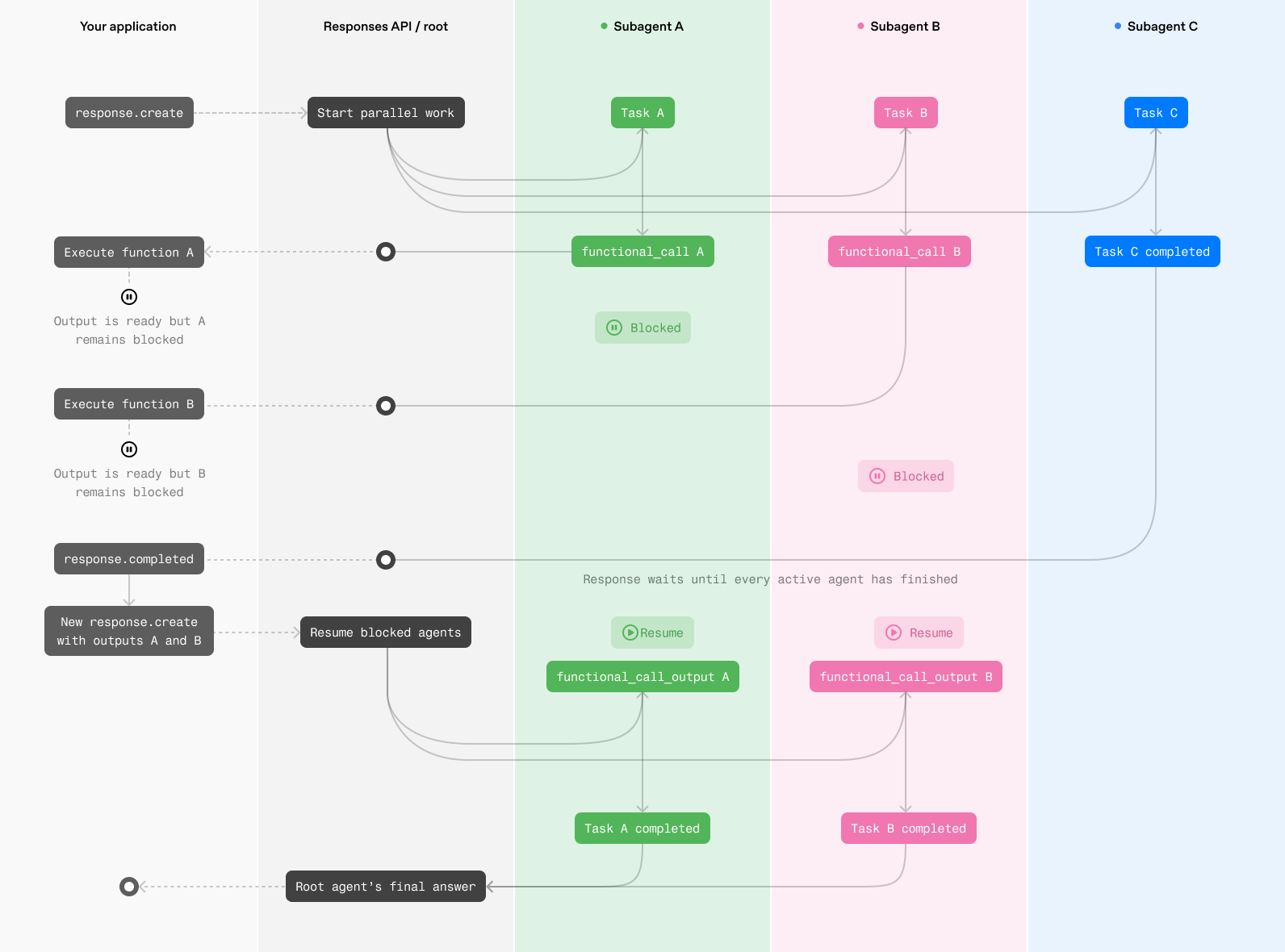
WebSocket での関数呼び出しの実行
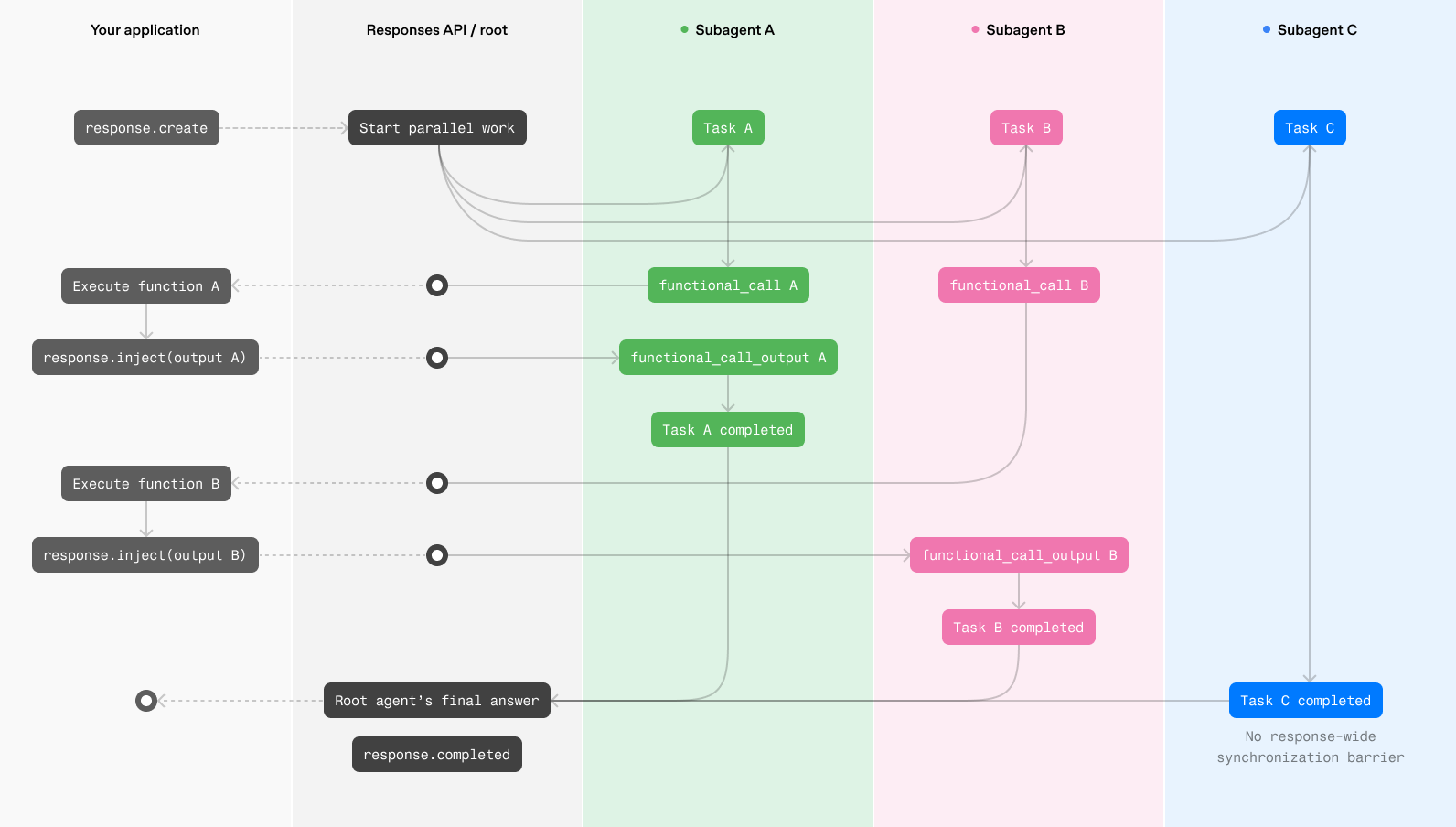
HTTP
これらの例には、ベータ版 Responses API を利用できるベータ版 SDK ビルドが必要です。HTTP ストリーミングでは、client.beta.responses.create を呼び出し、betas 引数に responses_multi_agent=v1 を渡します。これにより、ベータ版の型とオートコンプリートが有効になります。Python で型アノテーションを追加する場合は、openai.types.beta からベータ版のレスポンス項目の型をインポートします。
クライアント側のコード例:
from __future__ import annotations
import json
import sys
from openai import OpenAI
from openai.types.beta import BetaResponseOutputItem
client = OpenAI()
ROOT = "/root"
PROPOSALS = {
"alpha": {"estimated_weeks": 6, "risk": "medium"},
"beta": {"estimated_weeks": 8, "risk": "low"},
}
tools = [
{
"type": "function",
"name": "get_proposal",
"description": "Return details for a proposal that the agents should compare.",
"parameters": {
"type": "object",
"properties": {
"proposal": {
"type": "string",
"enum": ["alpha", "beta"],
}
},
"required": ["proposal"],
"additionalProperties": False,
},
"strict": True,
}
]
history = [
{
"role": "user",
"content": "Compare proposal alpha and proposal beta.",
}
]
def agent_name(item: BetaResponseOutputItem) -> str:
return item.agent.agent_name if item.agent else ROOT
def render_to_user(delta: str) -> None:
print(delta, end="", flush=True)
def log_subagent_text(agent: str, delta: str) -> None:
print(f"[{agent}] {delta}", end="", file=sys.stderr, flush=True)
def process_tool_call(name: str, arguments: str) -> str:
if name != "get_proposal":
raise ValueError(f"Unknown tool: {name}")
parsed_arguments = json.loads(arguments)
return json.dumps(PROPOSALS[parsed_arguments["proposal"]])
while True:
output_items = []
pending_calls = []
item_agents: dict[int, str] = {}
stream = client.beta.responses.create(
model="gpt-5.6-sol",
input=history,
tools=tools,
store=False,
multi_agent={
"enabled": True,
"max_concurrent_subagents": 3,
},
stream=True,
betas=["responses_multi_agent=v1"],
)
for event in stream:
if event.type == "response.output_item.added":
item_agents[event.output_index] = agent_name(event.item)
elif event.type == "response.output_text.delta":
agent = item_agents.get(event.output_index, ROOT)
if agent == ROOT:
render_to_user(event.delta)
else:
log_subagent_text(agent, event.delta)
elif event.type == "response.output_item.done":
output_items.append(event.item)
if event.item.type == "function_call":
# Handle function calls from both the root agent and subagents.
pending_calls.append(event.item)
elif event.type == "response.completed":
print(f"\nUsage: {event.response.usage}", file=sys.stderr)
break
elif event.type in {
"error",
"response.failed",
"response.incomplete",
}:
raise RuntimeError(event)
history.extend(output_items)
for call in pending_calls:
history.append(
{
"type": "function_call_output",
"call_id": call.call_id,
"output": process_tool_call(call.name, call.arguments),
}
)
if not pending_calls:
break1 つ以上のエージェントが開発者定義の関数を呼び出した場合は、保留中の呼び出しをすべて実行し、その出力を含む継続リクエストを作成します。
WebSocket
WebSocket モードでは、エージェントが開発者定義の関数を呼び出したら、アプリケーションでその関数を実行し、response.inject イベントを使って実行中のレスポンスに結果を送信します。これにより、待機中のエージェントは、マルチエージェントのレスポンス全体が完了するのを待たずに再開できます。
{
"type": "response.inject",
"response_id": "resp_123",
"input": [
{
"type": "function_call_output",
"call_id": "call_123",
"output": "{\"temperature\":72}"
}
]
}有効な response.inject リクエストに対し、サーバーは次のいずれかのイベントを返します。
response.inject.created:入力の検証が完了し、注入を受け付けましたresponse.inject.failed:入力は注入されませんでした。error.codeを確認してください
{
"type": "response.inject.created",
"sequence_number": 42,
"response_id": "resp_123"
}{
"type": "response.inject.failed",
"sequence_number": 43,
"response_id": "resp_123",
"input": [
{
"type": "function_call_output",
"call_id": "call_123",
"output": "{\"temperature\":72}"
}
],
"error": {
"code": "response_already_completed",
"message": "Response 'resp_123' has already completed."
}
}リクエストが response.inject スキーマに準拠していない場合、サーバーはステータス 400 の汎用エラーを送信し、WebSocket 接続を閉じます。次のイベントを送信する前に、リクエストを修正して新しい WebSocket 接続を開いてください。
Python のベータ版 SDK では、client.beta.responses.connect を通じて WebSocket モードを利用できます。TypeScript のベータ版 SDK では、ResponsesWS を通じて利用できます。接続ヘッダーに OpenAI-Beta: responses_multi_agent=v1 を渡してください。HTTP ストリーミングとは異なり、WebSocket コネクタはまだ betas 引数を受け付けません。
response.created イベントからレスポンス ID を保存し、そのレスポンスに対して送信するすべての response.inject イベントに含めてください。注入する項目を送信した後は、レスポンスが完了し、すべての注入に対して response.inject.created または response.inject.failed イベントが生成されるまで、WebSocket からの読み取りを続けます。
from __future__ import annotations
import json
from openai import OpenAI
client = OpenAI()
PROPOSALS = {
"alpha": {"estimated_weeks": 6, "risk": "medium"},
"beta": {"estimated_weeks": 8, "risk": "low"},
}
tools = [
{
"type": "function",
"name": "get_proposal",
"description": "Return details for a proposal that the agents should compare.",
"parameters": {
"type": "object",
"properties": {
"proposal": {
"type": "string",
"enum": ["alpha", "beta"],
}
},
"required": ["proposal"],
"additionalProperties": False,
},
"strict": True,
}
]
def process_tool_call(name: str, arguments: str) -> str:
if name != "get_proposal":
raise ValueError(f"Unknown tool: {name}")
parsed_arguments = json.loads(arguments)
return json.dumps(PROPOSALS[parsed_arguments["proposal"]])
def run_multi_agent(connection):
previous_response_id: str | None = None
pending_input: list[dict[str, object]] = [{"role": "user", "content": input()}]
while pending_input:
request = {
"type": "response.create",
"model": "gpt-5.6-sol",
"store": True,
"multi_agent": {"enabled": True},
"tools": tools,
"input": pending_input,
}
if previous_response_id is not None:
request["previous_response_id"] = previous_response_id
connection.send(request)
next_input: list[dict[str, object]] = []
completed_response = None
response_id: str | None = None
pending_injections = 0
for event in connection:
event_type = event.type
if event_type == "response.created":
response_id = event.response.id
elif event_type == "response.output_item.done":
item = event.item
if item.type == "function_call":
if response_id is None:
raise RuntimeError(
"Received a function call before response.created"
)
output = {
"type": "function_call_output",
"call_id": item.call_id,
"output": process_tool_call(item.name, item.arguments),
}
pending_injections += 1
connection.send(
{
"type": "response.inject",
"response_id": response_id,
"input": [output],
}
)
elif event_type == "response.inject.created":
pending_injections -= 1
elif event_type == "response.inject.failed":
pending_injections -= 1
if event.error.code != "response_already_completed":
raise RuntimeError(event.error)
next_input.extend(item.model_dump(mode="json") for item in event.input)
elif event_type == "response.completed":
completed_response = event.response
elif event_type in {
"error",
"response.failed",
"response.incomplete",
}:
raise RuntimeError(event)
if completed_response is not None and pending_injections == 0:
break
if completed_response is None:
raise RuntimeError("Connection ended before response.completed")
if not next_input:
return completed_response
previous_response_id = completed_response.id
pending_input = next_input
with client.beta.responses.connect(
extra_headers={"OpenAI-Beta": "responses_multi_agent=v1"},
) as connection:
run_multi_agent(connection)response.inject イベントを送信した後は、WebSocket からの読み取りを続け、確認応答を処理します。
response.inject.created:関数の出力が実行中のレスポンスに追加されました。そのレスポンスのイベントの読み取りを続けてください。response_already_completedを伴うresponse.inject.failed:関数の出力を追加する前にレスポンスが完了しました。失敗イベントで返されたinputを、完了したレスポンスから処理を継続する新しいresponse.createリクエストに含めて送信してください。response_not_foundを伴うresponse.inject.failed:サーバーはresponse_idで指定されたレスポンスを見つけられませんでした。response.createdで受信した ID を使用していることを確認してください。
マルチエージェントの 1 回の実行が、複数の Responses API リクエストにまたがる場合があります。HTTP では、エージェントが開発者定義の関数を呼び出したら、アプリケーションでその関数を実行し、新しい response.create 呼び出しで出力を送信します。一方、WebSocket では、アプリケーションで関数の出力を実行中のレスポンスに注入します。
マルチエージェントの新しい出力項目
マルチエージェントのレスポンスには、次の 3 種類の出力項目が追加で含まれることがあります。
multi_agent_call:spawn_agentなど、ホスト型のマルチエージェントアクションを記録します。multi_agent_call_output:ホスト型アクションの実行結果を含みます。agent_message:あるエージェントから別のエージェントへの暗号化されたメッセージを運びます。
call_id フィールドは、各 multi_agent_call を対応する multi_agent_call_output に関連付けます。
各項目には agent 属性も含まれます。agent_message では、agent.agent_name が受信側のエージェントを識別します。author と recipient を使って、メッセージの送受信方向を追跡できます。
アプリケーションが multi_agent_call を受信しても、関数呼び出しとして実行したり、結果を返したりしないでください。Responses API がホスト型アクションを実行し、対応する multi_agent_call_output を返します。アプリケーションでリプレイやトレースに必要な場合は、両方の項目を保持してください。
[
{
"type": "multi_agent_call",
"id": "mac_123",
"call_id": "call_spawn_a",
"action": "spawn_agent",
"arguments": "{\"task_name\":\"agent_a\",\"fork_turns\":\"all\",\"message\":\"enc_...\"}",
"agent": { "agent_name": "/root" }
},
{
"type": "multi_agent_call_output",
"id": "maco_123",
"call_id": "call_spawn_a",
"action": "spawn_agent",
"output": [
{
"type": "output_text",
"text": "{\"task_name\":\"/root/agent_a\"}",
"annotations": [],
"logprobs": []
}
],
"agent": { "agent_name": "/root" }
},
{
"type": "agent_message",
"id": "amsg_123",
"author": "/root/agent_a",
"recipient": "/root",
"content": [
{
"type": "encrypted_content",
"encrypted_content": "enc_..."
}
],
"agent": { "agent_name": "/root" }
}
]エージェントに紐づく SSE イベントには、トップレベルの agent 属性が含まれます。agent_message イベントでは、agent.agent_name が受信側のエージェントを識別します。response.created や response.completed などのレスポンスのライフサイクルイベントは、個々のエージェントではなくレスポンス全体を表すため、agent 属性を含みません。
{
"type": "response.output_item.done",
"agent": { "agent_name": "/root" },
"item": {
"type": "agent_message",
"id": "amsg_123",
"author": "/root/agent_a",
"recipient": "/root",
"content": [
{
"type": "encrypted_content",
"encrypted_content": "enc_..."
}
],
"agent": { "agent_name": "/root" }
}
}制限事項
- コンパクション:
- マルチエージェントが有効な場合、
/responses/compactエンドポイントはサポートされません。 multi_agent.enabledをtrueに設定すると、リクエストでcontext_managementを設定していなくても、サーバー側の自動コンパクションが暗黙的に有効になります。コンパクションはルートエージェントと各サブエージェントに個別に適用され、それぞれの独立したコンテキストが保持されます。リクエストでcontext_management.compact_thresholdを明示的に設定すれば、引き続きcompact_thresholdを上書きできます。
- マルチエージェントが有効な場合、
- マルチエージェントが有効な場合、
reasoning.summaryはサポートされません。 - マルチエージェントが有効な場合、
max_tool_callsはサポートされません。 max_concurrent_subagentsのデフォルト値は3で、この設定を推奨します。
プロンプトのガイダンス
マルチエージェントが有効な場合、システムはこれらの指示を新しい開発者メッセージとしてルートエージェントとサブエージェントに自動的に追加します。これらの指示は編集も削除もできません。開発者として指示を記述する際は、自動的に追加される指示を補足する内容にしてください。
ルートエージェント
You are `/root`, the primary agent in a team of agents collaborating to fulfill the user's goals.

At the start of your turn, you are the active agent.
You can spawn sub-agents to handle subtasks, and those sub-agents can spawn their own sub-agents.
All agents in the team, including the agents that you can assign tasks to, are equally intelligent and capable, and have access to the same set of tools.

You can use `spawn_agent` to create a new agent, `followup_task` to give an existing agent a new task and trigger a turn, and `send_message` to pass a message to a running agent without triggering a turn.
Child agents can also spawn their own sub-agents.
You can decide how much context you want to propagate to your sub-agents with the `fork_turns` parameter.

You will receive messages in the form:
```
Message Type: MESSAGE | FINAL_ANSWER
Task name: <recipient>
Sender: <author>
Payload:
<payload text>
```
They may be addressed as to=/root

There are {max_concurrent_subagents + 1} available concurrency slots, meaning that up to {max_concurrent_subagents + 1} agents can be active at once, including you.
サブエージェント
You are an agent in a team of agents collaborating to complete a task.

You can spawn sub-agents to handle subtasks, and those sub-agents can spawn their own sub-agents. All agents in the team, including the agents that you can assign tasks to, are equally intelligent and capable, and have access to the same set of tools.

You can use `spawn_agent` to create a new agent, `followup_task` to give an existing agent a new task and trigger a turn, and `send_message` to pass a message to a running agent.
Child agents can also spawn their own sub-agents.

When you provide a response in the final channel, that content is immediately delivered back to your parent agent.

You will receive messages in the form:
```
Message Type: NEW_TASK | MESSAGE | FINAL_ANSWER
Task name: <recipient>
Sender: <author>
Payload:
<payload text>
```
You may also see them addressed as to=/root/..., which indicates your identity is /root/...

There are {max_concurrent_subagents + 1} available concurrency slots, meaning that up to {max_concurrent_subagents + 1} agents can be active at once, including you.