
Think of a question you’d usually take to someone who knows your team’s data. Open a chat with the Data plugin and choose a file or connected source. Ask your question in your own words. When something in the answer catches your eye, you can ask a follow-up question to dig deeper.
A sales example
Say you’re getting ready for a sales meeting. We’ll use orders and account notes from Acme, a fictional company, to answer two questions. How did the quarter go? And which customers should we call first?
To follow along, download the Acme Sales 2026 workbook and attach it to a new chat with Data.
Ask your first question
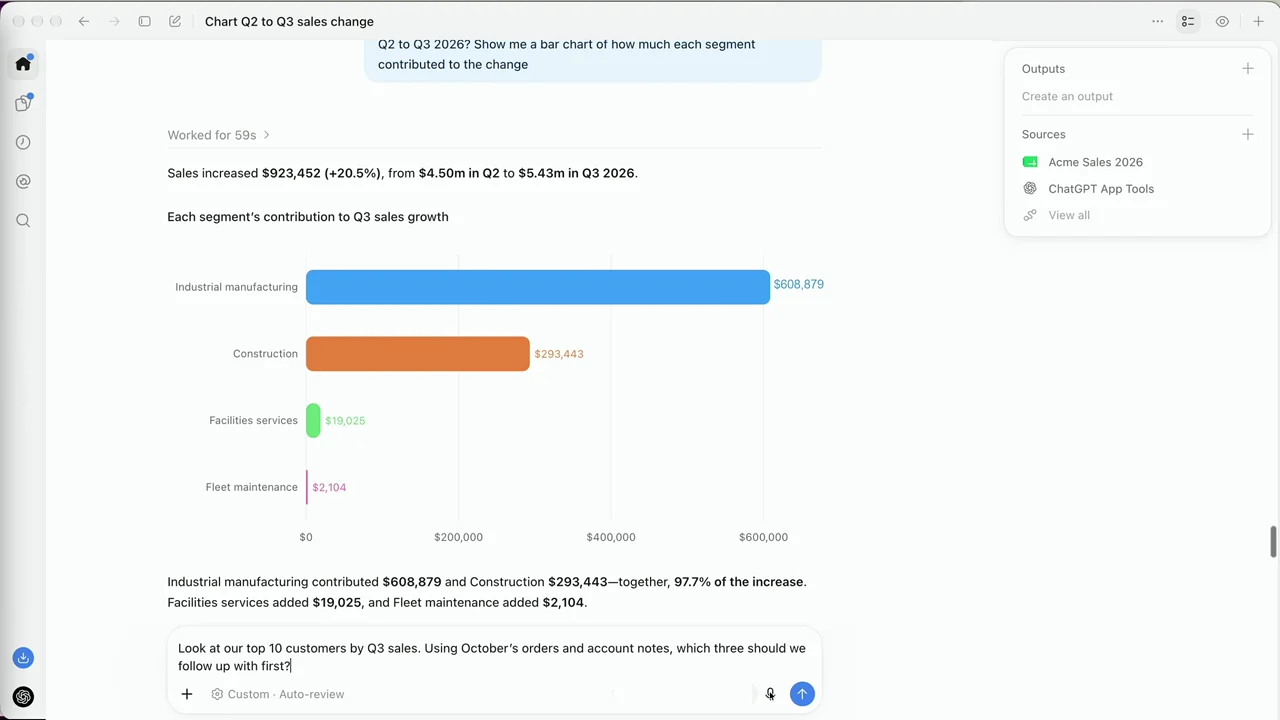
Give ChatGPT enough detail to know what you want to compare. Here, we care about net sales over two quarters and which customer segments contributed to the change.
Acme’s sales grew about 20% from Q2 to Q3. The chart shows that industrial manufacturing accounted for most of the increase. Now, who should we call before the sales meeting?
Explore the answer
Stay in the same chat. This time, ask ChatGPT to look at October’s orders alongside the sales team’s account notes.
For example, one buyer is waiting for a confirmed delivery date before releasing the next order. Open the buyer’s note in the workbook’s Activity tab.
Share what you found
Once you have an answer you’re ready to share, tell ChatGPT who it’s for and how you’ll use it. For this meeting, three slides will do.
Try a real example
Pick a question that came up in your last team meeting. If you’ve connected your data warehouse and the tools your team uses every day, ask ChatGPT to use them to answer it. Choose a file or source you know well, then check one finding against the original.
Next, we’ll create a dashboard so the team can monitor what matters.