
For every versioned update, bug fix, and minor improvement, see the Codex changelog and API changelog.
October 5–9, 2026
Use GPT-6.1 Sol with Ultrafast mode
Ultrafast mode speeds up token generation with GPT-6.1 Sol in Codex and ChatGPT Work. Ultrafast is available on Pro $500 and eligible Enterprise and Edu plans.
DevDay 2026


Meet your dot
Give your dot ongoing responsibility. Dots keep making progress between conversations and are rolling out gradually to eligible accounts.
Work across devices
Start a synced Work task on desktop and continue on web or mobile.
ChatGPT Space
Bring files and Pages together, and work with collaborators.
Get started Pages Work with the agent Collaboration Admin guide
Astra Ultrafast in Codex
Faster responses in Codex and Work on Pro $500 and eligible Enterprise and Edu plans.
Reusable cloud environments
Prepare a development setup once and reuse it in isolated cloud workspaces.
Codex Security Cloud
Scan repositories, review findings, and prepare patches in research preview.
Sign in with ChatGPT
Offer ChatGPT sign-in and eligible ChatGPT plan usage in your app. Commercial sign-in is in a limited trial with selected partners.
Sites with connected data
Build workspace-private Sites with each visitor’s connected apps, where enabled.
Plugin Extensions
Add sidebar apps, panels, editors, and forms to ChatGPT. Composer mentions require the desktop app; Free and Go web extensions are coming soon.
MCP Events
Let users ask ChatGPT to act on updates from your MCP server. Requires MCP 2.0 and webhook delivery.
Website annotations
Add context and preview controls to feedback from supported desktop browsers.
GPT-6.1 Sol
Use GPT-6.1 Sol for complex coding and professional work in the API and Codex, where available.
Astra Ultrafast in the API
Generate output tokens faster in the Responses API, subject to availability.
ChatGPT in Slack and Teams
Bring ChatGPT and approved tools into Slack and Teams conversations.
Team Tasks
Run scheduled or event-triggered work through a team’s service account and approved connections.
Workspace connections
Connect company-managed accounts for supported teams and workflows.
Agent Security
Manage tool, file, and network access for local and cloud agents.
September 28–October 2, 2026
Choose GPT-6.1 Sol for complex work
Use GPT-6.1 Sol for coding and professional work at a lower cost than Astra. Access depends on your plan, client, and workspace settings.
Delegate ongoing work to your dot
Dots continue work between conversations and bring back results for review. Access is rolling out gradually to eligible accounts.
Use GPT-6 Astra Ultrafast
Ultrafast speeds up token generation in Codex and Work on Pro $500 and eligible Enterprise and Edu plans. Usage and workspace restrictions apply.
Prepare reusable Codex Cloud environments
Prepare and publish a cloud environment once, then reuse its filesystem in isolated workspaces for new tasks.
Scan repositories with Codex Security Cloud
Install the Security Cloud plugin to scan connected repositories and review findings and patches. Available in research preview to workspaces with access.
Continue Work across devices
With Local computer access with Work Cloud enabled, continue eligible tasks from desktop, web, or mobile. Keep your computer online for steps that need its local resources.
Work together in ChatGPT Space
Create and share Pages in Space. Mention ChatGPT or your dot and use slash commands while editing.
Set up shared team workflows
Run scheduled or event-triggered Team Tasks with a service account and approved workspace connections. Admins also manage ChatGPT access in Slack and Teams.
Sign in to apps with ChatGPT
Add ChatGPT sign-in and eligible plan usage to your app. Commercial sign-in is in a limited trial; plan usage supports open-source partners and selected private clients.
Extend your plugin’s interface
Plugin Extensions add interfaces to ChatGPT. Composer mentions are desktop-only, and Free and Go web extensions are coming soon.
Respond to MCP events
Build webhook subscriptions so users can ask ChatGPT to act on updates from your MCP server. Requires MCP 2.0.
Customize website annotations
Use the Browser Annotation API to attach context and preview controls to website feedback in supported desktop browsers.
September 21–25, 2026
Choose GPT-6 Sol and Luna
GPT-6 Sol and GPT-6 Luna are rolling out in Codex at lower token prices than their GPT-5.6 predecessors. Start with Sol Medium for everyday and complex coding, or Luna High for focused, repeatable tasks. Availability depends on your plan, client, and workspace settings.
See Models for model selection, Pricing for usage and credit rates, and the launch announcement for availability details.
September 14–18, 2026
Prepare for GPT-5.5 retirement
GPT-5.5 will retire from ChatGPT, ChatGPT Work, and Codex on October 14, 2026, across all plans. The OpenAI API isn’t affected.
For Codex with ChatGPT sign-in, choose an available replacement for your plan and client. See GPT-5.5 retirement for migration guidance. Update saved model settings, workspace defaults, custom agents, scheduled tasks, and scripts that still select GPT-5.5 before the retirement date. Read the retirement notice for details.
September 7–11, 2026
Start a quick chat from your pet
Type a request or start a voice conversation from the floating Pets controls in the ChatGPT desktop app on macOS and Windows. Keep working in another app while you follow progress, then open the full conversation when you need it.
Choose a companion in Settings > Pets, or select Mini to use the
controls without a pet. Press Option+Space on macOS or Windows+Alt+P on
Windows to show the controls and focus Quick Chat. Use @ to add context and
$ to choose a skill, then press Enter to send your request.
Share an app window on Windows
Appshots bring a screenshot and available text from the frontmost Windows app into ChatGPT. Press both Alt keys at the same time, then ask a question about the window or describe what you want to do. Windows Appshots open in the main ChatGPT app.
On macOS, Appshots can also start a new chat in the floating Pets controls when they’re visible and the main ChatGPT window is in the background. Set Appshot destination to Automatic and authorize Appshots permissions in the main app first.
Update the desktop app to use these features. Availability depends on rollout and workspace settings.
Read the September 11 release notes for the full update and smaller improvements.
August 31–September 4, 2026
Take on demanding work with GPT-6 Astra
GPT-6 Astra combines advanced reasoning, computer use, and stronger judgment for complex work across code, apps, and research in Codex and ChatGPT Work. Use it to carry out a workflow, check the result, and produce a document, spreadsheet, or presentation that fits your templates and task.
Once Astra is available to your account, choose it from the model selector. See usage and pricing before starting a large task. Enterprise access requires both rollout eligibility and an administrator to enable it.
August 24–28, 2026
Work with more websites
-
Use your browser: Work in Edge, Brave, Opera, or Vivaldi as well as Chrome from the ChatGPT desktop app. Bring an open tab into a ChatGPT Work or Codex chat and work with the website where you’re already signed in. Opera supports browser control but doesn’t have side chat.
-
Use a website’s tools: With Site tools (WebMCP), ChatGPT Work and Codex can use actions offered by a website in the desktop app’s built-in browser. For example, a document editor can provide tools to find a section or add a comment. Update the desktop app and use GPT-5.6 Sol or GPT-5.6 Terra. Site tools aren’t available with GPT-5.6 Luna or in Enterprise or Edu workspaces.
-
Sign in through the cloud browser: On eligible plans, continue a task that needs a website account in ChatGPT Work on the web, iOS, or Android. Follow the sign-in request and enter your details in the sign-in flow, not in the chat. This doesn’t connect your local browser profile. Website sign-in isn’t available for Enterprise or Edu workspaces.
Availability depends on rollout and workspace settings.
Read the August 25 browser release notes.
Run scheduled tasks from app events
Scheduled tasks can now start when a supported event occurs in Gmail, Slack, or GitHub. Use an event trigger to triage new email, summarize channel activity, or act on pull request feedback without polling on a fixed cadence.
Event-triggered tasks are available in ChatGPT on the web and mobile for eligible plans. Connect the relevant app and approve its requested access first. In managed workspaces, administrators can control access.
Read the August 25 release notes.
August 17–21, 2026
Work with more of your apps and content
-
Apple Messages: Find chats, summarize messages, prepare replies, and send through Messages on your Mac. The plugin is available on all plans in the ChatGPT desktop app for macOS. Use it in ChatGPT Work and Codex, not in regular ChatGPT chats. By default, ChatGPT sends messages only after you approve the message and its recipients.
-
Site co-editing: Where available, invite active members of your workspace as editors. Editors can refine the Site and publish updates after its owner publishes it for the first time. Invited editors can read the Site’s live database data; owners retain control of sharing and settings.
-
Editable Site URLs: Where available, choose a new ChatGPT-hosted address for an existing Site without redeploying it. The previous address redirects to the new one.
-
Computer History in Europe: Use Computer History in the EEA, Switzerland, and the United Kingdom. It remains off by default for ChatGPT Pro, Business, and Enterprise users on macOS. Business and Enterprise administrators must enable access first.
-
Shared thread snapshots: Share a read-only snapshot of a local Codex thread from the ChatGPT desktop app for macOS. Personal-account links are viewable by anyone with the link; workspace-account links are limited to the originating workspace. Codex redacts known secret patterns, but review the snapshot before sharing because sensitive content may remain.
-
Unified pinned threads: Keep your pinned chats in sync between desktop and iOS.
Read the August 20 release notes.
OpenAI Developers
@OpenAIDevs
Shared threads in Codex and ChatGPT Work let you show the process behind your build with a read-only link

Work with GitLab projects in Codex cloud
GitLab support is available in beta on all ChatGPT
plans. Connect a project, create a cloud environment, start tasks from issues
or merge requests with @codex, and request one-off or automatic merge request
reviews.
The integration runs in Codex cloud, and a managed workspace admin can disable it. GitLab-triggered activity requires permission to configure the applicable webhook. GitLab Self-Managed and GitLab Dedicated connections require workspace admin setup; webhook activity requires GitLab 19.0 or later.
Read the August 19 GitLab release notes.
Export public plugin metadata for review
Eligible ChatGPT Enterprise workspace owners and admins can download a CSV of the public plugins visible to their workspace. In Admin > Plugins, select Public, then select the download icon (Export CSV).
The export lists plugin, app, and Chat skill names and descriptions, together with developer, version, date added in UTC, and OpenAI verification metadata. It uses a public-catalog snapshot that can be up to 48 hours old and excludes plugins created for the workspace. The export isn’t available in FedRAMP workspaces.
Read the August 17 admin export release notes.
August 10–14, 2026
Find earlier work with Computer History
Computer History turns activity across your apps and websites into a searchable timeline and memories that ChatGPT and Codex can use. Turn it on only if you want to share that context, then choose which apps and websites contribute, pause collection, and review or delete your history at any time.
Computer History is available in the ChatGPT desktop app on macOS for ChatGPT Pro, Business, and Enterprise customers. Business and Enterprise administrators must first enable access. Initial availability excludes the European Union, Switzerland, and the United Kingdom.
Use the ChatGPT desktop app on Linux
The ChatGPT desktop app for Linux is now available in
preview. Install a .deb package on supported Ubuntu or Debian distributions,
or an .rpm package on Fedora. Packages are available for both x64 and ARM64
processors.
Sign in with your ChatGPT account to work with projects, local files, and Codex. Some features, including Computer Use, aren’t yet available in the Linux preview.
OpenAI
@OpenAI
Now in preview: The ChatGPT desktop app for Linux.
Bring your existing agent setup and work with you
Import instructions, settings, skills, plugins, projects, and recent work from Claude Code, Claude Cowork, or Cursor into the ChatGPT desktop app. Turn on automatic updates in Settings > Import to keep your imported work in sync.
In Codex CLI, use /import to bring supported setup and recent chats from
Claude Code or Cursor into your local session.
Read the August 11 desktop and CLI release notes.
OpenAI Developers
@OpenAIDevs
You can now keep your work from other agents in sync with ChatGPT Work and Codex.

Choose the right access for defensive security work
Daybreak now offers two tiers for approved defenders. Daybreak Blue supports general defensive work, such as secure code review, incident response, and patch validation. Daybreak Red requires its own approval and provides access to purpose-trained models for authorized security assessments.
Access requires Trusted Access for Cyber and applies only to the approved identity, workspace or organization, model, and product surface.
Read the August 10 Daybreak announcement.
OpenAI
@OpenAI
We’re expanding our cybersecurity initiative Daybreak

August 3–7, 2026
Talk through files and projects with ChatGPT Voice
ChatGPT Voice now supports uploaded files and ChatGPT Projects. Ask questions about a document during a voice conversation, or continue a project using its recent chats, sources, and instructions.
Study and teach with dedicated education plugins
Three new plugins bring classroom-specific workflows to ChatGPT Work and Codex. College Student creates study guides, practice quizzes, flashcards, and interactive explanations. College Educator helps develop course plans, materials, and assessments. K–12 Educator supports lesson planning, classroom resources, and materials adapted for different learners.
The plugins are available through ChatGPT Edu and ChatGPT for Teachers district deployments. Schools control which tools and permissions are available. Read the education plugins announcement.
Reuse saved files and find past work faster
On the web, add a saved Library file to a conversation without uploading it again, search within Library, and paste formatted text without losing headings, links, or lists. Search also matches folders and conversation titles across the web, iOS, and Android.
Pastes longer than 10,000 characters now become attachments on every ChatGPT plan, including Enterprise and Edu. Select Show in text field if you want to move the content back into your message.
Read the ChatGPT release notes.
See your remaining ChatGPT Work usage
Eligible users on personal plans and ChatGPT Business can check their remaining ChatGPT Work usage directly in the web sidebar. Available credit options depend on your account and workspace permissions. ChatGPT Work and Codex continue to share the same usage limits and credits.
Choose how GPT-5.6 responds in ChatGPT
ChatGPT Plus and Pro users can adjust how much thought GPT-5.6 Sol puts into a response with a new slider. The updated model also provides more reliable facts and focused answers. GPT-5.6 Luna becomes the default ChatGPT model on the Free and Go plans.
These changes apply to ChatGPT conversations. They don’t change model behavior in ChatGPT Work or Codex. Read the ChatGPT release notes.
Organize work and switch agents in Codex CLI 0.147.0
Codex CLI 0.147.0 adds persistent, manually ordered chat sections and portable Agent Plugins. Search across local, personal, workspace, and remote plugin catalogs, or import Cursor and Claude Code setup without duplicating synced conversations.
Use --approve-for-me to enable automatic approval
review for eligible requests without expanding
filesystem or network permissions. Amazon Bedrock sessions also gain cached
web search and remote conversation compaction.
Follow and resume deeper security scans
Hosted Codex Security plugin versions 0.1.16 through 0.1.18 add live scan
progress, measured token usage, resumable deep scans, and configurable
discovery limits. The latest release also supports Amazon Bedrock
authentication for repository scans and their delegated workers.
Use the Codex Security workbench to review scan progress and findings, or configure a deep scan when you need a more thorough assessment. Check the plugin changelog to confirm which features your installed version supports.
Review GitHub pull requests for security risks
Codex Security Review analyzes pull-request
changes alongside repository context, threat models, and security guidance.
Configure automatic reviews when a pull request opens or receives new
commits, or request one directly with @codex security review.
The feature is available in research preview to eligible ChatGPT Enterprise, Business, Edu, and Pro customers. It isn’t available on Plus, and usage limits can apply.
OpenAI Developers
@OpenAIDevs
Now in research preview: Codex Security Review

July 27–31, 2026
Use GPT-5.6 Terra and Luna at lower rates
GPT-5.6 Terra now costs 20% less, and GPT-5.6 Luna costs 80% less. Input, cached input, and output rates decreased by the same proportions. The updated usage limits and rates make Terra a stronger fit for everyday work and Luna especially useful for focused coding and high-volume tasks.
OpenAI
@OpenAI
Starting today, we are reducing prices for GPT-5.6 Luna by 80% and GPT-5.6 Terra by 20%

Find useful context across your browser and open tabs
In the ChatGPT desktop app, the built-in browser can find pages from your browsing history or search Google directly from its address bar. ChatGPT can also search your browsing history when a task needs earlier context.
The Chrome extension lets you mention open tabs, bring selected page text into a side chat, ask questions about YouTube videos, or select Ask ChatGPT from a page’s context menu. Review and approve requests to use browser history before ChatGPT includes that information in a task.
ChatGPT
@ChatGPT
In Side Chat, ask about a YouTube video, reference your open tabs, or highlight text on a page and ask away.
Review changes across repositories
When a local project contains more than one folder, the desktop app shows every repository and the lines changed in each one. Select Review to inspect their diffs together without switching between separate review views.
Refine generated images in your conversation
Open a generated image in the expanded viewer, then switch between Focused view and Canvas view. Add comments across images, select the versions you want to keep, and ask for targeted edits without leaving the chat. Learn more about image generation.
OpenAI Developers
@OpenAIDevs
ImageGen in Codex just got a new lightbox and canvas.

Find chats that need your attention
The desktop app’s new Activity view brings together chats you recently engaged with and work that needs your attention. Select the bell in the sidebar to open the view.
Read the July 30 desktop release notes.
OpenAI Developers
@OpenAIDevs
The new Activity view in the ChatGPT desktop app brings together conversations that need your attention

Connect partner tools with Sign in with ChatGPT
Sign in with ChatGPT is rolling out in beta to supported plugins and partner sites, beginning with Airtable, GitLab, HubSpot, Notion, Supabase, and Vercel. Use it to create or link a partner account with fewer steps, then start working with that service in ChatGPT or Codex.
Partners receive only your name, email address, and profile picture when available. Each plugin’s requested access still requires a separate review and approval. Read the July 29 sign-in announcement.
Collaborate in a dedicated academic research workspace
ChatGPT for Academic Researchers offers eligible faculty and postdoctoral researchers 12 months of complimentary access to a dedicated ChatGPT workspace. Approved teams can include up to five verified researchers from the same institution and receive business data protections and ChatGPT Pro-level usage limits. Participants can use GPT-5.6 across ChatGPT, ChatGPT Work, and Codex for research and coding workflows.
The program covers ChatGPT access, not OpenAI API credits. Eligibility requires institutional verification and a qualifying research paper.
Continue Codex tasks more reliably on iOS
ChatGPT for iOS 1.2026.202 reconnects to tasks more reliably when you return to the app or unlock your device with Face ID. Voice conversations use your chosen ChatGPT voice and show usage-limit warnings, while the composer now suggests installed plugins and their skills consistently with the desktop app.
The release also improves pause and resume controls for goals, inline tables and visual themes, large workspace diffs, selected-text references, and model restoration. Read the July 27 iOS release notes.
Compare security scans and manage findings
Hosted Codex Security plugin releases 0.1.14 and 0.1.15 add scan comparisons,
false-positive feedback, scoped SECURITY.md policies, and clearer repository
and finding histories. You can select findings for tracking in Linear or GitHub
Issues, with Codex reviewing the proposed action before you approve it.
Use the existing Codex Security
workbench to review saved scans, findings,
repository history, and remediation in the desktop app. The hosted plugin
catalog offers version 0.1.15, while the public CLI plugin marketplace
offers version 0.1.11. Check the Codex Security plugin
changelog before relying on a new feature.
Run security scans from the terminal, CI, or TypeScript
The public @openai/codex-security CLI and TypeScript SDK reached version
0.1.5, with release numbers separate from the Codex Security plugin. Use the
package to run scans from the CLI, review pull-request
changes and upload SARIF results in CI, or run
resumable bulk scans across GitHub
repositories or a pinned CSV inventory.
The Codex Security TypeScript SDK also lets you build scanning, progress reporting, cost controls, and cancellation into your own tools. The package is public, but running scans still requires Codex Security access. Some full-repository scans also require Trusted Access for Cyber.
OpenAI
@OpenAI
You can now use it to scan repositories, track findings across runs, verify fixes, and add security checks to CI/CD.

Organize sessions and extend Codex CLI 0.146.0
Codex CLI 0.146.0
lets you name a new chat with /new release prep or /clear bug bash, pin
important threads, and switch between side conversations without closing them.
It also adds temporary conversation forks, standalone web search for compatible
custom model providers, executor-provided skills, and support for Agent Plugins
manifests, workspace plugin publishing, and other plugin marketplaces.
For custom clients, the app server can filter pinned threads, create in-memory forks, inspect installed connector state, and read connector metadata. Experimental WebSocket support also connects app-server to remote Code Mode hosts. Review the app-server security requirements before exposing a remote connection. The release also improves proxy support, MCP reconnection, terminal responsiveness, and Windows sandbox reliability.
Use GPT-5.6 Sol for hosted Codex work
GPT-5.6 Sol now powers Codex cloud code review and quality assurance for eligible customers. Sol is the flagship GPT-5.6 model for complex coding, research, computer use, and security work. Codex cloud selects its model automatically; Terra and Luna remain available on supported local and web surfaces.
Prepare for the GPT-5.4 model retirement
On August 31, GPT-5.4 and GPT-5.4 mini will retire from Codex for users signed
in with ChatGPT. Replace gpt-5.4 with gpt-5.6-terra and gpt-5.4-mini
with gpt-5.6-luna in workspace defaults, saved model settings, managed
configurations, custom agents, and scheduled tasks.
The OpenAI API and Codex sessions authenticated with an API key are not affected. Review the deprecated Codex models and workspace model availability before the cutoff.
July 20–24, 2026
Talk through work with ChatGPT Voice
ChatGPT Voice, powered by GPT-Live, lets you talk through work and coordinate tasks in Chat, Work, and Codex in the ChatGPT desktop app. Start a new chat or task in voice mode, then ask ChatGPT to start, check, or steer work in other threads.
On macOS, say, “Take a look at this” to share an appshot of your frontmost window when Screen context is on.
Voice is available with Plus, Pro, Business, Edu, and Enterprise plans in the desktop app and through Remote on iOS.
Work across multiple folders in one local project
Local projects in the ChatGPT desktop app can now include multiple related
folders. Choose a primary folder for new chats, Git operations, and automatic
discovery of AGENTS.md, skills, and config.toml. Secondary folders remain
available for file search, reading, and editing.
Open Edit project to add folders and choose the primary folder.
Read the July 23 release notes.
OpenAI Developers
@OpenAIDevs
Local projects can now include related code, docs, and reference files from multiple folders.

July 13–17, 2026
Keep Work conversations and Projects together on desktop
The ChatGPT desktop app now keeps Chat and Work conversations together in the ChatGPT view. Cloud Work conversations sync across web, mobile, and desktop; local Work conversations stay on your computer. ChatGPT Projects are available in the desktop app. Codex keeps its dedicated view and separate history for developer workflows.
Compare ChatGPT Work and Codex on desktop to choose the view that fits your task.
Control parallel Codex work with Codex Micro
On July 15, OpenAI and Work Louder launched Codex Micro, a limited-run physical control surface for Codex in the ChatGPT desktop app. Its Agent Keys show the status of up to six chats and switch between them. Customizable Command Keys, an analog stick, and a dial can trigger common actions or skills, start push-to-talk, and adjust reasoning effort without leaving the keyboard.
Use GPT-5.6 through Amazon Bedrock
GPT-5.6 Sol, Terra, and Luna reached general availability through Amazon
Bedrock. Local ChatGPT Work and Codex surfaces can use the built-in
amazon-bedrock provider with a Bedrock API key or the
AWS SDK credential chain. This includes Work and Codex in the ChatGPT desktop
app, Codex CLI, the IDE extension, and the Codex SDK.
Inspect Codex task visualizations on iOS
ChatGPT for iOS 1.2026.188 added inline visualizations to Codex tasks and improved creating and managing tasks from conversations, including reliable links to newly created tasks. Read the July 13 iOS release notes.
July 6–10, 2026
Take on ambitious work in ChatGPT
ChatGPT Work in ChatGPT can gather context from your files and plugins, take action across workflows, and create reviewable documents, presentations, spreadsheets, Sites, and other finished work. Powered by GPT-5.6, it can break a goal into steps and work for hours while you follow its progress, answer questions, change direction, and approve important actions.
Scheduled tasks can keep that work moving when you’re away by running once, on a schedule, when an event occurs, or while monitoring for changes.
Choose the right GPT-5.6 model
The GPT-5.6 family offers three recommended models across ChatGPT Work, the ChatGPT desktop app, Codex CLI, and the Codex IDE extension. Sol is the flagship for complex coding, computer use, research, and security work. Terra balances capability and cost for everyday work, while Luna is the fastest, lowest-cost option. The default Power setting uses Sol with medium reasoning.
Use Codex in the ChatGPT desktop app
On July 9, the Codex app merged into the ChatGPT desktop app for macOS and Windows. Codex keeps its dedicated coding experience alongside ChatGPT’s Chat and Work. The Codex experience includes inline editing in diffs, pull request review in the side panel, faster Computer Use powered by GPT-5.6, and multi-repository projects.
Existing Codex app users can update as usual. You can make Codex the default view, use the Codex logo as the app icon, and access desktop Codex projects from the ChatGPT mobile app. The updated desktop app is available globally on every ChatGPT plan, including Free.
June 15–19, 2026
Turn demonstrated workflows into reusable skills
Record & Replay lets you show ChatGPT or Codex a workflow on macOS and turn the demonstration into a reusable skill. Use it for repetitive tasks that are easier to show than describe, then refine the generated skill and replay it with new inputs. Initial availability excludes the EEA, the United Kingdom, and Switzerland, and requires Computer Use.
Continue a chat on another host
Chat handoff moves a chat and its Git state between your local computer and a connected remote host. Codex can create or reuse a worktree on the destination, transfer the chat, and continue from the matching project.
The same desktop release adds bulk actions to scheduled run history, so you can mark every run as read or archive eligible runs together.
Browse and review workspaces from iOS
In the ChatGPT mobile app, Remote added a workspace file browser, a directory picker for new chats, expand-and-collapse controls for diffs, and per-chat or cross-chat MCP approval choices on iOS.
Computer Use, the Chrome extension, Memories, and Chronicle also began rolling out to the EEA, the United Kingdom, and Switzerland. Memories remain off by default in those regions, and Chronicle is an opt-in research preview for ChatGPT Pro subscribers on macOS.
Read the June 15 iOS, June 16 availability, and June 18 app release notes.
June 8–12, 2026
Debug web apps with Browser Developer mode
Developer mode gives Codex controlled access to Chrome DevTools Protocol capabilities in Chrome and the built-in browser. Codex can inspect network traffic, console output, runtime errors, and page state while it profiles or debugs your app. Under Developer mode in Settings > Browser, turn on Enable full CDP access. Codex asks for explicit approval before it uses that access on a website.
Browser use is also up to twice as fast because CDP and DOM snapshot optimizations reduce browser round trips.
Bring your setup to Codex
New migration flows can import supported setup from other coding agents during
onboarding. The Codex app also added /init for creating project instructions,
plus improved plugin management, browser diagnostics, and completed-chat
summaries.
Set up Codex chats from iOS
Remote on iOS can now choose a branch, create a worktree, run an environment setup script, manage goals, and add inline review comments.
Read the June 9 app, June 9 iOS, and June 11 app release notes.
June 1–5, 2026
Build and deploy websites with Sites
Sites lets ChatGPT create, save, deploy, and inspect websites, dashboards, internal tools, web apps, and games hosted by OpenAI. Sites has a dedicated entry point in ChatGPT on the web and desktop, where you can return to projects and manage hosted environment values and secrets without assembling a separate deployment stack.
Use Codex with Amazon Bedrock
You can use Codex with Amazon Bedrock for local workflows with AWS-managed authentication, account controls, and billing. Remote on iOS also added an optional in-app lock, follow-up behavior settings, line wrapping for diffs, and SSH connections to Windows machines. The desktop app added terminal placement controls and activity insights in the profile view.
Read all June 2026 release notes.
OpenAI Developers
@OpenAIDevs
OpenAI models and Codex, now in your AWS workflows.
May 25–29, 2026
Use Windows apps and control Codex remotely
Computer use added support for seeing, clicking, and typing in Windows desktop apps. Install the Computer Use plugin before starting. On Windows, Codex uses the active desktop and takes over the foreground while the task runs. Remote connections also support Windows. In the ChatGPT mobile app, open Remote to start work on a Windows device, or use a Mac running the ChatGPT desktop app and check progress from elsewhere.
Remote on iOS also added Spotlight and Shortcuts entry points, archived-chat
browsing, /side, and options to save or copy rendered images. The desktop app
added chat coordination for local projects and worktrees, content and
branch-name search for past chats, and consistent visual identifiers for
background subagents.
Read the May 25 iOS and May 29 app release notes.
May 18–22, 2026
Give Codex context from any Mac app with Appshots
Appshots send the frontmost app window to Codex with a screenshot and available text when you press both Command keys. Codex gets working context from design tools, dashboards, documents, and other apps without requiring you to copy, paste, or describe what’s on screen.
Follow long-running goals
Goal mode left experimental status and is available in the Codex app, IDE extension, and CLI for objectives that can take hours or days. Locked use lets Codex continue approved computer-use work after a Mac locks, including through Remote in the ChatGPT mobile app. ChatGPT Business workspaces can also share reusable plugin bundles with workspace members.
May 11–15, 2026
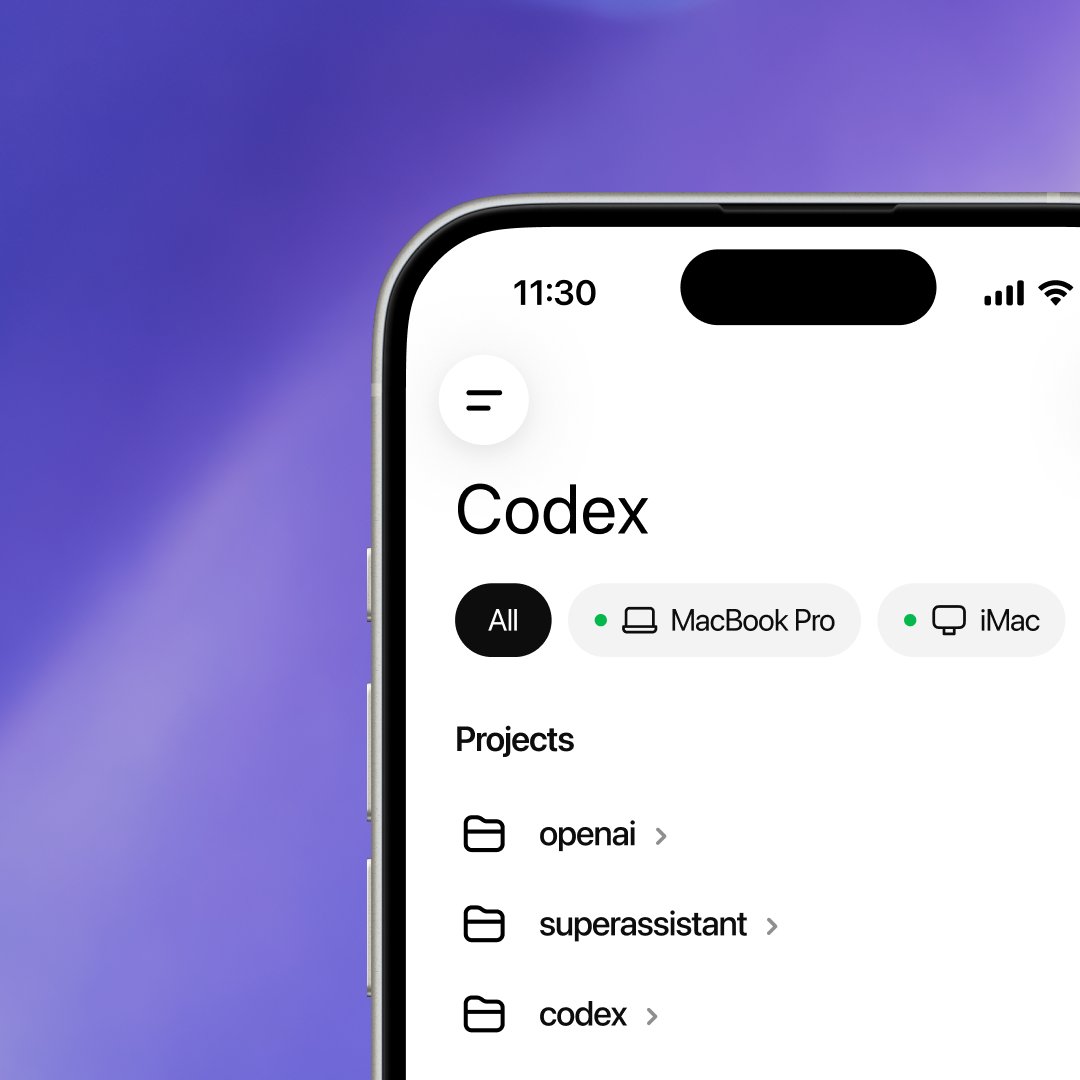
Continue desktop work from mobile
In the ChatGPT mobile app, Remote connects to a Mac running the ChatGPT desktop app. Because work runs on the connected host, your projects, files, credentials, plugins, skills, and configuration remain available when you continue from your phone. See Remote connections to set up a host and pick up work from another device.
OpenAI
@OpenAI
Now in preview: Codex in the ChatGPT mobile app.
Automate trusted workflows
Hooks reached general availability for running custom commands at key points in the agent lifecycle. ChatGPT Enterprise admins can also enable Codex access tokens for trusted scripts, schedulers, and private CI runners. Enterprise guidance expanded to cover managed setup and controls for Codex.
OpenAI Developers
@OpenAIDevs
Codex is getting easier to automate and customize around your code.
May 4–8, 2026
Work across browser tabs with the Chrome extension
The Chrome extension can work in parallel across tabs in the background without taking over your browser. You control which websites Codex can use, making it practical to combine research, data entry, and verification across web apps in one task.
The Codex app also added dictation cleanup and a custom dictionary for names, file paths, and code symbols. ChatGPT Enterprise workspace owners can allow members to create Codex access tokens for trusted, non-interactive local workflows.
Read the May 5 app, May 5 access-token, and Codex for Chrome launch notes.
April 20–24, 2026
Use GPT-5.5 for complex work
GPT-5.5 arrived in Codex as the recommended model for most tasks, with strengths across implementation, debugging, testing, computer use, research, and finished knowledge-work outputs.
Let Codex operate the browser and review approvals
Computer Use in the built-in browser lets Codex click through local development servers and file-backed pages to reproduce issues and verify fixes. Eligible approval requests can also go through automatic approval review, which shows the review status and risk before the action runs.
Read the April 23 launch notes.
OpenAI Developers
@OpenAIDevs
With GPT-5.5, Codex now gets more of the job done across the browser, files, docs, and your computer.

April 13–17, 2026
Preview and operate work in one place
The built-in browser added live previews and page comments, while Computer Use let Codex see and operate macOS apps. Together, they made visual implementation and end-to-end verification part of the same task as the code change.


Start with a chat and keep it moving
Standalone chats made it possible to begin without choosing a project folder. The same release added scheduled tasks inside a chat, pull-request context, richer file previews, and Memories for work that spans chats.
Read the April 16 Codex app release notes.
OpenAI
@OpenAI
Automations can now run in the same thread, so Codex can pick up where it left off

April 6–10, 2026
Review and ship pull requests in the app
The review experience added collapsible inline comments, inline and detached review modes, and clearer Git and source context. Pull-request activity, comments, and push choices then moved into the app alongside workspace file tabs, so you could inspect a change and respond without switching tools.
Read the April 9 and April 10 Codex app release notes, or learn how to review changes in the app.
March 23–27, 2026
Package workflows as plugins
Plugins launched as installable bundles of skills, connectors, and MCP servers. They made complete workflows easier to discover, install, and share, while redesigned plugin and skill pages made their contents and status clearer. Search for past chats also arrived that week.
Read the task search, plugins launch, and Codex app release notes.
OpenAI Developers
@OpenAIDevs
Plugins in Codex? We got you.

March 16–20, 2026
Branch earlier and choose tools from the composer
You could fork a chat from an earlier message, making it easier to try a new
approach without losing the original path. Model and reasoning commands became
available while drafting, enabled skills appeared in the @ menu, and GPT-5.4
mini added a faster option for lighter tasks and subagents.
Read the GPT-5.4 mini, chat control, and skill menu release notes.
OpenAI Developers
@OpenAIDevs
GPT-5.4 mini is more than 2x faster than GPT-5 mini. Optimized for coding, computer use, multimodal understanding, and subagents.

March 9–13, 2026
Schedule work with the right environment
Scheduled tasks could run locally or in a worktree with an explicit model and reasoning level. Reusable templates made common tasks faster to configure, and custom themes made the workspace easier to personalize.

OpenAI Developers
@OpenAIDevs
Automations are now GA.

Let Codex inspect terminal output
Codex also learned to read the integrated terminal for the current chat. It could inspect a running development server or build output directly instead of asking you to paste it.
Read the March 11 and March 12 Codex app release notes.
March 2–6, 2026
Run Codex natively on Windows
The Codex app launched on Windows with native PowerShell and sandbox support, plus worktrees, scheduled tasks, and skills. WSL remained available for developers who preferred a Linux environment.


 Open
Open Commit
Move chats between Local and Worktree
Local and Worktree handoff made it possible to move an active chat while preserving its context. GPT-5.4 also arrived in Codex that week for coding, computer use, and longer-context workflows.
Read the Windows launch, worktree handoff, and GPT-5.4 release notes.
February 9–13, 2026
Iterate in real time and branch an approach
GPT-5.3-Codex-Spark entered research preview as a near-instant model for real-time coding iteration. The app also added chat forking and a floating, always-on-top chat window, so you could explore another approach or keep Codex beside an editor or browser.
Read the Spark and Codex app release notes, or see the current model guide.
OpenAI Developers
@OpenAIDevs
Introducing GPT-5.3-Codex-Spark, our ultra-fast model purpose built for real-time coding.

February 2–6, 2026
The Codex app launches on macOS
The Codex app launched as a desktop workspace for parallel project chats, built-in Git review, worktrees, skills, scheduled tasks, and voice dictation. Those capabilities now live in Codex in the ChatGPT desktop app.


Steer active work and add files
Mid-turn steering made it possible to redirect Codex without stopping an active response, and file attachments expanded beyond images. These patterns became the foundation for steering and queuing follow-ups with the context Codex needs.
Read the Codex app launch notes and February 5 app release notes.