Aprende cómo funcionan los modelos de razonamiento y cómo usarlos bien.
Responses
Los modelos de razonamiento usan tokens de razonamiento internos antes de producir una respuesta. Esto ayuda al modelo a planificar, usar herramientas de manera eficaz, examinar alternativas, resolver ambigüedades y resolver tareas más difíciles de varios pasos. Los modelos de razonamiento funcionan especialmente bien para resolver problemas complejos, programar, realizar razonamiento científico y ejecutar flujos de trabajo con agentes de varios pasos. También son los mejores modelos para Codex CLI, nuestro agente de programación ligero.
Comienza con gpt-6-astra para la mayoría de las cargas de trabajo de razonamiento. Para reducir el costo, considera gpt-5.6-terra, o gpt-5.6-luna para obtener el menor costo y la menor latencia. Si usas un modelo GPT-5.6, consulta modo de razonamiento para conocer su opción pro.
Los modelos de razonamiento funcionan mejor con la API
Responses. Aunque la API para completar chats
sigue siendo compatible, obtendrás mayor inteligencia y mejor rendimiento del modelo al
usar Responses.
Primeros pasos con el razonamiento
Llama a la API Responses y especifica tu modelo de razonamiento y el esfuerzo de razonamiento:
Usar un modelo de razonamiento en la API Responses
Python
1
2
3
4
5
6
7
8
9
10
11
12
13
14
15
16
17
18
19
20
21import OpenAI from "openai";const openai = new OpenAI();const prompt = `Write a bash script that takes a matrix represented as a string withformat '[1,2],[3,4],[5,6]' and prints the transpose in the same format.`;const response = await openai.responses.create({ model: "gpt-6-astra", reasoning: { effort: "low" }, input: [ { role: "user", content: prompt, }, ],});console.log(response.output_text);
1
2
3
4
5
6
7
8
9
10
11
12
13
14
15
16from openai import OpenAIclient = OpenAI()prompt ="""Write a bash script that takes a matrix represented as a string withformat '[1,2],[3,4],[5,6]' and prints the transpose in the same format."""response = client.responses.create(model="gpt-6-astra",reasoning={"effort": "low"},input=[{"role": "user", "content": prompt}],)print(response.output_text)
1
2
3
4
5
6
7
8
9
10
11
12
13
14
15
16
17
18
19
20
21
22
23
24
25
26
27
28
29
30package mainimport ( "context" "fmt" "github.com/openai/openai-go/v3" "github.com/openai/openai-go/v3/responses")func main() { client := openai.NewClient() prompt := `Write a bash script that takes a matrix represented as a string withformat '[1,2],[3,4],[5,6]' and prints the transpose in the same format.` response, err := client.Responses.New(context.Background(), responses.ResponseNewParams{ Model: "gpt-6-astra", Reasoning: responses.ReasoningParam{ Effort: responses.ReasoningEffortLow, }, Input: responses.ResponseNewParamsInputUnion{ OfString: openai.String(prompt), }, }) if err != nil { panic(err) } fmt.Println(response.OutputText())}
1
2
3
4
5
6
7
8
9
10
11
12
13
14
15
16
17
18
19
20
21
22
23
24
25import com.openai.client.OpenAIClient;import com.openai.client.okhttp.OpenAIOkHttpClient;import com.openai.models.Reasoning;import com.openai.models.ReasoningEffort;import com.openai.models.responses.ResponseCreateParams;String prompt = """ Write a bash script that takes a matrix represented as a string with format '[1,2],[3,4],[5,6]' and prints the transpose in the same format. """ .strip();ResponseCreateParams params = ResponseCreateParams.builder() .model("gpt-6-astra") .input(prompt) .reasoning(Reasoning.builder().effort(ReasoningEffort.LOW).build()) .build();client.responses().create(params).output().stream() .flatMap(item -> item.message().stream()) .flatMap(message -> message.content().stream()) .flatMap(content -> content.outputText().stream()) .forEach(text -> System.out.println(text.text()));
1
2
3
4
5
6
7
8
9
10
11
12
13
14
15
16
17
18
19
20
21
22
23
24using OpenAI.Responses;#pragma warning disable OPENAI001string key = Environment.GetEnvironmentVariable("OPENAI_API_KEY")!;ResponsesClient client = new(key);string prompt = """ Write a bash script that takes a matrix represented as a string with format '[1,2],[3,4],[5,6]' and prints the transpose in the same format. """;CreateResponseOptions options = new(){ Model = "gpt-6-astra", ReasoningOptions = new ResponseReasoningOptions { ReasoningEffortLevel = ResponseReasoningEffortLevel.Low, },};options.InputItems.Add(ResponseItem.CreateUserMessageItem(prompt));ResponseResult response = await client.CreateResponseAsync(options);Console.WriteLine(response.GetOutputText());
1
2
3
4
5
6
7
8
9
10
11
12
13
14
15require "openai"client = OpenAI::Client.newprompt = <<~PROMPT Write a bash script that takes a matrix represented as a string with format '[1,2],[3,4],[5,6]' and prints the transpose in the same format.PROMPTresponse = client.responses.create( model: "gpt-6-astra", reasoning: { effort: :low }, input: prompt)puts(response.output_text)
1
2
3
4
5
6
7
8
9
10
11
12
13curl https://api.openai.com/v1/responses \
  -H "Content-Type: application/json" \
  -H "Authorization: Bearer $OPENAI_API_KEY" \
  -d '{
    "model": "gpt-6-astra",
    "reasoning": {"effort": "low"},
    "input": [
      {
        "role": "user",
        "content": "Write a bash script that takes a matrix represented as a string with format \"[1,2],[3,4],[5,6]\" and prints the transpose in the same format."
      }
    ]
  }'
Esfuerzo de razonamiento
El parámetro reasoning.effort orienta al modelo sobre cuánto debe pensar al realizar una tarea.
Los valores admitidos dependen del modelo y pueden incluir none, minimal, low, medium, high, xhigh y max. Un esfuerzo menor favorece la velocidad y un menor consumo de tokens, mientras que, con un esfuerzo mayor, el modelo piensa de forma más exhaustiva para ofrecer respuestas de mayor calidad. Los modelos también adaptan su razonamiento en los distintos niveles de esfuerzo: usan menos tokens para tareas sencillas y piensan más a fondo en las tareas complejas.
GPT-6 Astra no admite el esfuerzo de razonamiento none.
Establecer reasoning.effort (Responses) o reasoning_effort (Chat
Completions) en none devuelve HTTP 400.
Usa la API Responses para la llamada a
funciones. Chat Completions no admite la llamada a funciones con GPT-6 Astra.
Los valores predeterminados también dependen del modelo; no son universales. gpt-5.5 usa el esfuerzo de razonamiento medium de forma predeterminada. Este es el mejor punto de partida para aprovechar el equilibrio entre calidad, confiabilidad y rendimiento de gpt-5.5.
Esfuerzo
Ideal para
none
Tareas en las que la latencia es crítica y que no se benefician del razonamiento ni de varias llamadas encadenadas a herramientas. Para los casos de uso sensibles a la latencia con gpt-5.5, recomendamos probar primero low y luego pasar a none si es necesario.
Los casos de uso comunes incluyen voz, recuperación rápida de información y clasificación.
low
Razonamiento eficiente con un aumento moderado de la latencia. Ideal para casos de uso que requieren el uso de herramientas, planificación, búsqueda o toma de decisiones en varios pasos, mientras se optimizan la velocidad y el costo.
Los casos de uso comunes incluyen análisis de datos, redacción, programación orientada a la ejecución y flujos de trabajo de atención al cliente o asistentes de chat.
medium
Para cuando la calidad y la confiabilidad son importantes y la tarea implica planificación, razonamiento complejo y criterio. Es la configuración predeterminada para la mayoría de las cargas de trabajo y un punto de buen equilibrio en la curva de Pareto de latencia, rendimiento y costo.
Los casos de uso comunes incluyen codificación con agentes, investigación, trabajo con hojas de cálculo y diapositivas, y delegación de trabajos de larga duración.
high
Razonamiento exigente, depuración compleja, planificación profunda y tareas de alto valor en las que la calidad y la inteligencia importan más que la latencia. Se recomienda para flujos de trabajo complejos y tareas con agentes.
Los casos de uso comunes incluyen codificación con agentes, investigación de larga duración y trabajo del conocimiento. Según la complejidad de la tarea, evalúa tanto medium como high.
xhigh
Investigación profunda, flujos de trabajo asíncronos y tareas con agentes que requieren ejecuciones prolongadas. Úsalo solo cuando tus evaluaciones muestren un beneficio claro que justifique la latencia y el costo adicionales.
Los casos de uso comunes incluyen revisiones de seguridad y de código, productividad empresarial, tareas de investigación más profundas y flujos de trabajo de programación exigentes.
max
Razonamiento máximo para tus tareas más complejas. Si actualmente usas xhigh, evalúa si max ofrece un mejor rendimiento
Para reducir el tiempo hasta el primer token visible en aplicaciones sensibles a la latencia, pide al modelo que genere un preámbulo breve antes de continuar con un razonamiento más profundo.
Algunos modelos solo admiten un subconjunto de estos valores, así que consulta la página del modelo correspondiente antes de elegir una configuración.
Modo de razonamiento
Los modelos GPT-5.6 admiten los modos de razonamiento standard y pro en la API Responses. standard es el predeterminado. Establece reasoning.mode en pro para tareas difíciles que requieren más trabajo del modelo y pueden tolerar una mayor latencia y un mayor consumo de tokens.
El modo de razonamiento y el esfuerzo de razonamiento son independientes. El modo selecciona la ejecución estándar o pro, mientras que reasoning.effort controla cuánto razonamiento aplica el modelo dentro de ese modo. Si omites reasoning.effort, GPT-5.6 usa medium de forma predeterminada en ambos modos.
El modo Pro suma el trabajo que realiza el modelo para producir la respuesta final y factura esos tokens según las tarifas por token estándar del modelo seleccionado. En el modo Pro, el modelo realiza más trabajo que en el modo estándar, lo que aumenta el consumo de tokens y el costo. Los ID de modelos Pro existentes conservan su comportamiento y sus precios actuales.
Cómo funciona el razonamiento
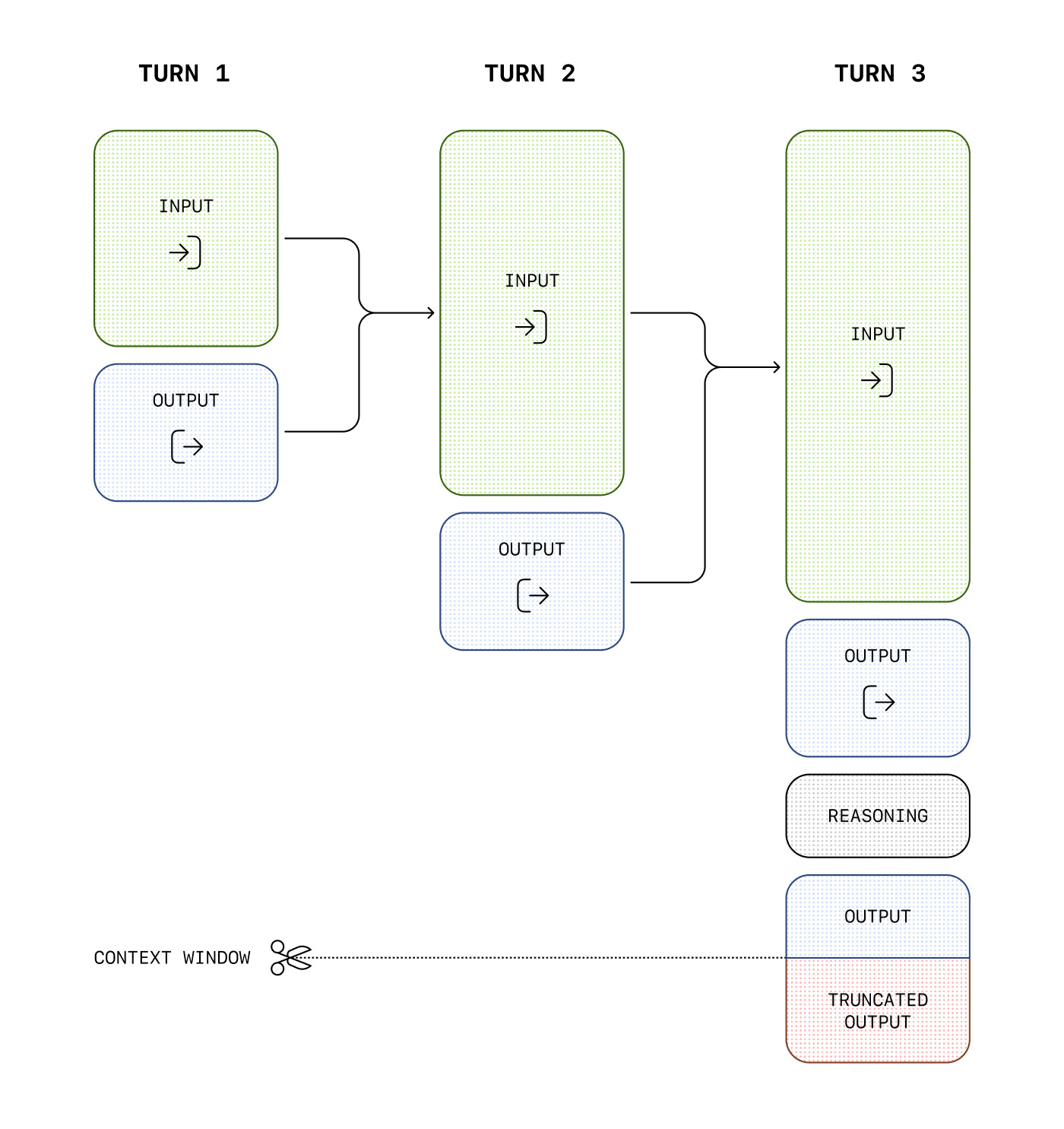
Los modelos de razonamiento incorporan tokens de razonamiento además de los tokens de entrada y salida. Los modelos usan estos tokens de razonamiento para “pensar”, descomponiendo el prompt y considerando varios enfoques para generar una respuesta. Nuestros modelos de razonamiento, como gpt-5.5 y gpt-5.4, admiten el razonamiento intercalado, que permite al modelo generar tokens de salida visibles antes de razonar y entre etapas de razonamiento, así como pensar entre llamadas a herramientas.
En los modelos lanzados antes de GPT-5.6, el comportamiento predeterminado en una conversación de varios pasos es conservar los tokens de entrada y salida de cada paso sin incorporar el razonamiento de turnos anteriores en la siguiente generación. Los modelos GPT-5.6, en cambio, incorporan de forma predeterminada el razonamiento disponible de turnos anteriores. Usa reasoning.context para seleccionar cualquiera de los dos comportamientos en los modelos compatibles.
Aunque los tokens de razonamiento no son visibles a través de la API, ocupan espacio en
la ventana de contexto del modelo y se facturan como tokens de
salida.
Controlar los costos
Para administrar los costos con los modelos de razonamiento, puedes limitar el número total de tokens que
genera el modelo, incluidos los tokens de razonamiento, los tokens de salida visibles y los tokens de formato
no visibles, mediante el parámetro
max_output_tokens.
Consulta conteos de tokens de salida para obtener detalles sobre cómo se reflejan los tokens generados en el uso y los límites de salida.
Administrar la ventana de contexto
Es importante asegurarse de que haya suficiente espacio en la ventana de contexto para los tokens de razonamiento al crear respuestas. Según la complejidad del problema, los modelos pueden generar desde unos cientos hasta decenas de miles de tokens de razonamiento. El número exacto de tokens de razonamiento utilizados se puede consultar en el objeto de uso del objeto de respuesta, en output_tokens_details:
Los tamaños de las ventanas de contexto se encuentran en la página de referencia de modelos y varían entre las versiones del modelo.
Asignar espacio para el razonamiento
Si los tokens generados alcanzan el límite de la ventana de contexto o el valor de max_output_tokens que estableciste, recibirás una respuesta con status establecido en incomplete y incomplete_details con reason establecido en max_output_tokens. Esto puede ocurrir antes de que se produzcan tokens de salida visibles, lo que significa que podrías incurrir en costos por tokens de entrada y de razonamiento sin recibir una respuesta visible.
Para evitarlo, asegúrate de que haya suficiente espacio en la ventana de contexto o aumenta el valor de max_output_tokens. OpenAI recomienda reservar al menos 25 000 tokens para el razonamiento y las salidas cuando comiences a experimentar con estos modelos. A medida que te familiarices con la cantidad de tokens de razonamiento que requieren tus prompts, podrás ajustar este margen según sea necesario.
Manejar respuestas incompletas
Python
1
2
3
4
5
6
7
8
9
10
11
12
13
14
15
16
17
18
19
20
21
22
23
24
25
26
27
28
29
30
31
32import OpenAI from "openai";const openai = new OpenAI();const prompt = `Write a bash script that takes a matrix represented as a string withformat '[1,2],[3,4],[5,6]' and prints the transpose in the same format.`;const response = await openai.responses.create({ model: "gpt-6-astra", reasoning: { effort: "medium" }, input: [ { role: "user", content: prompt, }, ], max_output_tokens: 300,});if ( response.status === "incomplete" && response.incomplete_details.reason === "max_output_tokens") { console.log("Ran out of tokens"); if (response.output_text?.length > 0) { console.log("Partial output:", response.output_text); } else { console.log("Ran out of tokens during reasoning"); }}
1
2
3
4
5
6
7
8
9
10
11
12
13
14
15
16
17
18
19
20
21
22
23
24
25from openai import OpenAIclient = OpenAI()prompt ="""Write a bash script that takes a matrix represented as a string withformat '[1,2],[3,4],[5,6]' and prints the transpose in the same format."""response = client.responses.create(model="gpt-6-astra",reasoning={"effort": "medium"},input=[{"role": "user", "content": prompt}],max_output_tokens=300,)if ( response.status =="incomplete"and response.incomplete_details.reason =="max_output_tokens"):print("Ran out of tokens")if response.output_text:print("Partial output:", response.output_text)else:print("Ran out of tokens during reasoning")
1
2
3
4
5
6
7
8
9
10
11
12
13
14
15
16
17
18
19
20
21
22
23
24
25
26
27
28
29
30
31
32
33
34
35
36package mainimport ( "context" "fmt" "github.com/openai/openai-go/v3" "github.com/openai/openai-go/v3/responses")func main() { client := openai.NewClient() prompt := `Write a bash script that takes a matrix represented as a string withformat '[1,2],[3,4],[5,6]' and prints the transpose in the same format.` response, err := client.Responses.New(context.Background(), responses.ResponseNewParams{ Model: "gpt-6-astra", MaxOutputTokens: openai.Int(300), Reasoning: responses.ReasoningParam{ Effort: responses.ReasoningEffortMedium, }, Input: responses.ResponseNewParamsInputUnion{ OfString: openai.String(prompt), }, }) if err != nil { panic(err) } if response.Status == responses.ResponseStatusIncomplete { fmt.Println("Ran out of tokens") if text := response.OutputText(); text != "" { fmt.Println("Partial output:", text) } }}
1
2
3
4
5
6
7
8
9
10
11
12
13
14
15
16
17
18
19
20
21
22
23
24
25
26
27
28
29
30
31
32import com.openai.client.OpenAIClient;import com.openai.client.okhttp.OpenAIOkHttpClient;import com.openai.models.Reasoning;import com.openai.models.ReasoningEffort;import com.openai.models.responses.Response;import com.openai.models.responses.ResponseCreateParams;import com.openai.models.responses.ResponseStatus;ResponseCreateParams params = ResponseCreateParams.builder() .model("gpt-6-astra") .input( "Write a bash script that takes a matrix represented as a string with format " + "'[1,2],[3,4],[5,6]' and prints the transpose in the same format.") .maxOutputTokens(300) .reasoning(Reasoning.builder().effort(ReasoningEffort.MEDIUM).build()) .build();var response = client.responses().create(params);if (response.status().filter(ResponseStatus.INCOMPLETE::equals).isPresent() && response .incompleteDetails() .flatMap(Response.IncompleteDetails::reason) .filter(Response.IncompleteDetails.Reason.MAX_OUTPUT_TOKENS::equals) .isPresent()) { System.out.println("Ran out of tokens"); response.output().stream() .flatMap(item -> item.message().stream()) .flatMap(message -> message.content().stream()) .flatMap(content -> content.outputText().stream()) .forEach(text -> System.out.println("Partial output: " + text.text()));}
1
2
3
4
5
6
7
8
9
10
11
12
13
14
15
16
17
18
19
20
21
22
23
24
25
26
27
28
29
30
31
32
33
34
35
36
37
38
39
40
41
42
43
44
45
46
47
48using OpenAI.Responses;#pragma warning disable OPENAI001string key = Environment.GetEnvironmentVariable("OPENAI_API_KEY")!;ResponsesClient client = new(key);CreateResponseOptions options = new(){ Model = "gpt-6-astra", MaxOutputTokenCount = 300, ReasoningOptions = new ResponseReasoningOptions { ReasoningEffortLevel = ResponseReasoningEffortLevel.Medium, },};options.InputItems.Add( ResponseItem.CreateUserMessageItem("Write a bash script that transposes a matrix."));ResponseResult response = await client.CreateResponseAsync(options);if ( response.Status == ResponseStatus.Incomplete && response.IncompleteStatusDetails?.Reason == ResponseIncompleteStatusReason.MaxOutputTokens){ Console.WriteLine("The response ended before all output tokens were generated."); string partialOutput = response.GetOutputText(); Console.WriteLine( string.IsNullOrWhiteSpace(partialOutput) ? "Ran out of tokens during reasoning." : $"Partial output: {partialOutput}" );}else if ( response.Status == ResponseStatus.Incomplete && response.IncompleteStatusDetails?.Reason == ResponseIncompleteStatusReason.ContentFilter){ Console.WriteLine("The response was interrupted by the content filter.");}else if (response.Status == ResponseStatus.Completed){ Console.WriteLine(response.GetOutputText());}else{ throw new InvalidOperationException($"The response ended with status: {response.Status}");}
1
2
3
4
5
6
7
8
9
10
11
12
13
14
15
16
17
18
19require "openai"client = OpenAI::Client.newprompt = <<~PROMPT Write a bash script that takes a matrix represented as a string with format '[1,2],[3,4],[5,6]' and prints the transpose in the same format.PROMPTresponse = client.responses.create( model: "gpt-6-astra", max_output_tokens: 300, reasoning: { effort: :medium }, input: prompt)if response.status == OpenAI::Responses::ResponseStatus::INCOMPLETE puts("Ran out of tokens") puts("Partial output: #{response.output_text}") unless response.output_text.empty?end
Conservar el razonamiento entre llamadas
El estado de la conversación y el estado del razonamiento tienen propósitos distintos. Pasar mensajes entre llamadas le proporciona al modelo el historial visible de la conversación. En los modelos compatibles, el razonamiento persistente también permite al modelo incorporar elementos de razonamiento compatibles de turnos anteriores en su siguiente contexto.
El razonamiento persistente proporciona continuidad; no expone el razonamiento sin procesar del modelo. Los elementos de razonamiento permanecen opacos y la API no devuelve su texto de razonamiento. Configura reasoning.context para controlar qué elementos de razonamiento disponibles puede usar el modelo:
La familia de modelos GPT-5.6
admite
all_turns y lo usa de forma predeterminada. Los modelos anteriores usan de forma predeterminada
current_turn. Omite reasoning.context o establécelo en
auto para usar el valor predeterminado del modelo seleccionado.
Valor
Comportamiento
auto
Usa el valor predeterminado del modelo seleccionado. Omitir reasoning.context tiene el mismo efecto que auto.
current_turn
Hace que el razonamiento del turno activo esté disponible, pero no incorpora el razonamiento de turnos anteriores en la siguiente generación.
all_turns
Incorpora los elementos de razonamiento disponibles y compatibles de turnos anteriores en la siguiente generación. Los modelos GPT-5.6 admiten este valor.
El campo reasoning.context de la respuesta contiene el modo efectivo, ya sea current_turn o all_turns. Revisa este campo en cada respuesta para confirmar qué modo usó el modelo. La configuración no crea elementos de razonamiento que no estén disponibles previamente.
all_turns solo tiene efecto cuando la solicitud tiene acceso a elementos de respuestas anteriores. Usa previous_response_id, vincula la respuesta a una conversación o vuelve a enviar manualmente el historial completo de respuestas. En la primera solicitud, current_turn y all_turns se comportan de la misma manera porque no existe razonamiento previo.
El razonamiento persistente solo se puede reutilizar dentro de la misma familia de modelos. Por ejemplo, gpt-5.6-sol, gpt-5.6-terra y gpt-5.6-luna pueden reutilizar el razonamiento de los otros, pero el razonamiento no se transfiere entre las familias GPT-5.6 y GPT-5.5.
Cuando cambias de familia de modelos, la API omite el razonamiento incompatible del contexto del modelo, incluso cuando reasoning.context es all_turns.
Continuar el razonamiento con respuestas almacenadas
Usa previous_response_id para la integración con estado más sencilla:
Conservar el razonamiento con una respuesta anterior
Python
1
2
3
4
5
6
7
8
9
10
11
12
13
14
15
16
17
18import OpenAI from "openai";const client = new OpenAI();const first = await client.responses.create({ model: "gpt-5.6", input: "Inspect this repository and identify the likely bug.", reasoning: { context: "current_turn" },});const second = await client.responses.create({ model: "gpt-5.6", previous_response_id: first.id, input: "Now patch the bug and explain the change.", reasoning: { context: "all_turns" },});console.log(second.output_text);
1
2
3
4
5
6
7
8
9
10
11
12
13
14
15
16
17
18
19from openai import OpenAIclient = OpenAI()model ="gpt-5.6"first = client.responses.create(model=model,input="Inspect this repository and identify the likely bug.",reasoning={"context": "current_turn"},)second = client.responses.create(model=model,previous_response_id=first.id,input="Now patch the bug and explain the change.",reasoning={"context": "all_turns"},)print(second.output_text)
1
2
3
4
5
6
7
8
9
10
11
12
13
14
15
16
17
18require "openai"client = OpenAI::Client.newfirst = client.responses.create( model: "gpt-5.6", input: "Inspect this repository and identify the likely bug.", reasoning: { context: :current_turn })second = client.responses.create( model: "gpt-5.6", previous_response_id: first.id, input: "Now patch the bug and explain the change.", reasoning: { context: :all_turns })puts(second.output_text)
Usa current_turn al reenviar elementos de respuestas anteriores que el modelo ya no necesita. Esos elementos de razonamiento pueden permanecer en el cuerpo de la solicitud a la API para mantener la continuidad, pero el servicio no los incorpora a la nueva generación. Esto puede reducir el contexto incorporado en los flujos de trabajo de larga duración.
Conservar el razonamiento sin respuestas almacenadas
Cuando creas una respuesta en modo sin estado, los elementos de razonamiento del arreglo output de la respuesta incluyen una propiedad encrypted_content de forma predeterminada. El modo sin estado se aplica cuando store es false o cuando tu organización usa retención cero de datos (ZDR). La API sigue aceptando el valor heredado reasoning.encrypted_content en include por compatibilidad, pero no lo requiere.
La siguiente solicitud devuelve contenido de razonamiento cifrado sin especificar include:
1
2
3
4
5
6
7
8
9
10curlhttps://api.openai.com/v1/responses\-H"Content-Type: application/json"\-H"Authorization: Bearer $OPENAI_API_KEY"\-d'{ "model": "gpt-6-astra", "store": false, "reasoning": {"effort": "medium"}, "input": "What is the weather like today?", "tools": [ ... function config here ... ] }'
Los elementos de razonamiento del arreglo output incluirán una propiedad encrypted_content que contiene tokens de razonamiento cifrados que puedes pasar a llamadas futuras.
Para usar all_turns con store: false, conserva todos los elementos de salida, agrega el siguiente mensaje del usuario y reenvía el historial completo:
Conservar el razonamiento sin almacenar respuestas
Python
1
2
3
4
5
6
7
8
9
10
11
12
13
14
15
16
17
18
19
20
21
22
23
24
25
26
27
28
29
30
31
32
33
34import OpenAI from "openai";import { toResponseInputItems } from "openai/lib/responses/ResponseInputItems";const client = new OpenAI();const history = [ { role: "user", content: "Inspect this repository and identify the likely bug.", },];const first = await client.responses.create({ model: "gpt-5.6", store: false, input: history, reasoning: { context: "current_turn" },});// Keep replayable output, including encrypted reasoning and assistant phase.history.push(...toResponseInputItems(first.output));history.push({ role: "user", content: "Now patch the bug and explain the change.",});const second = await client.responses.create({ model: "gpt-5.6", store: false, input: history, reasoning: { context: "all_turns" },});console.log(second.output_text);
1
2
3
4
5
6
7
8
9
10
11
12
13
14
15
16
17
18
19
20
21
22
23
24
25
26
27
28
29
30
31
32
33
34
35
36from openai import OpenAIclient = OpenAI()model ="gpt-5.6"history = [ {"role": "user","content": "Inspect this repository and identify the likely bug.", }]first = client.responses.create(model=model,store=False,input=history,reasoning={"context": "current_turn"},)# Keep every output item, including encrypted reasoning and assistant phase.history.extend(item.model_dump() for item in first.output)history.append( {"role": "user","content": "Now patch the bug and explain the change.", })second = client.responses.create(model=model,store=False,input=history,reasoning={"context": "all_turns"},)print(second.output_text)
Mantener los elementos de razonamiento en el contexto
Cuando uses la llamada a funciones con un modelo de razonamiento en la API Responses, te recomendamos especialmente que reenvíes todos los elementos de razonamiento devueltos con la última llamada a una función (además de la salida de tu función). Si el modelo llama a varias funciones consecutivamente, debes reenviar todos los elementos de razonamiento, de llamada a funciones y de salida de llamadas a funciones desde el último mensaje user. Esto permite que el modelo continúe su proceso de razonamiento para producir mejores resultados con el uso más eficiente posible de tokens.
La forma más sencilla de hacerlo es pasar todos los elementos de razonamiento de una respuesta anterior a la siguiente. Nuestros sistemas ignorarán de forma inteligente los elementos de razonamiento que no sean relevantes para tus funciones y conservarán en el contexto solo los que sí lo sean. Puedes pasar elementos de razonamiento de respuestas anteriores mediante el parámetro previous_response_id o pasando manualmente todos los elementos de salida de una respuesta anterior a la entrada de una nueva.
En casos de uso avanzados en los que trunques y optimices partes de la ventana de contexto antes de pasarlas a la siguiente respuesta, solo asegúrate de pasar a esa respuesta, sin cambios, todos los elementos comprendidos entre el último mensaje del usuario y la salida de tu llamada a una función. Así, el modelo tendrá todo el contexto que necesita.
Consulta esta guía para obtener más información sobre la gestión manual del contexto.
Cambiar el razonamiento durante la conversación
Usa configuration_update para aumentar el esfuerzo de razonamiento en trabajos difíciles o reducirlo en solicitudes de seguimiento rutinarias. Agrega la actualización entre respuestas y deja sin cambios el valor de reasoning.effort definido en la solicitud. Esto conserva el prefijo original del prompt para el almacenamiento de prompts en caché.
Solo GPT-6 Astra (gpt-6-astra) admite actualizaciones de configuración en
modo estándar de un solo agente. Estas solo cambian el esfuerzo de razonamiento.
Agrega el siguiente elemento antes del próximo mensaje del usuario en el arreglo input de una solicitud HTTP a Responses o de una solicitud response.create por WebSocket:
Por ejemplo, si la conversación comienza con un esfuerzo de low definido en la solicitud, esta actualización selecciona high para la próxima respuesta y las siguientes hasta que otra actualización lo reemplace.
Aumentar el esfuerzo de razonamiento para una solicitud de seguimiento
Conserva las actualizaciones con previous_response_id o reenvíalas en sus posiciones originales cuando gestiones manualmente el historial de la conversación. El campo reasoning.effort de la respuesta sigue indicando la configuración definida en la solicitud, no el esfuerzo seleccionado por la actualización.
No coloques dos elementos configuration_update uno inmediatamente después del otro en el historial de la conversación; la API rechaza las actualizaciones adyacentes.
No combines las actualizaciones de configuración con la compactación automática ni con el truncamiento automático. El punto de acceso independiente /responses/compact también rechaza los historiales que contienen estas actualizaciones.
Aun así, puedes compactar explícitamente el historial si incluyes un elemento compaction_trigger en una solicitud a /responses. Después de la compactación, agrega un nuevo configuration_update con el esfuerzo deseado antes del siguiente mensaje del usuario.
Los requisitos habituales del almacenamiento de prompts en caché siguen vigentes. Para enviar instrucciones del usuario mientras se genera una respuesta, usa la orientación durante el turno.
Resúmenes del razonamiento
Aunque no exponemos los tokens de razonamiento sin procesar que emite el modelo, puedes ver un resumen de su razonamiento mediante el parámetro summary. Consulta nuestra documentación de modelos para comprobar qué modelos de razonamiento admiten resúmenes.
Cada modelo admite distintas opciones de resumen del razonamiento. Por ejemplo, nuestro modelo de uso de la computadora admite el generador de resúmenes concise, mientras que o4-mini admite detailed. Para acceder al generador de resúmenes más detallado disponible para un modelo, establece el valor de este parámetro en auto. Actualmente, auto equivale a detailed en la mayoría de los modelos de razonamiento, pero en el futuro podría haber opciones más específicas.
El resumen del razonamiento forma parte del arreglo summary del elemento de salidareasoning. Esta salida no se incluirá a menos que elijas explícitamente incluir resúmenes del razonamiento.
El siguiente ejemplo muestra cómo realizar una solicitud a la API que incluya un resumen del razonamiento.
Incluir un resumen del razonamiento en la respuesta de la API
Python
1
2
3
4
5
6
7
8
9
10
11
12
13import OpenAI from "openai";const openai = new OpenAI();const response = await openai.responses.create({ model: "gpt-6-astra", input: "What is the capital of France?", reasoning: { effort: "low", summary: "auto", },});console.log(response.output);
1
2
3
4
5
6
7
8
9
10
11from openai import OpenAIclient = OpenAI()response = client.responses.create(model="gpt-6-astra",input="What is the capital of France?",reasoning={"effort": "low", "summary": "auto"},)print(response.output)
Esta solicitud a la API devolverá un arreglo de salida con un mensaje del asistente y un resumen del razonamiento del modelo al generar esa respuesta.
1234567891011121314151617181920212223242526[ { "id": "rs_6876cf02e0bc8192b74af0fb64b715ff06fa2fcced15a5ac", "type": "reasoning", "summary": [ { "type": "summary_text", "text": "**Answering a simple question**\n\nI\u2019m looking at a straightforward question: the capital of France is Paris. It\u2019s a well-known fact, and I want to keep it brief and to the point. Paris is known for its history, art, and culture, so it might be nice to add just a hint of that charm. But mostly, I\u2019ll aim to focus on delivering a clear and direct answer, ensuring the user gets what they\u2019re looking for without any extra fluff." } ] }, { "id": "msg_6876cf054f58819284ecc1058131305506fa2fcced15a5ac", "type": "message", "status": "completed", "content": [ { "type": "output_text", "annotations": [], "logprobs": [], "text": "The capital of France is Paris." } ], "role": "assistant" }]
Para flujos de larga duración o que usan muchas herramientas con GPT-5.5 y GPT-5.4 en la API Responses, usa el campo phase del mensaje del asistente para evitar interrupciones prematuras y otros comportamientos incorrectos.
phase es opcional en la API, pero OpenAI recomienda usarlo. Usa phase: "commentary" para las actualizaciones intermedias del asistente, como los preámbulos antes de las llamadas a herramientas, y phase: "final_answer" para la respuesta completa. No agregues phase a los mensajes del usuario.
Usar previous_response_id suele ser la opción más sencilla porque se conserva el estado anterior del asistente. Si reenvías manualmente el historial del asistente, conserva cada valor original de phase.
Si phase falta o se descarta, los preámbulos pueden tratarse como respuestas finales en esos flujos de trabajo. Para obtener orientación sobre prompts específica del modelo, consulta Diseño de prompts para GPT-5.5.
Conservar los valores de phase del asistente al reenviarlos
Conservar los valores de phase del asistente al reenviarlos
Python
1
2
3
4
5
6
7
8
9
10
11
12
13
14
15
16
17
18
19
20
21
22
23
24
25import OpenAI from "openai";const client = new OpenAI();const response = await client.responses.create({ model: "gpt-6-astra", input: [ { role: "assistant", phase: "commentary", content: "I’ll inspect the logs and then summarize root cause and remediation.", }, { role: "assistant", phase: "final_answer", content: "Root cause: cache invalidation race.", }, { role: "user", content: "Great—now give me a rollout-safe fix plan.", }, ],});console.log(response.output_text);
1
2
3
4
5
6
7
8
9
10
11
12
13
14
15
16
17
18
19
20
21
22
23
24
25from openai import OpenAIclient = OpenAI()response = client.responses.create(model="gpt-6-astra",input=[ {"role": "assistant","phase": "commentary","content": "I’ll inspect the logs and then summarize root cause and remediation.", }, {"role": "assistant","phase": "final_answer","content": "Root cause: cache invalidation race.", }, {"role": "user","content": "Great—now give me a rollout-safe fix plan.", }, ],)print(response.output_text)
1
2
3
4
5
6
7
8
9
10
11
12
13
14
15
16
17
18
19
20
21
22
23
24
25require "openai"client = OpenAI::Client.newresponse = client.responses.create( model: "gpt-6-astra", input: [ { role: :assistant, phase: :commentary, content: "I'll inspect the logs and then summarize root cause and remediation." }, { role: :assistant, phase: :final_answer, content: "Root cause: cache invalidation race." }, { role: :user, content: "Great—now give me a rollout-safe fix plan." } ])puts(response.output_text)
Consejos para el diseño de prompts
Ten en cuenta estas diferencias al escribir prompts para un modelo de razonamiento. Los modelos GPT-5 con capacidad de razonamiento suelen funcionar mejor cuando les das un objetivo claro, restricciones firmes y requisitos explícitos para la salida, sin indicar cada paso intermedio.
Indica al modelo la tarea, las restricciones y el formato de salida deseado.
Usa reasoning.effort como un parámetro de ajuste, no como la principal forma de recuperar la calidad.
Para los flujos de trabajo con agentes o que requieren mucha investigación, define cuándo se considera terminado el trabajo y cómo debe verificarlo el modelo.
Para obtener más información sobre las prácticas recomendadas al usar modelos de razonamiento, consulta esta guía.
Ejemplos de prompts
Programación (refactorización)
Los modelos de la serie o de OpenAI pueden implementar algoritmos complejos y generar código. Este prompt le pide a o1 que refactorice un componente de React según criterios específicos.
Refactorizar código
JavaScript
1
2
3
4
5
6
7
8
9
10
11
12
13
14
15
16
17
18
19
20
21
22
23
24
25
26
27
28
29
30
31
32
33
34
35
36
37
38
39
40
41
42
43
44import OpenAI from"openai";constopenai=newOpenAI();constprompt=`Instructions:- Given the React component below, change it so that nonfiction books have red text.- Return only the code in your reply- Do not include any additional formatting, such as markdown code blocks- For formatting, use four space tabs, and do not allow any lines of code to exceed 80 columnsconst books = [ { title: 'Dune', category: 'fiction', id: 1 }, { title: 'Frankenstein', category: 'fiction', id: 2 }, { title: 'Moneyball', category: 'nonfiction', id: 3 },];export default function BookList() { const listItems = books.map(book => <li> {book.title} </li> ); return ( <ul>{listItems}</ul> );}`.trim();constcompletion=await openai.chat.completions.create({ model: "gpt-6-astra", messages: [ { role: "user", content: prompt, }, ], store: true,});console.log(completion.choices[0].message.content);
1
2
3
4
5
6
7
8
9
10
11
12
13
14
15
16
17
18
19
20
21
22
23
24
25
26
27
28
29
30
31
32
33
34
35
36
37
38
39
40
41
42
43
44
45from openai import OpenAIclient = OpenAI()prompt = """Instructions:- Given the React component below, change it so that nonfiction books have red text.- Return only the code in your reply- Do not include any additional formatting, such as markdown code blocks- For formatting, use four space tabs, and do not allow any lines of code to exceed 80 columnsconst books = [ { title: 'Dune', category: 'fiction', id: 1 }, { title: 'Frankenstein', category: 'fiction', id: 2 }, { title: 'Moneyball', category: 'nonfiction', id: 3 },];export default function BookList() { const listItems = books.map(book => <li> {book.title} </li> ); return ( <ul>{listItems}</ul> );}"""response = client.chat.completions.create( model="gpt-6-astra", messages=[ { "role": "user", "content": [ {"type": "text", "text": prompt}, ], } ],)print(response.choices[0].message.content)
1
2
3
4
5
6
7
8
9
10
11
12
13
14
15
16
17
18
19
20
21
22
23
24
25
26
27
28
29
30
31
32
33
34package mainimport ( "context" "fmt" "github.com/openai/openai-go/v3")func main() { client := openai.NewClient() prompt := `Instructions:- Given the React component below, change it so that nonfiction books have red text.- Return only the code in your reply.- Do not include any additional formatting, such as markdown code blocks.const books = [ { title: 'Dune', category: 'fiction', id: 1 }, { title: 'Frankenstein', category: 'fiction', id: 2 }, { title: 'Moneyball', category: 'nonfiction', id: 3 },];` completion, err := client.Chat.Completions.New(context.Background(), openai.ChatCompletionNewParams{ Model: "gpt-6-astra", Messages: []openai.ChatCompletionMessageParamUnion{ openai.UserMessage(prompt), }, }) if err != nil { panic(err) } fmt.Println(completion.Choices[0].Message.Content)}
1
2
3
4
5
6
7
8
9
10
11
12
13
14
15
16
17
18
19
20
21
22
23
24
25import com.openai.client.OpenAIClient;import com.openai.client.okhttp.OpenAIOkHttpClient;import com.openai.models.chat.completions.ChatCompletionCreateParams;String prompt = """ Instructions: - Given the React component below, change it so that nonfiction books have red text. - Return only the code in your reply. - Do not include any additional formatting, such as markdown code blocks. const books = [ { title: 'Dune', category: 'fiction', id: 1 }, { title: 'Frankenstein', category: 'fiction', id: 2 }, { title: 'Moneyball', category: 'nonfiction', id: 3 }, ]; """ .strip();ChatCompletionCreateParams params = ChatCompletionCreateParams.builder().model("gpt-6-astra").addUserMessage(prompt).build();client.chat().completions().create(params).choices().stream() .flatMap(choice -> choice.message().content().stream()) .forEach(System.out::println);
1
2
3
4
5
6
7
8
9
10
11
12
13
14
15
16
17
18
19
20
21
22
23
24
25
26
27
28
29
30
31
32
33
34
35using OpenAI.Chat;string key = Environment.GetEnvironmentVariable("OPENAI_API_KEY")!;string model = "gpt-6-astra";ChatClient client = new(model, key);string prompt = """ Instructions: - Given the React component below, make nonfiction book titles red. - Return only the updated component code in your reply. - Do not include any additional formatting, such as markdown code blocks. - For formatting, use four space tabs, and do not allow any lines of code to exceed 80 columns. const books = [ { title: 'Dune', category: 'fiction', id: 1 }, { title: 'Frankenstein', category: 'fiction', id: 2 }, { title: 'Moneyball', category: 'nonfiction', id: 3 }, ]; export default function BookList() { const listItems = books.map(book => <li> {book.title} </li> ); return ( <ul>{listItems}</ul> ); } """;ChatCompletion completion = await client.CompleteChatAsync(new UserChatMessage(prompt));Console.WriteLine(completion.Content[0].Text);
1
2
3
4
5
6
7
8
9
10
11
12
13
14
15
16
17
18
19
20
21
22
23
24
25
26
27require "openai"client = OpenAI::Client.newprompt = <<~PROMPT Instructions: - Given the React component below, change it so that nonfiction books have red text. - Return only the code in your reply. - Do not include any additional formatting, such as markdown code blocks. const books = [ { title: 'Dune', category: 'fiction', id: 1 }, { title: 'Frankenstein', category: 'fiction', id: 2 }, { title: 'Moneyball', category: 'nonfiction', id: 3 }, ];PROMPTcompletion = client.chat.completions.create( model: "gpt-6-astra", messages: [ { role: :user, content: prompt } ])puts(completion.choices.fetch(0).message.content)
Refactorizar código
JavaScript
1
2
3
4
5
6
7
8
9
10
11
12
13
14
15
16
17
18
19
20
21
22
23
24
25
26
27
28
29
30
31
32
33
34
35
36
37
38
39
40
41
42
43import OpenAI from"openai";constopenai=newOpenAI();constprompt=`Instructions:- Given the React component below, change it so that nonfiction books have red text.- Return only the code in your reply- Do not include any additional formatting, such as markdown code blocks- For formatting, use four space tabs, and do not allow any lines of code to exceed 80 columnsconst books = [ { title: 'Dune', category: 'fiction', id: 1 }, { title: 'Frankenstein', category: 'fiction', id: 2 }, { title: 'Moneyball', category: 'nonfiction', id: 3 },];export default function BookList() { const listItems = books.map(book => <li> {book.title} </li> ); return ( <ul>{listItems}</ul> );}`.trim();constresponse=await openai.responses.create({ model: "gpt-6-astra", input: [ { role: "user", content: prompt, }, ],});console.log(response.output_text);
1
2
3
4
5
6
7
8
9
10
11
12
13
14
15
16
17
18
19
20
21
22
23
24
25
26
27
28
29
30
31
32
33
34
35
36
37
38
39
40
41
42
43from openai import OpenAIclient = OpenAI()prompt = """Instructions:- Given the React component below, change it so that nonfiction books have red text.- Return only the code in your reply- Do not include any additional formatting, such as markdown code blocks- For formatting, use four space tabs, and do not allow any lines of code to exceed 80 columnsconst books = [ { title: 'Dune', category: 'fiction', id: 1 }, { title: 'Frankenstein', category: 'fiction', id: 2 }, { title: 'Moneyball', category: 'nonfiction', id: 3 },];export default function BookList() { const listItems = books.map(book => <li> {book.title} </li> ); return ( <ul>{listItems}</ul> );}"""response = client.responses.create( model="gpt-6-astra", input=[ { "role": "user", "content": prompt, } ],)print(response.output_text)
1
2
3
4
5
6
7
8
9
10
11
12
13
14
15
16
17
18
19
20
21
22
23
24
25
26
27
28
29
30
31
32
33
34
35package mainimport ( "context" "fmt" "github.com/openai/openai-go/v3" "github.com/openai/openai-go/v3/responses")func main() { client := openai.NewClient() prompt := `Instructions:- Given the React component below, change it so that nonfiction books have red text.- Return only the code in your reply.- Do not include any additional formatting, such as markdown code blocks.const books = [ { title: 'Dune', category: 'fiction', id: 1 }, { title: 'Frankenstein', category: 'fiction', id: 2 }, { title: 'Moneyball', category: 'nonfiction', id: 3 },];` response, err := client.Responses.New(context.Background(), responses.ResponseNewParams{ Model: "gpt-6-astra", Input: responses.ResponseNewParamsInputUnion{ OfString: openai.String(prompt), }, }) if err != nil { panic(err) } fmt.Println(response.OutputText())}
1
2
3
4
5
6
7
8
9
10
11
12
13
14
15
16
17
18
19
20
21
22
23
24
25
26
27import com.openai.client.OpenAIClient;import com.openai.client.okhttp.OpenAIOkHttpClient;import com.openai.models.responses.ResponseCreateParams;String prompt = """ Instructions: - Given the React component below, change it so that nonfiction books have red text. - Return only the code in your reply. - Do not include any additional formatting, such as markdown code blocks. const books = [ { title: 'Dune', category: 'fiction', id: 1 }, { title: 'Frankenstein', category: 'fiction', id: 2 }, { title: 'Moneyball', category: 'nonfiction', id: 3 }, ]; """ .strip();ResponseCreateParams params = ResponseCreateParams.builder().model("gpt-6-astra").input(prompt).build();client.responses().create(params).output().stream() .flatMap(item -> item.message().stream()) .flatMap(message -> message.content().stream()) .flatMap(content -> content.outputText().stream()) .forEach(text -> System.out.println(text.text()));
1
2
3
4
5
6
7
8
9
10
11
12
13
14
15
16
17
18
19
20
21
22
23
24
25
26
27
28
29
30
31
32
33
34
35
36
37
38using OpenAI.Responses;#pragma warning disable OPENAI001string key = Environment.GetEnvironmentVariable("OPENAI_API_KEY")!;ResponsesClient client = new(key);string prompt = """ Instructions: - Given the React component below, make nonfiction book titles red. - Return only the updated component code in your reply. - Do not include any additional formatting, such as markdown code blocks. - For formatting, use four space tabs, and do not allow any lines of code to exceed 80 columns. const books = [ { title: 'Dune', category: 'fiction', id: 1 }, { title: 'Frankenstein', category: 'fiction', id: 2 }, { title: 'Moneyball', category: 'nonfiction', id: 3 }, ]; export default function BookList() { const listItems = books.map(book => <li> {book.title} </li> ); return ( <ul>{listItems}</ul> ); } """;ResponseResult response = await client.CreateResponseAsync( "gpt-6-astra", [ResponseItem.CreateUserMessageItem(prompt)]);Console.WriteLine(response.GetOutputText());
1
2
3
4
5
6
7
8
9
10
11
12
13
14
15
16
17
18
19
20
21
22require "openai"client = OpenAI::Client.newprompt = <<~PROMPT Instructions: - Given the React component below, change it so that nonfiction books have red text. - Return only the code in your reply. - Do not include any additional formatting, such as markdown code blocks. const books = [ { title: 'Dune', category: 'fiction', id: 1 }, { title: 'Frankenstein', category: 'fiction', id: 2 }, { title: 'Moneyball', category: 'nonfiction', id: 3 }, ];PROMPTresponse = client.responses.create( model: "gpt-6-astra", input: prompt)puts(response.output_text)
Programación (planificación)
Los modelos de la serie o de OpenAI también son capaces de crear planes de varios pasos. Este prompt de ejemplo le pide a o1 que cree una estructura de archivos para una solución completa, junto con código Python que implemente el caso de uso deseado.
Planifica y crea un proyecto de Python
JavaScript
1
2
3
4
5
6
7
8
9
10
11
12
13
14
15
16
17
18
19
20
21
22
23
24
25
26import OpenAI from"openai";constopenai=newOpenAI();constprompt=`I want to build a Python app that takes user questions and looksthem up in a database where they are mapped to answers. If thereis close match, it retrieves the matched answer. If there isn't,it asks the user to provide an answer and stores thequestion/answer pair in the database. Make a plan for the directorystructure you'll need, then return each file in full. Only supplyyour reasoning at the beginning and end, not throughout the code.`.trim();constcompletion=await openai.chat.completions.create({ model: "gpt-6-astra", messages: [ { role: "user", content: prompt, }, ], store: true,});console.log(completion.choices[0].message.content);
1
2
3
4
5
6
7
8
9
10
11
12
13
14
15
16
17
18
19
20
21
22
23
24
25
26
27from openai import OpenAIclient = OpenAI()prompt = """I want to build a Python app that takes user questions and looksthem up in a database where they are mapped to answers. If thereis close match, it retrieves the matched answer. If there isn't,it asks the user to provide an answer and stores thequestion/answer pair in the database. Make a plan for the directorystructure you'll need, then return each file in full. Only supplyyour reasoning at the beginning and end, not throughout the code."""response = client.chat.completions.create( model="gpt-6-astra", messages=[ { "role": "user", "content": [ {"type": "text", "text": prompt}, ], } ],)print(response.choices[0].message.content)
1
2
3
4
5
6
7
8
9
10
11
12
13
14
15
16
17
18
19
20
21
22
23
24
25
26
27
28
29package mainimport ( "context" "fmt" "github.com/openai/openai-go/v3")func main() { client := openai.NewClient() prompt := `I want to build a Python app that takes user questions and looks them upin a database where they are mapped to answers. If there is a close match, itretrieves the matched answer. If there is not, it asks the user to provide ananswer and stores the question/answer pair in the database. Make a plan for thedirectory structure you will need, then return each file in full.` completion, err := client.Chat.Completions.New(context.Background(), openai.ChatCompletionNewParams{ Model: "gpt-6-astra", Messages: []openai.ChatCompletionMessageParamUnion{ openai.UserMessage(prompt), }, }) if err != nil { panic(err) } fmt.Println(completion.Choices[0].Message.Content)}
1
2
3
4
5
6
7
8
9
10
11
12
13
14
15
16
17
18
19import com.openai.client.OpenAIClient;import com.openai.client.okhttp.OpenAIOkHttpClient;import com.openai.models.chat.completions.ChatCompletionCreateParams;String prompt = """ I want to build a Python app that looks up user questions in a database where they are mapped to answers. If there is a close match, it retrieves the answer. Otherwise, it asks the user for an answer and stores the question and answer. Plan the directory structure, then return each file in full. """ .strip();ChatCompletionCreateParams params = ChatCompletionCreateParams.builder().model("gpt-6-astra").addUserMessage(prompt).build();client.chat().completions().create(params).choices().stream() .flatMap(choice -> choice.message().content().stream()) .forEach(System.out::println);
1
2
3
4
5
6
7
8
9
10
11
12
13
14
15
16
17
18
19using OpenAI.Chat;string key = Environment.GetEnvironmentVariable("OPENAI_API_KEY")!;string model = "gpt-6-astra";ChatClient client = new(model, key);string prompt = """ I want to build a Python app that looks up user questions in a database where they are mapped to answers. If there is a close match, it retrieves the answer. Otherwise, it asks the user for an answer and stores the question and answer. Plan the directory structure, then return each file in full. Only supply your reasoning at the beginning and end, not throughout the code. """;ChatCompletion completion = await client.CompleteChatAsync( new UserChatMessage(prompt));Console.WriteLine(completion.Content[0].Text);
1
2
3
4
5
6
7
8
9
10
11
12
13
14
15
16
17
18
19
20
21require "openai"client = OpenAI::Client.newprompt = <<~PROMPT I want to build a Python app that looks up user questions in a database where they are mapped to answers. If there is a close match, it retrieves the answer. Otherwise, it asks the user for an answer and stores the question and answer. Plan the directory structure, then return each file in full.PROMPTcompletion = client.chat.completions.create( model: "gpt-6-astra", messages: [ { role: :user, content: prompt } ])puts(completion.choices.fetch(0).message.content)
Planifica y crea un proyecto de Python
JavaScript
1
2
3
4
5
6
7
8
9
10
11
12
13
14
15
16
17
18
19
20
21
22
23
24
25import OpenAI from"openai";constopenai=newOpenAI();constprompt=`I want to build a Python app that takes user questions and looksthem up in a database where they are mapped to answers. If thereis close match, it retrieves the matched answer. If there isn't,it asks the user to provide an answer and stores thequestion/answer pair in the database. Make a plan for the directorystructure you'll need, then return each file in full. Only supplyyour reasoning at the beginning and end, not throughout the code.`.trim();constresponse=await openai.responses.create({ model: "gpt-6-astra", input: [ { role: "user", content: prompt, }, ],});console.log(response.output_text);
1
2
3
4
5
6
7
8
9
10
11
12
13
14
15
16
17
18
19
20
21
22
23
24
25from openai import OpenAIclient = OpenAI()prompt = """I want to build a Python app that takes user questions and looksthem up in a database where they are mapped to answers. If thereis close match, it retrieves the matched answer. If there isn't,it asks the user to provide an answer and stores thequestion/answer pair in the database. Make a plan for the directorystructure you'll need, then return each file in full. Only supplyyour reasoning at the beginning and end, not throughout the code."""response = client.responses.create( model="gpt-6-astra", input=[ { "role": "user", "content": prompt, } ],)print(response.output_text)
1
2
3
4
5
6
7
8
9
10
11
12
13
14
15
16
17
18
19
20
21
22
23
24
25
26
27
28
29
30package mainimport ( "context" "fmt" "github.com/openai/openai-go/v3" "github.com/openai/openai-go/v3/responses")func main() { client := openai.NewClient() prompt := `I want to build a Python app that takes user questions and looks them upin a database where they are mapped to answers. If there is a close match, itretrieves the matched answer. If there is not, it asks the user to provide ananswer and stores the question/answer pair in the database. Make a plan for thedirectory structure you will need, then return each file in full.` response, err := client.Responses.New(context.Background(), responses.ResponseNewParams{ Model: "gpt-6-astra", Input: responses.ResponseNewParamsInputUnion{ OfString: openai.String(prompt), }, }) if err != nil { panic(err) } fmt.Println(response.OutputText())}
1
2
3
4
5
6
7
8
9
10
11
12
13
14
15
16
17
18
19
20
21import com.openai.client.OpenAIClient;import com.openai.client.okhttp.OpenAIOkHttpClient;import com.openai.models.responses.ResponseCreateParams;String prompt = """ I want to build a Python app that looks up user questions in a database where they are mapped to answers. If there is a close match, it retrieves the answer. Otherwise, it asks the user for an answer and stores the question and answer. Plan the directory structure, then return each file in full. """ .strip();ResponseCreateParams params = ResponseCreateParams.builder().model("gpt-6-astra").input(prompt).build();client.responses().create(params).output().stream() .flatMap(item -> item.message().stream()) .flatMap(message -> message.content().stream()) .flatMap(content -> content.outputText().stream()) .forEach(text -> System.out.println(text.text()));
1
2
3
4
5
6
7
8
9
10
11
12
13
14
15
16
17using OpenAI.Responses;#pragma warning disable OPENAI001string key = Environment.GetEnvironmentVariable("OPENAI_API_KEY")!;ResponsesClient client = new(key);string prompt = """ I want to build a Python app that looks up user questions in a database where they are mapped to answers. If there is a close match, it retrieves the answer. Otherwise, it asks the user for an answer and stores the question and answer. Plan the directory structure, then return each file in full. Only supply your reasoning at the beginning and end, not throughout the code. """;ResponseResult response = await client.CreateResponseAsync("gpt-6-astra", prompt);Console.WriteLine(response.GetOutputText());
1
2
3
4
5
6
7
8
9
10
11
12
13
14
15
16require "openai"client = OpenAI::Client.newprompt = <<~PROMPT I want to build a Python app that looks up user questions in a database where they are mapped to answers. If there is a close match, it retrieves the answer. Otherwise, it asks the user for an answer and stores the question and answer. Plan the directory structure, then return each file in full.PROMPTresponse = client.responses.create( model: "gpt-6-astra", input: prompt)puts(response.output_text)
Investigación en STEM
Los modelos de la serie o de OpenAI han demostrado un excelente desempeño en la investigación STEM. Los prompts que solicitan apoyo para tareas de investigación básica deberían dar buenos resultados.
Haz preguntas relacionadas con la investigación científica básica
JavaScript
1
2
3
4
5
6
7
8
9
10
11
12
13
14
15
16
17
18
19
20
21
22import OpenAI from"openai";constopenai=newOpenAI();constprompt=`What are three compounds we should consider investigating toadvance research into new antibiotics? Why should we considerthem?`;constcompletion=await openai.chat.completions.create({ model: "gpt-6-astra", messages: [ { role: "user", content: prompt, }, ], store: true,});console.log(completion.choices[0].message.content);
1
2
3
4
5
6
7
8
9
10
11
12
13
14
15from openai import OpenAIclient = OpenAI()prompt = """What are three compounds we should consider investigating toadvance research into new antibiotics? Why should we considerthem?"""response = client.chat.completions.create( model="gpt-6-astra", messages=[{"role": "user", "content": prompt}])print(response.choices[0].message.content)
1
2
3
4
5
6
7
8
9
10
11
12
13
14
15
16
17
18
19
20
21
22
23
24
25
26package mainimport ( "context" "fmt" "github.com/openai/openai-go/v3")func main() { client := openai.NewClient() prompt := `What are three compounds we should consider investigating to advanceresearch into new antibiotics? Why should we consider them?` completion, err := client.Chat.Completions.New(context.Background(), openai.ChatCompletionNewParams{ Model: "gpt-6-astra", Messages: []openai.ChatCompletionMessageParamUnion{ openai.UserMessage(prompt), }, }) if err != nil { panic(err) } fmt.Println(completion.Choices[0].Message.Content)}
1
2
3
4
5
6
7
8
9
10
11
12
13
14
15
16
17import com.openai.client.OpenAIClient;import com.openai.client.okhttp.OpenAIOkHttpClient;import com.openai.models.chat.completions.ChatCompletionCreateParams;String prompt = """ What are three compounds we should consider investigating to advance research into new antibiotics? Why should we consider them? """ .strip();ChatCompletionCreateParams params = ChatCompletionCreateParams.builder().model("gpt-6-astra").addUserMessage(prompt).build();client.chat().completions().create(params).choices().stream() .flatMap(choice -> choice.message().content().stream()) .forEach(System.out::println);
1
2
3
4
5
6
7
8
9
10
11
12
13using OpenAI.Chat;string key = Environment.GetEnvironmentVariable("OPENAI_API_KEY")!;string model = "gpt-6-astra";ChatClient client = new(model, key);string prompt = """ What are three compounds we should investigate to advance research into new antibiotics? Why should we consider them? """;ChatCompletion completion = await client.CompleteChatAsync(new UserChatMessage(prompt));Console.WriteLine(completion.Content[0].Text);
1
2
3
4
5
6
7
8
9
10
11
12
13
14
15
16
17
18
19require "openai"client = OpenAI::Client.newprompt = <<~PROMPT What are three compounds we should consider investigating to advance research into new antibiotics? Why should we consider them?PROMPTcompletion = client.chat.completions.create( model: "gpt-6-astra", messages: [ { role: :user, content: prompt } ])puts(completion.choices.fetch(0).message.content)
Haz preguntas relacionadas con la investigación científica básica
JavaScript
1
2
3
4
5
6
7
8
9
10
11
12
13
14
15
16
17
18
19
20
21import OpenAI from"openai";constopenai=newOpenAI();constprompt=`What are three compounds we should consider investigating toadvance research into new antibiotics? Why should we considerthem?`;constresponse=await openai.responses.create({ model: "gpt-6-astra", input: [ { role: "user", content: prompt, }, ],});console.log(response.output_text);
1
2
3
4
5
6
7
8
9
10
11
12
13
14
15from openai import OpenAIclient = OpenAI()prompt = """What are three compounds we should consider investigating toadvance research into new antibiotics? Why should we considerthem?"""response = client.responses.create( model="gpt-6-astra", input=[{"role": "user", "content": prompt}])print(response.output_text)
1
2
3
4
5
6
7
8
9
10
11
12
13
14
15
16
17
18
19
20
21
22
23
24
25
26
27package mainimport ( "context" "fmt" "github.com/openai/openai-go/v3" "github.com/openai/openai-go/v3/responses")func main() { client := openai.NewClient() prompt := `What are three compounds we should consider investigating to advanceresearch into new antibiotics? Why should we consider them?` response, err := client.Responses.New(context.Background(), responses.ResponseNewParams{ Model: "gpt-6-astra", Input: responses.ResponseNewParamsInputUnion{ OfString: openai.String(prompt), }, }) if err != nil { panic(err) } fmt.Println(response.OutputText())}
1
2
3
4
5
6
7
8
9
10
11
12
13
14
15
16
17
18
19import com.openai.client.OpenAIClient;import com.openai.client.okhttp.OpenAIOkHttpClient;import com.openai.models.responses.ResponseCreateParams;String prompt = """ What are three compounds we should consider investigating to advance research into new antibiotics? Why should we consider them? """ .strip();ResponseCreateParams params = ResponseCreateParams.builder().model("gpt-6-astra").input(prompt).build();client.responses().create(params).output().stream() .flatMap(item -> item.message().stream()) .flatMap(message -> message.content().stream()) .flatMap(content -> content.outputText().stream()) .forEach(text -> System.out.println(text.text()));
1
2
3
4
5
6
7
8
9
10
11
12
13
14
15
16using OpenAI.Responses;#pragma warning disable OPENAI001string key = Environment.GetEnvironmentVariable("OPENAI_API_KEY")!;ResponsesClient client = new(key);string prompt = """ What are three compounds we should investigate to advance research into new antibiotics? Why should we consider them? """;ResponseResult response = await client.CreateResponseAsync( "gpt-6-astra", [ResponseItem.CreateUserMessageItem(prompt)]);Console.WriteLine(response.GetOutputText());
1
2
3
4
5
6
7
8
9
10
11
12
13
14require "openai"client = OpenAI::Client.newprompt = <<~PROMPT What are three compounds we should consider investigating to advance research into new antibiotics? Why should we consider them?PROMPTresponse = client.responses.create( model: "gpt-6-astra", input: prompt)puts(response.output_text)
Ejemplos de casos de uso
Puedes encontrar ejemplos de modelos de razonamiento aplicados a casos de uso reales en el Cookbook.