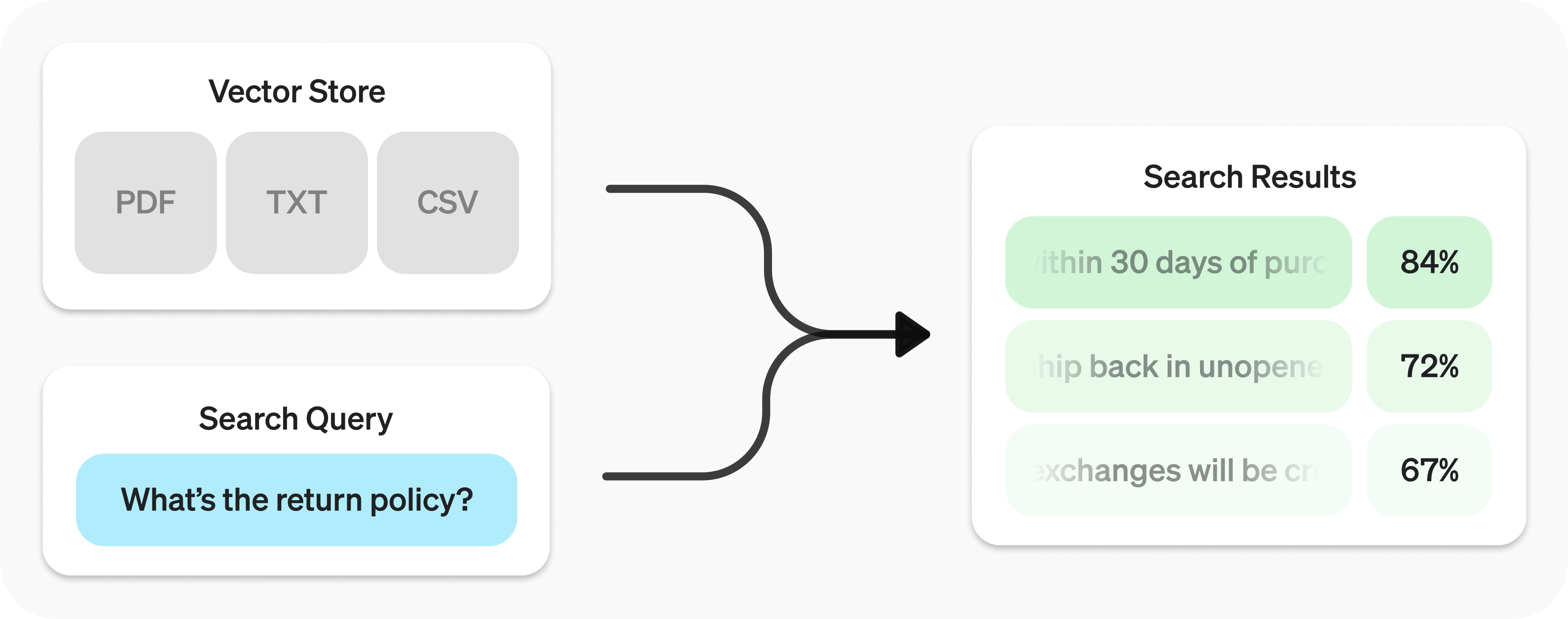
Retrieval API 讓你對資料進行語意搜尋
Retrieval API 以向量儲存庫
建立向量儲存庫 並上傳檔案。
1
2
3
4
5
6
7
8
9
10
11
12
13 import OpenAI from "openai";
const client = new OpenAI();
const vector_store = await client.vectorStores.create({
// Create vector store
name: "Support FAQ",
});
await client.vectorStores.files.uploadAndPoll(
vector_store.id,
// Upload file
fs.createReadStream("customer_policies.txt")
); 1
2
3
4
5
6
7
8
9
10
11
12 from openai import OpenAI
client = OpenAI()
vector_store = client.vector_stores.create( # Create vector store
name = "Support FAQ" ,
)
client.vector_stores.files.upload_and_poll( # Upload file
vector_store_id = vector_store.id,
file = open ( "customer_policies.txt" , "rb" )
) 1
2
3
4
5
6
7
8
9
10
11
12
13
14
15
16
17
18
19
20
21
22
23
24
25
26
27
28
29
30 package main
import (
"context"
"fmt"
"os"
"github.com/openai/openai-go/v3"
)
func main() {
client := openai.NewClient()
vectorStore, err := client.VectorStores.New(context.Background(), openai.VectorStoreNewParams{Name: openai.String("Support FAQ")})
if err != nil {
panic(err)
}
file, err := os.Open("customer_policies.txt")
if err != nil {
panic(err)
}
defer file.Close()
_, err = client.VectorStores.Files.UploadAndPoll(context.Background(), vectorStore.ID, openai.FileNewParams{
File: openai.File(file, "customer_policies.txt", "text/plain"),
Purpose: openai.FilePurposeAssistants,
}, 1000)
if err != nil {
panic(err)
}
fmt.Println(vectorStore.ID)
} 1
2
3
4
5
6
7
8
9
10
11
12
13
14
15
16
17
18
19
20
21
22
23
24
25
26
27
28
29
30
31
32
33
34
35
36
37 import com.openai.client.OpenAIClient;
import com.openai.client.okhttp.OpenAIOkHttpClient;
import com.openai.models.files.FileCreateParams;
import com.openai.models.files.FilePurpose;
import com.openai.models.vectorstores.VectorStoreCreateParams;
import com.openai.models.vectorstores.files.FileRetrieveParams;
import com.openai.models.vectorstores.files.VectorStoreFile;
import java.nio.file.Path;
var store =
client.vectorStores().create(VectorStoreCreateParams.builder().name("Support FAQ").build());
var uploaded =
client
.files()
.create(
FileCreateParams.builder()
.file(Path.of(System.getenv("OPENAI_EXAMPLE_FILE_PATH")))
.purpose(FilePurpose.ASSISTANTS)
.build());
var file =
client
.vectorStores()
.files()
.create(
store.id(),
com.openai.models.vectorstores.files.FileCreateParams.builder()
.fileId(uploaded.id())
.build());
while (file.status().equals(VectorStoreFile.Status.IN_PROGRESS)) {
Thread.sleep(1000);
file =
client
.vectorStores()
.files()
.retrieve(file.id(), FileRetrieveParams.builder().vectorStoreId(store.id()).build());
}
System.out.println(store.id()); 1
2
3
4
5
6
7
8
9
10
11
12
13 require "openai"
require "pathname"
client = OpenAI::Client.new
store = client.vector_stores.create(name: "Support FAQ")
file = client.vector_stores.files.upload_and_poll(
store.id,
file: Pathname("customer_policies.txt"),
timeout: 600
)
raise "File ingestion ended with status: #{file.status}" unless file.status == OpenAI::VectorStores::VectorStoreFile::Status::COMPLETED
puts(store.id) 傳送搜尋查詢 以取得相關結果。
1
2
3
4
5 const userQuery = "What is the return policy?";
const results = await client.vectorStores.search(vector_store.id, {
query: userQuery,
}); 1
2
3
4
5
6 user_query = "What is the return policy?"
results = client.vector_stores.search(
vector_store_id = vector_store.id,
query = user_query,
) 1
2
3
4
5
6
7
8
9
10
11
12
13
14
15
16
17
18
19 package main
import (
"context"
"fmt"
"github.com/openai/openai-go/v3"
)
func main() {
client := openai.NewClient()
results, err := client.VectorStores.Search(context.Background(), "vs_123", openai.VectorStoreSearchParams{
Query: openai.VectorStoreSearchParamsQueryUnion{OfString: openai.String("What is the return policy?")},
})
if err != nil {
panic(err)
}
fmt.Println(results.Data)
} 1
2
3
4
5
6
7
8
9
10
11
12
13
14 import com.openai.client.OpenAIClient;
import com.openai.client.okhttp.OpenAIOkHttpClient;
import com.openai.models.vectorstores.VectorStoreSearchParams;
String vectorStoreId = "vs_123";
var results =
client
.vectorStores()
.search(
vectorStoreId,
VectorStoreSearchParams.builder().query("What is the return policy?").build());
System.out.println(results.data()); 1
2
3
4
5 require "openai"
client = OpenAI::Client.new
results = client.vector_stores.search("vs_123", query: "What is the return policy?")
puts(results.data&.first&.content) 語意搜尋 利用嵌入向量 找出語意相關的結果。這項技術的關鍵在於,即使結果只有少數相同的關鍵字,甚至完全沒有相同的關鍵字,也能被找出來,而傳統搜尋技術可能會遺漏這些結果。
例如,來看看 "When did we go to the moon?" 可能會得到哪些結果:
文字 關鍵字相似度 語意相似度 首次登月發生於 1969 年 7 月。 0% 65% 第一位登上月球的人是尼爾.阿姆斯壯。 27% 43% 我吃了那個月餅,覺得很好吃。 40% 28%
(關鍵字相似度使用交集與聯集的比值 計算;語意相似度則搭配 text-embedding-3-small,使用餘弦相似度 計算。)
請注意,最相關的結果完全不含搜尋查詢中的任何字詞。這種彈性讓語意搜尋成為查詢各種規模知識庫的強大技術。
語意搜尋以向量儲存庫 為基礎,本指南稍後會詳細介紹向量儲存庫。本節將著重說明語意搜尋的運作方式。
你可以使用 search 函式,並以自然語言指定 query,來查詢向量儲存庫。這會傳回結果清單,每筆結果都包含相關的文字區塊、相似度分數及來源檔案。
1
2
3 const results = await client.vectorStores.search(vector_store.id, {
query: "How many woodchucks are allowed per passenger?",
}); 1
2
3
4 results = client.vector_stores.search(
vector_store_id = vector_store.id,
query = "How many woodchucks are allowed per passenger?" ,
) 1
2
3
4
5
6
7
8
9
10
11
12
13
14
15
16
17
18
19 package main
import (
"context"
"fmt"
"github.com/openai/openai-go/v3"
)
func main() {
client := openai.NewClient()
results, err := client.VectorStores.Search(context.Background(), "vs_123", openai.VectorStoreSearchParams{
Query: openai.VectorStoreSearchParamsQueryUnion{OfString: openai.String("How many woodchucks are allowed per passenger?")},
})
if err != nil {
panic(err)
}
fmt.Println(results.Data)
} 1
2
3
4
5
6
7
8
9
10
11
12
13
14
15
16 import com.openai.client.OpenAIClient;
import com.openai.client.okhttp.OpenAIOkHttpClient;
import com.openai.models.vectorstores.VectorStoreSearchParams;
String vectorStoreId = "vs_123";
var results =
client
.vectorStores()
.search(
vectorStoreId,
VectorStoreSearchParams.builder()
.query("How many woodchucks are allowed per passenger?")
.build());
System.out.println(results.data()); 1
2
3
4
5
6
7
8 require "openai"
client = OpenAI::Client.new
results = client.vector_stores.search(
"vs_123",
query: "How many woodchucks are allowed per passenger?"
)
puts(results.data&.first&.content) 1
2
3
4
5
6
7
8
9
10
11
12
13
14
15
16
17
18
19
20
21
22
23
24
25
26
27
28
29
30
31
32
33
34
35
36
37
38
39
40
41
42 {
"object" : "vector_store.search_results.page" ,
"search_query" : "How many woodchucks are allowed per passenger?" ,
"data" : [
{
"file_id" : "file-12345" ,
"filename" : "woodchuck_policy.txt" ,
"score" : 0.85 ,
"attributes" : {
"region" : "North America" ,
"author" : "Wildlife Department"
},
"content" : [
{
"type" : "text" ,
"text" : "According to the latest regulations, each passenger is allowed to carry up to two woodchucks."
},
{
"type" : "text" ,
"text" : "Ensure that the woodchucks are properly contained during transport."
}
]
},
{
"file_id" : "file-67890" ,
"filename" : "transport_guidelines.txt" ,
"score" : 0.75 ,
"attributes" : {
"region" : "North America" ,
"author" : "Transport Authority"
},
"content" : [
{
"type" : "text" ,
"text" : "Passengers must adhere to the guidelines set forth by the Transport Authority regarding the transport of woodchucks."
}
]
}
],
"has_more" : false ,
"next_page" : null
} 回應預設最多包含 10 筆結果,但你可以透過 max_num_results 參數將上限設為最多 50 筆。
某些查詢方式能得到更好的結果,因此我們提供了一項設定,可自動改寫查詢以達到最佳效果。執行 search 時,設定 rewrite_query=true 即可啟用這項功能。
改寫後的查詢會出現在結果的 search_query 欄位中。
原始查詢 改寫後的查詢 我想知道主要辦公大樓的高度。 主要辦公大樓高度 運送危險物品有哪些安全規範? 危險物品安全規範 我要如何針對服務問題提出申訴? 服務申訴提出流程
屬性篩選可透過套用條件來縮小結果範圍,例如將搜尋限制在特定日期範圍內。你可以在 attribute_filter 中定義及組合條件,在執行語意搜尋前,先依檔案屬性篩選出目標檔案。
使用 比較篩選器 ,將檔案 attributes 中的特定 key 與指定的 value 比較;使用 複合篩選器 ,則可透過 and 和 or 組合多個篩選器。
1
2
3
4
5 {
"type" : "eq" | "ne" | "gt" | "gte" | "lt" | "lte" | "in" | "nin" , // comparison operators
"key" : "attributes_key" , // attributes key
"value" : "target_value" // value to compare against
} 1
2
3
4 {
"type" : "and" | "or" , // logical operators
"filters" : [ ... ]
} 以下是一些篩選器範例。
地區
1
2
3
4
5 {
"type" : "eq" ,
"key" : "region" ,
"value" : "us"
} 日期範圍
1
2
3
4
5
6
7
8
9
10
11
12
13
14
15 {
"type" : "and" ,
"filters" : [
{
"type" : "gte" ,
"key" : "date" ,
"value" : 1704067200 // unix timestamp for 2024-01-01
},
{
"type" : "lte" ,
"key" : "date" ,
"value" : 1710892800 // unix timestamp for 2024-03-20
}
]
} 檔案名稱
1
2
3
4
5 {
"type" : "in" ,
"property" : "filename" ,
"value" : [ "example.txt" , "example2.txt" ]
} 排除檔案名稱
1
2
3
4
5 {
"type" : "nin" ,
"property" : "filename" ,
"value" : [ "draft.txt" , "internal_notes.md" ]
} 複雜條件
1
2
3
4
5
6
7
8
9
10
11
12
13
14
15
16
17
18
19
20
21
22
23
24
25
26
27
28
29
30
31
32
33
34
35 {
"type" : "or" ,
"filters" : [
{
"type" : "and" ,
"filters" : [
{
"type" : "or" ,
"filters" : [
{
"type" : "eq" ,
"key" : "project_code" ,
"value" : "X123"
},
{
"type" : "eq" ,
"key" : "project_code" ,
"value" : "X999"
}
]
},
{
"type" : "eq" ,
"key" : "confidentiality" ,
"value" : "top_secret"
}
]
},
{
"type" : "eq" ,
"key" : "language" ,
"value" : "en"
}
]
}
如果檔案搜尋結果的相關性不夠高,你可以調整 ranking_options,改善回應品質。可調整的項目包括指定 ranker,例如 auto 或 default-2024-08-21,以及將 score_threshold 設為 0.0 到 1.0 之間的值。提高 score_threshold 會讓結果僅包含相關性較高的區塊,但也可能排除一些有用的區塊。提供 ranking_options.hybrid_search 時,你也可以調整 hybrid_search.embedding_weight(rrf_embedding_weight)和 hybrid_search.text_weight(rrf_text_weight),控制倒數排名融合如何平衡語意嵌入比對與稀疏關鍵字比對的結果。提高前者的權重可強調語意相似度,提高後者的權重可強調文字重疊程度,且至少須有一個權重大於零。
向量儲存庫是為 Retrieval API 和檔案搜尋 工具提供語意搜尋功能的容器。將檔案加入向量儲存庫後,系統會自動將檔案分割成區塊、產生嵌入向量,並建立索引。
向量儲存庫包含 vector_store_file 物件,每個物件都以一個 file 物件為基礎。
物件類型
說明 file代表透過 Files API 上傳的內容。通常與向量儲存庫搭配使用,也可用於微調和其他使用案例。 vector_store存放可搜尋檔案的容器。 vector_store.file封裝類型,專門用來代表已分割成區塊、產生嵌入向量,並與 vector_store 建立關聯的 file。attributes 對應表。
費用依所有向量儲存庫使用的總儲存空間計算,儲存用量取決於解析後的區塊及其對應嵌入向量的大小。
儲存空間 費用 1 GB 以內(所有儲存庫合計) 免費 超過 1 GB 的部分 $0.10/GB/天
建立
1
2
3
4 await client.vectorStores.create({
name: "Support FAQ",
file_ids: ["file_123"],
}); 1
2
3
4 client.vector_stores.create(
name = "Support FAQ" ,
file_ids = [ "file_123" ]
) 1
2
3
4
5
6
7
8
9
10
11
12
13
14
15
16
17
18
19
20 package main
import (
"context"
"fmt"
"github.com/openai/openai-go/v3"
)
func main() {
client := openai.NewClient()
vectorStore, err := client.VectorStores.New(context.Background(), openai.VectorStoreNewParams{
Name: openai.String("Support FAQ"),
FileIDs: []string{"file_123"},
})
if err != nil {
panic(err)
}
fmt.Println(vectorStore.ID)
} 1
2
3
4
5
6
7
8
9
10
11
12
13 import com.openai.client.OpenAIClient;
import com.openai.client.okhttp.OpenAIOkHttpClient;
import com.openai.models.vectorstores.VectorStoreCreateParams;
String fileId = "file_123";
var store =
client
.vectorStores()
.create(
VectorStoreCreateParams.builder().name("Support FAQ").addFileId(fileId).build());
System.out.println(store.id()); 1
2
3
4
5
6
7
8 require "openai"
client = OpenAI::Client.new
store = client.vector_stores.create(
name: "Support FAQ",
file_ids: ["file_123"]
)
puts(store.id) 取得
1 await client.vectorStores.retrieve("vs_123"); 1
2
3 client.vector_stores.retrieve(
vector_store_id = "vs_123"
) 1
2
3
4
5
6
7
8
9
10
11
12
13
14
15
16
17 package main
import (
"context"
"fmt"
"github.com/openai/openai-go/v3"
)
func main() {
client := openai.NewClient()
vectorStore, err := client.VectorStores.Get(context.Background(), "vs_123")
if err != nil {
panic(err)
}
fmt.Println(vectorStore.ID)
} 1
2
3
4
5
6 import com.openai.client.OpenAIClient;
import com.openai.client.okhttp.OpenAIOkHttpClient;
String vectorStoreId = "vs_123";
System.out.println(client.vectorStores().retrieve(vectorStoreId).id()); 1
2
3
4
5 require "openai"
client = OpenAI::Client.new
store = client.vector_stores.retrieve("vs_123")
puts(store.id) 更新
1
2
3 await client.vectorStores.update("vs_123", {
name: "Support FAQ Updated",
}); 1
2
3
4 client.vector_stores.update(
vector_store_id = "vs_123" ,
name = "Support FAQ Updated"
) 1
2
3
4
5
6
7
8
9
10
11
12
13
14
15
16
17
18
19 package main
import (
"context"
"fmt"
"github.com/openai/openai-go/v3"
)
func main() {
client := openai.NewClient()
vectorStore, err := client.VectorStores.Update(context.Background(), "vs_123", openai.VectorStoreUpdateParams{
Name: openai.String("Support FAQ Updated"),
})
if err != nil {
panic(err)
}
fmt.Println(vectorStore.Name)
} 1
2
3
4
5
6
7
8
9
10
11
12
13
14 import com.openai.client.OpenAIClient;
import com.openai.client.okhttp.OpenAIOkHttpClient;
import com.openai.models.vectorstores.VectorStoreUpdateParams;
String vectorStoreId = "vs_123";
var store =
client
.vectorStores()
.update(
vectorStoreId,
VectorStoreUpdateParams.builder().name("Updated knowledge base").build());
System.out.println(store.name()); 1
2
3
4
5 require "openai"
client = OpenAI::Client.new
store = client.vector_stores.update("vs_123", name: "Updated knowledge base")
puts(store.name) 刪除
1 await client.vectorStores.delete("vs_123"); 1
2
3 client.vector_stores.delete(
vector_store_id = "vs_123"
) 1
2
3
4
5
6
7
8
9
10
11
12
13
14
15
16
17 package main
import (
"context"
"fmt"
"github.com/openai/openai-go/v3"
)
func main() {
client := openai.NewClient()
deleted, err := client.VectorStores.Delete(context.Background(), "vs_123")
if err != nil {
panic(err)
}
fmt.Println(deleted.Deleted)
} 1
2
3
4
5
6 import com.openai.client.OpenAIClient;
import com.openai.client.okhttp.OpenAIOkHttpClient;
String vectorStoreId = "vs_123";
System.out.println(client.vectorStores().delete(vectorStoreId).deleted()); 1
2
3
4
5 require "openai"
client = OpenAI::Client.new
deleted = client.vector_stores.delete("vs_123")
puts(deleted.deleted) 列出
await client.vectorStores.list(); client.vector_stores.list() package main
import (
"context"
"fmt"
"github.com/openai/openai-go/v3"
)
func main() {
client := openai.NewClient()
vectorStores, err := client.VectorStores.List(context.Background(), openai.VectorStoreListParams{})
if err != nil {
panic(err)
}
fmt.Println(vectorStores.Data)
} import com.openai.client.OpenAIClient;
import com.openai.client.okhttp.OpenAIOkHttpClient;
System.out.println(client.vectorStores().list().data()); require "openai"
client = OpenAI::Client.new
stores = client.vector_stores.list(limit: 10)
puts((stores.data || []).length)
某些操作(例如 vector_store.file 的 create)採非同步方式執行,可能需要一些時間才能完成。您可以使用我們的輔助函式(例如 create_and_poll)阻塞等待,直到操作完成,也可以自行檢查狀態。從向量儲存庫移除檔案採用最終一致性,因此搜尋結果在短時間內仍可能包含已移除檔案的內容。
新增檔案的速率限制以各個向量儲存庫 ID 為單位。對 /vector_stores/{vector_store_id}/files/vector_stores/{vector_store_id}/file_batches
建立
1
2
3 await client.vectorStores.files.createAndPoll("vs_123", {
file_id: "file_123",
}); 1
2
3
4 client.vector_stores.files.create_and_poll(
vector_store_id = "vs_123" ,
file_id = "file_123"
) 1
2
3
4
5
6
7
8
9
10
11
12
13
14
15
16
17
18
19 package main
import (
"context"
"fmt"
"github.com/openai/openai-go/v3"
)
func main() {
client := openai.NewClient()
file, err := client.VectorStores.Files.NewAndPoll(context.Background(), "vs_123", openai.VectorStoreFileNewParams{
FileID: "file_123",
}, 1000)
if err != nil {
panic(err)
}
fmt.Println(file.ID)
} 1
2
3
4
5
6
7
8
9
10
11
12
13
14
15 import com.openai.client.OpenAIClient;
import com.openai.client.okhttp.OpenAIOkHttpClient;
import com.openai.models.vectorstores.files.FileCreateParams;
String vectorStoreId = "vs_123";
String fileId = "file_123";
var file =
client
.vectorStores()
.files()
.create(vectorStoreId, FileCreateParams.builder().fileId(fileId).build());
System.out.println(file.id()); 1
2
3
4
5 require "openai"
client = OpenAI::Client.new
file = client.vector_stores.files.create("vs_123", file_id: "file_123")
puts(file.id) 上傳
1
2
3
4 await client.vectorStores.files.uploadAndPoll(
"vs_123",
fs.createReadStream("customer_policies.txt")
); 1
2
3
4 client.vector_stores.files.upload_and_poll(
vector_store_id = "vs_123" ,
file = open ( "customer_policies.txt" , "rb" )
) 1
2
3
4
5
6
7
8
9
10
11
12
13
14
15
16
17
18
19
20
21
22
23
24
25
26 package main
import (
"context"
"fmt"
"os"
"github.com/openai/openai-go/v3"
)
func main() {
client := openai.NewClient()
file, err := os.Open("customer_policies.txt")
if err != nil {
panic(err)
}
defer file.Close()
result, err := client.VectorStores.Files.UploadAndPoll(context.Background(), "vs_123", openai.FileNewParams{
File: openai.File(file, "customer_policies.txt", "text/plain"),
Purpose: openai.FilePurposeAssistants,
}, 1000)
if err != nil {
panic(err)
}
fmt.Println(result.ID)
} 1
2
3
4
5
6
7
8
9
10
11
12
13
14
15
16
17
18
19
20
21
22
23
24
25
26
27
28
29
30
31
32
33
34
35
36 import com.openai.client.OpenAIClient;
import com.openai.client.okhttp.OpenAIOkHttpClient;
import com.openai.models.files.FileCreateParams;
import com.openai.models.files.FilePurpose;
import com.openai.models.vectorstores.files.FileRetrieveParams;
import com.openai.models.vectorstores.files.VectorStoreFile;
import java.nio.file.Path;
String vectorStoreId = "vs_123";
var uploaded =
client
.files()
.create(
FileCreateParams.builder()
.file(Path.of(System.getenv("OPENAI_EXAMPLE_FILE_PATH")))
.purpose(FilePurpose.ASSISTANTS)
.build());
var file =
client
.vectorStores()
.files()
.create(
vectorStoreId,
com.openai.models.vectorstores.files.FileCreateParams.builder()
.fileId(uploaded.id())
.build());
while (file.status().equals(VectorStoreFile.Status.IN_PROGRESS)) {
Thread.sleep(1000);
file =
client
.vectorStores()
.files()
.retrieve(
file.id(), FileRetrieveParams.builder().vectorStoreId(vectorStoreId).build());
}
System.out.println(file.id()); 1
2
3
4
5
6
7
8
9
10
11
12 require "openai"
require "pathname"
client = OpenAI::Client.new
vector_store_file = client.vector_stores.files.upload_and_poll(
"vs_123",
file: Pathname("customer_policies.txt"),
timeout: 600
)
raise "File ingestion ended with status: #{vector_store_file.status}" unless vector_store_file.status == OpenAI::VectorStores::VectorStoreFile::Status::COMPLETED
puts(vector_store_file.id) 取得
1
2
3 await client.vectorStores.files.retrieve("file_123", {
vector_store_id: "vs_123",
}); 1
2
3
4 client.vector_stores.files.retrieve(
vector_store_id = "vs_123" ,
file_id = "file_123"
) 1
2
3
4
5
6
7
8
9
10
11
12
13
14
15
16
17 package main
import (
"context"
"fmt"
"github.com/openai/openai-go/v3"
)
func main() {
client := openai.NewClient()
file, err := client.VectorStores.Files.Get(context.Background(), "vs_123", "file_123")
if err != nil {
panic(err)
}
fmt.Println(file.ID)
} 1
2
3
4
5
6
7
8
9
10
11
12
13
14
15
16
17 import com.openai.client.OpenAIClient;
import com.openai.client.okhttp.OpenAIOkHttpClient;
String fileId = "file_123";
String vectorStoreId = "vs_123";
System.out.println(
client
.vectorStores()
.files()
.retrieve(
fileId,
com.openai.models.vectorstores.files.FileRetrieveParams.builder()
.vectorStoreId(vectorStoreId)
.build())
.id()); 1
2
3
4
5 require "openai"
client = OpenAI::Client.new
file = client.vector_stores.files.retrieve("file_123", vector_store_id: "vs_123")
puts(file.id) 更新
1
2
3
4 await client.vectorStores.files.update("file_123", {
vector_store_id: "vs_123",
attributes: { key: "value" },
}); 1
2
3
4
5 client.vector_stores.files.update(
vector_store_id = "vs_123" ,
file_id = "file_123" ,
attributes = { "key" : "value" }
) 1
2
3
4
5
6
7
8
9
10
11
12
13
14
15
16
17
18
19
20
21 package main
import (
"context"
"fmt"
"github.com/openai/openai-go/v3"
)
func main() {
client := openai.NewClient()
file, err := client.VectorStores.Files.Update(context.Background(), "vs_123", "file_123", openai.VectorStoreFileUpdateParams{
Attributes: map[string]openai.VectorStoreFileUpdateParamsAttributeUnion{
"key": {OfString: openai.String("value")},
},
})
if err != nil {
panic(err)
}
fmt.Println(file.ID)
} 1
2
3
4
5
6
7
8
9
10
11
12
13
14
15
16
17
18
19
20
21
22
23
24 import com.openai.client.OpenAIClient;
import com.openai.client.okhttp.OpenAIOkHttpClient;
import com.openai.core.JsonValue;
import com.openai.models.vectorstores.files.FileUpdateParams;
String fileId = "file_123";
String vectorStoreId = "vs_123";
var file =
client
.vectorStores()
.files()
.update(
fileId,
FileUpdateParams.builder()
.vectorStoreId(vectorStoreId)
.attributes(
FileUpdateParams.Attributes.builder()
.putAdditionalProperty("category", JsonValue.from("policy"))
.build())
.build());
System.out.println(file.id()); 1
2
3
4
5 require "openai"
client = OpenAI::Client.new
file = client.vector_stores.files.update("file_123", vector_store_id: "vs_123", attributes: { category: "policy" })
puts(file.id) 刪除
1
2
3 await client.vectorStores.files.delete("file_123", {
vector_store_id: "vs_123",
}); 1
2
3
4 client.vector_stores.files.delete(
vector_store_id = "vs_123" ,
file_id = "file_123"
) 1
2
3
4
5
6
7
8
9
10
11
12
13
14
15
16
17 package main
import (
"context"
"fmt"
"github.com/openai/openai-go/v3"
)
func main() {
client := openai.NewClient()
deleted, err := client.VectorStores.Files.Delete(context.Background(), "vs_123", "file_123")
if err != nil {
panic(err)
}
fmt.Println(deleted.Deleted)
} 1
2
3
4
5
6
7
8
9
10
11
12
13
14
15
16
17 import com.openai.client.OpenAIClient;
import com.openai.client.okhttp.OpenAIOkHttpClient;
String fileId = "file_123";
String vectorStoreId = "vs_123";
System.out.println(
client
.vectorStores()
.files()
.delete(
fileId,
com.openai.models.vectorstores.files.FileDeleteParams.builder()
.vectorStoreId(vectorStoreId)
.build())
.deleted()); 1
2
3
4
5 require "openai"
client = OpenAI::Client.new
deleted = client.vector_stores.files.delete("file_123", vector_store_id: "vs_123")
puts(deleted.deleted) 列出
1 await client.vectorStores.files.list("vs_123"); 1
2
3 client.vector_stores.files.list(
vector_store_id = "vs_123"
) 1
2
3
4
5
6
7
8
9
10
11
12
13
14
15
16
17 package main
import (
"context"
"fmt"
"github.com/openai/openai-go/v3"
)
func main() {
client := openai.NewClient()
files, err := client.VectorStores.Files.List(context.Background(), "vs_123", openai.VectorStoreFileListParams{})
if err != nil {
panic(err)
}
fmt.Println(files.Data)
} 1
2
3
4
5
6 import com.openai.client.OpenAIClient;
import com.openai.client.okhttp.OpenAIOkHttpClient;
String vectorStoreId = "vs_123";
System.out.println(client.vectorStores().files().list(vectorStoreId).data()); 1
2
3
4
5 require "openai"
client = OpenAI::Client.new
files = client.vector_stores.files.list("vs_123")
puts((files.data || []).length)
建立
1
2
3
4
5
6
7
8
9
10
11
12
13
14
15
16
17
18 await client.vectorStores.fileBatches.createAndPoll("vs_123", {
files: [
{
file_id: "file_123",
attributes: { department: "finance" },
},
{
file_id: "file_456",
chunking_strategy: {
type: "static",
static: {
max_chunk_size_tokens: 1200,
chunk_overlap_tokens: 200,
},
},
},
],
}); 1
2
3
4
5
6
7
8
9
10
11
12
13
14
15
16
17 client.vector_stores.file_batches.create_and_poll(
vector_store_id = "vs_123" ,
files = [
{
"file_id" : "file_123" ,
"attributes" : { "department" : "finance" }
},
{
"file_id" : "file_456" ,
"chunking_strategy" : {
"type" : "static" ,
"max_chunk_size_tokens" : 1200 ,
"chunk_overlap_tokens" : 200
}
}
]
) 1
2
3
4
5
6
7
8
9
10
11
12
13
14
15
16
17
18
19
20
21
22
23
24
25
26
27
28
29
30
31
32 package main
import (
"context"
"fmt"
"github.com/openai/openai-go/v3"
)
func main() {
client := openai.NewClient()
batch, err := client.VectorStores.FileBatches.NewAndPoll(context.Background(), "vs_123", openai.VectorStoreFileBatchNewParams{
Files: []openai.VectorStoreFileBatchNewParamsFile{
{
FileID: "file_123",
Attributes: map[string]openai.VectorStoreFileBatchNewParamsFileAttributeUnion{
"department": {OfString: openai.String("finance")},
},
},
{
FileID: "file_456",
ChunkingStrategy: openai.FileChunkingStrategyParamUnion{OfStatic: &openai.StaticFileChunkingStrategyObjectParam{
Static: openai.StaticFileChunkingStrategyParam{MaxChunkSizeTokens: 1200, ChunkOverlapTokens: 200},
}},
},
},
}, 1000)
if err != nil {
panic(err)
}
fmt.Println(batch.ID)
} 1
2
3
4
5
6
7
8
9
10
11
12
13
14
15
16
17
18
19
20
21
22
23
24
25
26
27
28
29
30
31
32
33
34
35
36
37
38
39
40
41
42
43
44
45
46
47 import com.openai.client.OpenAIClient;
import com.openai.client.okhttp.OpenAIOkHttpClient;
import com.openai.core.JsonValue;
import com.openai.models.vectorstores.StaticFileChunkingStrategy;
import com.openai.models.vectorstores.filebatches.FileBatchCreateParams;
import com.openai.models.vectorstores.filebatches.FileBatchRetrieveParams;
import com.openai.models.vectorstores.filebatches.VectorStoreFileBatch;
String vectorStoreId = "vs_123";
String fileId = "file_123";
String fileId2 = "file_456";
var first =
FileBatchCreateParams.File.builder()
.fileId(fileId)
.attributes(
FileBatchCreateParams.File.Attributes.builder()
.putAdditionalProperty("department", JsonValue.from("finance"))
.build())
.build();
var second =
FileBatchCreateParams.File.builder()
.fileId(fileId2)
.staticChunkingStrategy(
StaticFileChunkingStrategy.builder()
.maxChunkSizeTokens(1200)
.chunkOverlapTokens(200)
.build())
.build();
var batch =
client
.vectorStores()
.fileBatches()
.create(
vectorStoreId,
FileBatchCreateParams.builder().addFile(first).addFile(second).build());
while (batch.status().equals(VectorStoreFileBatch.Status.IN_PROGRESS)) {
Thread.sleep(1000);
batch =
client
.vectorStores()
.fileBatches()
.retrieve(
batch.id(),
FileBatchRetrieveParams.builder().vectorStoreId(vectorStoreId).build());
}
System.out.println(batch.status()); 1
2
3
4
5
6
7
8
9
10
11
12
13
14
15
16
17
18
19
20
21
22
23
24
25
26
27
28
29
30
31
32
33
34
35
36
37 require "openai"
client = OpenAI::Client.new
batch = client.vector_stores.file_batches.create_and_poll(
"vs_123",
files: [
{
file_id: "file_123",
attributes: { department: "finance" }
},
{
file_id: "file_456",
chunking_strategy: {
type: :static,
static: {
max_chunk_size_tokens: 1_200,
chunk_overlap_tokens: 200
}
}
}
],
timeout: 600
)
raise "File ingestion ended with status: #{batch.status}" unless batch.status == OpenAI::VectorStores::VectorStoreFileBatch::Status::COMPLETED
raise "File ingestion failed for #{batch.file_counts.failed} file(s)" if batch.file_counts.failed.positive?
# Live validation of per-file batches returned default chunking despite overrides.
file = client.vector_stores.files.retrieve("file_456", vector_store_id: "vs_123")
strategy = file.chunking_strategy
unless strategy.is_a?(OpenAI::StaticFileChunkingStrategyObject) &&
strategy.static.max_chunk_size_tokens == 1_200 &&
strategy.static.chunk_overlap_tokens == 200
raise "Requested chunking was not applied to #{file.id}: #{strategy.to_json}"
end
puts(batch.status) 取得
1
2
3 await client.vectorStores.fileBatches.retrieve("vsfb_123", {
vector_store_id: "vs_123",
}); 1
2
3
4 client.vector_stores.file_batches.retrieve(
vector_store_id = "vs_123" ,
batch_id = "vsfb_123"
) 1
2
3
4
5
6
7
8
9
10
11
12
13
14
15
16
17 package main
import (
"context"
"fmt"
"github.com/openai/openai-go/v3"
)
func main() {
client := openai.NewClient()
batch, err := client.VectorStores.FileBatches.Get(context.Background(), "vs_123", "vsfb_123")
if err != nil {
panic(err)
}
fmt.Println(batch.ID)
} 1
2
3
4
5
6
7
8
9
10
11
12
13
14
15
16
17 import com.openai.client.OpenAIClient;
import com.openai.client.okhttp.OpenAIOkHttpClient;
String fileBatchId = "vsfb_123";
String vectorStoreId = "vs_123";
System.out.println(
client
.vectorStores()
.fileBatches()
.retrieve(
fileBatchId,
com.openai.models.vectorstores.filebatches.FileBatchRetrieveParams.builder()
.vectorStoreId(vectorStoreId)
.build())
.status()); 1
2
3
4
5
6
7
8 require "openai"
client = OpenAI::Client.new
batch = client.vector_stores.file_batches.retrieve(
"vsfb_123",
vector_store_id: "vs_123"
)
puts(batch.status) 取消
1
2
3 await client.vectorStores.fileBatches.cancel("vsfb_123", {
vector_store_id: "vs_123",
}); 1
2
3
4 client.vector_stores.file_batches.cancel(
vector_store_id = "vs_123" ,
batch_id = "vsfb_123"
) 1
2
3
4
5
6
7
8
9
10
11
12
13
14
15
16
17 package main
import (
"context"
"fmt"
"github.com/openai/openai-go/v3"
)
func main() {
client := openai.NewClient()
batch, err := client.VectorStores.FileBatches.Cancel(context.Background(), "vs_123", "vsfb_123")
if err != nil {
panic(err)
}
fmt.Println(batch.Status)
} 1
2
3
4
5
6
7
8
9
10
11
12
13
14
15
16
17 import com.openai.client.OpenAIClient;
import com.openai.client.okhttp.OpenAIOkHttpClient;
String fileBatchId = "vsfb_123";
String vectorStoreId = "vs_123";
System.out.println(
client
.vectorStores()
.fileBatches()
.cancel(
fileBatchId,
com.openai.models.vectorstores.filebatches.FileBatchCancelParams.builder()
.vectorStoreId(vectorStoreId)
.build())
.status()); 1
2
3
4
5
6
7
8 require "openai"
client = OpenAI::Client.new
batch = client.vector_stores.file_batches.cancel(
"vsfb_123",
vector_store_id: "vs_123"
)
puts(batch.status) 列出
1
2
3 await client.vectorStores.fileBatches.listFiles("vsfb_123", {
vector_store_id: "vs_123",
}); 1
2
3
4 client.vector_stores.file_batches.list_files(
"vsfb_123" ,
vector_store_id = "vs_123"
) 1
2
3
4
5
6
7
8
9
10
11
12
13
14
15
16
17 package main
import (
"context"
"fmt"
"github.com/openai/openai-go/v3"
)
func main() {
client := openai.NewClient()
files, err := client.VectorStores.FileBatches.ListFiles(context.Background(), "vs_123", "vsfb_123", openai.VectorStoreFileBatchListFilesParams{})
if err != nil {
panic(err)
}
fmt.Println(files.Data)
} 1
2
3
4
5
6
7
8
9
10
11
12
13
14
15
16
17 import com.openai.client.OpenAIClient;
import com.openai.client.okhttp.OpenAIOkHttpClient;
String fileBatchId = "vsfb_123";
String vectorStoreId = "vs_123";
System.out.println(
client
.vectorStores()
.fileBatches()
.listFiles(
fileBatchId,
com.openai.models.vectorstores.filebatches.FileBatchListFilesParams.builder()
.vectorStoreId(vectorStoreId)
.build())
.data()); 1
2
3
4
5
6
7
8 require "openai"
client = OpenAI::Client.new
files = client.vector_stores.file_batches.list_files(
"vsfb_123",
vector_store_id: "vs_123"
)
puts((files.data || []).length)
建立批次時,你可以提供 file_ids,並選擇性地搭配 attributes 和/或 chunking_strategy;也可以使用 files 陣列,為每個檔案傳入包含 file_id 以及選填的 attributes 和 chunking_strategy 的物件。這兩種方式不能同時使用,讓你能明確控制所有檔案是否共用相同設定,或是針對個別檔案覆寫設定。
若要提高將資料匯入單一向量儲存庫的吞吐量,建議盡可能使用批次建立。每個批次可在一次請求中包含最多 500 個檔案。相較於傳送大量單一檔案建立請求,這通常能減少資源爭用,並降低端到端延遲。
每個 vector_store.file 都可以有關聯的 attributes,這是一個儲存值的字典,可在執行搭配屬性篩選 的語意搜尋 時參照。字典最多可有 16 個鍵,每個鍵的長度上限為 256 個字元。
1
2
3
4
5
6
7
8 await client.vectorStores.files.create("<vector_store_id>", {
file_id: "file_123",
attributes: {
region: "US",
category: "Marketing",
date: 1672531200, // Jan 1, 2023
},
}); 1
2
3
4
5
6
7
8
9 client.vector_stores.files.create(
vector_store_id = "<vector_store_id>" ,
file_id = "file_123" ,
attributes = {
"region" : "US" ,
"category" : "Marketing" ,
"date" : 1672531200 # Jan 1, 2023
}
) 1
2
3
4
5
6
7
8
9
10
11
12
13
14
15
16
17
18
19
20
21
22
23
24 package main
import (
"context"
"fmt"
"github.com/openai/openai-go/v3"
)
func main() {
client := openai.NewClient()
file, err := client.VectorStores.Files.New(context.Background(), "<vector_store_id>", openai.VectorStoreFileNewParams{
FileID: "file_123",
Attributes: map[string]openai.VectorStoreFileNewParamsAttributeUnion{
"region": {OfString: openai.String("US")},
"category": {OfString: openai.String("Marketing")},
"date": {OfFloat: openai.Float(1672531200)},
},
})
if err != nil {
panic(err)
}
fmt.Println(file.ID)
} 1
2
3
4
5
6
7
8
9
10
11
12
13
14
15
16
17
18
19
20
21
22
23
24 import com.openai.client.OpenAIClient;
import com.openai.client.okhttp.OpenAIOkHttpClient;
import com.openai.core.JsonValue;
import com.openai.models.vectorstores.files.FileCreateParams;
String vectorStoreId = "<vector_store_id>";
String fileId = "file_123";
var file =
client
.vectorStores()
.files()
.create(
vectorStoreId,
FileCreateParams.builder()
.fileId(fileId)
.attributes(
FileCreateParams.Attributes.builder()
.putAdditionalProperty("category", JsonValue.from("policy"))
.build())
.build());
System.out.println(file.id()); 1
2
3
4
5 require "openai"
client = OpenAI::Client.new
file = client.vector_stores.files.create("<vector_store_id>", file_id: "file_123", attributes: { category: "policy" })
puts(file.id) 你可以使用 expires_after 為 vector_store 物件設定到期政策。向量儲存庫到期後,所有關聯的 vector_store.file 物件都會遭到刪除,也不再產生費用。
1
2
3
4
5
6 await client.vectorStores.update("vs_123", {
expires_after: {
anchor: "last_active_at",
days: 7,
},
}); 1
2
3
4
5
6
7 client.vector_stores.update(
vector_store_id = "vs_123" ,
expires_after = {
"anchor" : "last_active_at" ,
"days" : 7
}
) 1
2
3
4
5
6
7
8
9
10
11
12
13
14
15
16
17
18
19 package main
import (
"context"
"fmt"
"github.com/openai/openai-go/v3"
)
func main() {
client := openai.NewClient()
vectorStore, err := client.VectorStores.Update(context.Background(), "vs_123", openai.VectorStoreUpdateParams{
ExpiresAfter: openai.VectorStoreUpdateParamsExpiresAfter{Days: 7},
})
if err != nil {
panic(err)
}
fmt.Println(vectorStore.ExpiresAfter)
} 1
2
3
4
5
6
7
8
9
10
11
12
13
14
15
16
17
18
19
20
21 import com.openai.client.OpenAIClient;
import com.openai.client.okhttp.OpenAIOkHttpClient;
import com.openai.core.JsonValue;
import com.openai.models.vectorstores.VectorStoreUpdateParams;
String vectorStoreId = "vs_123";
var store =
client
.vectorStores()
.update(
vectorStoreId,
VectorStoreUpdateParams.builder()
.expiresAfter(
VectorStoreUpdateParams.ExpiresAfter.builder()
.anchor(JsonValue.from("last_active_at"))
.days(7)
.build())
.build());
System.out.println(store.expiresAfter().orElseThrow()); 1
2
3
4
5
6
7
8
9
10
11 require "openai"
client = OpenAI::Client.new
store = client.vector_stores.update(
"vs_123",
expires_after: {
anchor: :last_active_at,
days: 7
}
)
puts(store.expires_after) 檔案大小上限為 512 MB。每個檔案應包含不超過 5,000,000 個 Token(附加檔案時會自動計算)。
預設情況下,max_chunk_size_tokens 設為 800,chunk_overlap_tokens 設為 400。這表示每個檔案在建立索引時,都會分割成各含 800 個 Token 的區塊,相鄰區塊之間有 400 個 Token 重疊。
你可以在將檔案新增至向量儲存庫時,設定 chunking_strategy
max_chunk_size_tokens 必須介於 100 到 4096 之間,包含上下限。chunk_overlap_tokens 必須為非負值,且不應超過 max_chunk_size_tokens / 2。
支援的檔案類型 對於 text/ MIME 類型,編碼必須是 utf-8、utf-16 或 ascii 其中之一。
檔案格式 MIME 類型 .ctext/x-c.cpptext/x-c++.cstext/x-csharp.csstext/css.docapplication/msword.docxapplication/vnd.openxmlformats-officedocument.wordprocessingml.document.gotext/x-golang.htmltext/html.javatext/x-java.jstext/javascript.jsonapplication/json.mdtext/markdown.pdfapplication/pdf.phptext/x-php.pptxapplication/vnd.openxmlformats-officedocument.presentationml.presentation.pytext/x-python.pytext/x-script.python.rbtext/x-ruby.shapplication/x-sh.textext/x-tex.tsapplication/typescript.txttext/plain
執行查詢後,你可能會想根據結果整合產生回應。你可以將結果和原始查詢提供給我們的模型,讓模型產生有依據的回應。
1
2
3
4
5
6
7
8
9 import OpenAI from "openai";
const client = new OpenAI();
const userQuery = "What is the return policy?";
const results = await client.vectorStores.search(vector_store.id, {
query: userQuery,
}); 1
2
3
4
5
6
7
8
9
10 from openai import OpenAI
client = OpenAI()
user_query = "What is the return policy?"
results = client.vector_stores.search(
vector_store_id = vector_store.id,
query = user_query,
) 1
2
3
4
5
6
7
8
9
10
11
12
13
14
15
16
17
18
19 package main
import (
"context"
"fmt"
"github.com/openai/openai-go/v3"
)
func main() {
client := openai.NewClient()
results, err := client.VectorStores.Search(context.Background(), "vs_123", openai.VectorStoreSearchParams{
Query: openai.VectorStoreSearchParamsQueryUnion{OfString: openai.String("What is the return policy?")},
})
if err != nil {
panic(err)
}
fmt.Println(results.Data)
} 1
2
3
4
5
6
7
8
9
10
11
12
13
14 import com.openai.client.OpenAIClient;
import com.openai.client.okhttp.OpenAIOkHttpClient;
import com.openai.models.vectorstores.VectorStoreSearchParams;
String vectorStoreId = "vs_123";
var results =
client
.vectorStores()
.search(
vectorStoreId,
VectorStoreSearchParams.builder().query("What is the return policy?").build());
System.out.println(results.data()); 1
2
3
4
5
6
7
8 require "openai"
client = OpenAI::Client.new
results = client.vector_stores.search(
"vs_123",
query: "What is the return policy?"
)
puts(results.data) 1
2
3
4
5
6
7
8
9
10
11
12
13
14
15
16
17
18
19
20
21
22 const formattedResults = formatResults(results.data);
// Join the text content of all results
const textSources = results.data
.map((result) => result.content.map((c) => c.text).join("\n"))
.join("\n");
const completion = await client.chat.completions.create({
model: "gpt-6-astra",
messages: [
{
role: "developer",
content:
"Produce a concise answer to the query based on the provided sources.",
},
{
role: "user",
content: `Sources: ${formattedResults}\n\nQuery: '${userQuery}'`,
},
],
});
console.log(completion.choices[0].message.content); 1
2
3
4
5
6
7
8
9
10
11
12
13
14
15
16
17
18
19
20 # Use results and user_query from the preceding search step.
formatted_results = format_results(results.data)
" \n " .join( " \n " .join(c.text for c in result.content) for result in results.data)
completion = client.chat.completions.create(
model = "gpt-6-astra" ,
messages = [
{
"role" : "developer" ,
"content" : "Produce a concise answer to the query based on the provided sources." ,
},
{
"role" : "user" ,
"content" : f "Sources: { formatted_results }\n\n Query: ' { user_query } '" ,
},
],
)
print (completion.choices[ 0 ].message.content) 1
2
3
4
5
6
7
8
9
10
11
12
13
14
15
16
17
18
19
20
21
22
23
24
25
26
27
28
29
30
31
32
33
34
35
36
37
38
39
40
41
42
43
44
45
46 package main
import (
"context"
"fmt"
"strings"
"github.com/openai/openai-go/v3"
)
func main() {
client := openai.NewClient()
userQuery := "What is the return policy?"
results, err := client.VectorStores.Search(context.Background(), "vs_123", openai.VectorStoreSearchParams{
Query: openai.VectorStoreSearchParamsQueryUnion{OfString: openai.String(userQuery)},
})
if err != nil {
panic(err)
}
completion, err := client.Chat.Completions.New(context.Background(), openai.ChatCompletionNewParams{
Model: "gpt-6-astra",
Messages: []openai.ChatCompletionMessageParamUnion{
openai.DeveloperMessage("Produce a concise answer to the query based on the provided sources."),
openai.UserMessage(fmt.Sprintf("Sources: %s\n\nQuery: %q", formatResults(results.Data), userQuery)),
},
})
if err != nil {
panic(err)
}
fmt.Println(completion.Choices[0].Message.Content)
}
func formatResults(results []openai.VectorStoreSearchResponse) string {
var sources strings.Builder
sources.WriteString("<sources>")
for _, result := range results {
fmt.Fprintf(&sources, "<result file_id=%q file_name=%q>", result.FileID, result.Filename)
for _, content := range result.Content {
fmt.Fprintf(&sources, "<content>%s</content>", content.Text)
}
sources.WriteString("</result>")
}
sources.WriteString("</sources>")
return sources.String()
} 1
2
3
4
5
6
7
8
9
10
11
12
13
14
15
16
17
18
19
20
21
22
23
24
25
26
27
28
29
30
31
32
33
34
35
36
37
38
39
40
41
42
43
44 import com.openai.client.OpenAIClient;
import com.openai.client.okhttp.OpenAIOkHttpClient;
import com.openai.models.chat.completions.ChatCompletionCreateParams;
import com.openai.models.vectorstores.VectorStoreSearchParams;
import java.util.stream.Collectors;
String vectorStoreId = "vs_123";
String query = "What is the return policy?";
var results =
client
.vectorStores()
.search(vectorStoreId, VectorStoreSearchParams.builder().query(query).build());
String sources =
results.data().stream()
.map(
result ->
"<result file_id='"
+ result.fileId()
+ "' file_name='"
+ result.filename()
+ "'>"
+ result.content().stream()
.map(content -> "<content>" + content.text() + "</content>")
.collect(Collectors.joining())
+ "</result>")
.collect(Collectors.joining());
var completion =
client
.chat()
.completions()
.create(
ChatCompletionCreateParams.builder()
.model("gpt-6-astra")
.addDeveloperMessage(
"Answer the query concisely using only the provided sources.")
.addUserMessage(
"Sources: <sources>" + sources + "</sources>\n\nQuery: " + query)
.build());
completion.choices().stream()
.flatMap(choice -> choice.message().content().stream())
.forEach(System.out::println); 1
2
3
4
5
6
7
8
9
10
11
12
13
14
15
16
17
18
19
20
21
22
23
24 require "openai"
client = OpenAI::Client.new
query = "What is the return policy?"
results = client.vector_stores.search("vs_123", query: query)
sources = (results.data || []).map do |result|
content = result.content.map { |part| "<content>#{part.text}</content>" }.join
"<result file_id='#{result.file_id}' file_name='#{result.filename}'>#{content}</result>"
end.join
completion = client.chat.completions.create(
model: "gpt-6-astra",
messages: [
{
role: :developer,
content: "Answer the query concisely using only the provided sources."
},
{
role: :user,
content: "Sources: <sources>#{sources}</sources>\n\nQuery: #{query}"
}
]
)
puts(completion.choices.fetch(0).message.content) "Our return policy allows returns within 30 days of purchase." 這裡使用了範例函式 format_results,其實作方式可以
如下:
1
2
3
4
5
6
7
8
9
10
11 function formatResults(results) {
let formattedResults = "";
for (const result of results.data) {
let formattedResult = `<result file_id='${result.file_id}' file_name='${result.filename}'>`;
for (const part of result.content) {
formattedResult += `<content>${part.text}</content>`;
}
formattedResults += formattedResult + "</result>";
}
return `<sources>${formattedResults}</sources>`;
} 1
2
3
4
5
6
7
8
9
10 def format_results (results):
formatted_results = ""
for result in results.data:
formatted_result = (
f "<result file_id=' { result.file_id } ' file_name=' { result.file_name } '>"
)
for part in result.content:
formatted_result += f "<content> { part.text } </content>"
formatted_results += formatted_result + "</result>"
return f "<sources> { formatted_results } </sources>" 1
2
3
4
5
6
7
8
9
10
11
12
13
14
15
16
17
18
19
20
21
22
23
24
25
26
27
28
29
30
31 package main
import (
"fmt"
"strings"
"github.com/openai/openai-go/v3"
)
func main() {
results := []openai.VectorStoreSearchResponse{{
FileID: "file-12345",
Filename: "woodchuck_policy.txt",
Content: []openai.VectorStoreSearchResponseContent{{Text: "Each passenger may carry up to two woodchucks."}},
}}
fmt.Println(formatResults(results))
}
func formatResults(results []openai.VectorStoreSearchResponse) string {
var sources strings.Builder
sources.WriteString("<sources>")
for _, result := range results {
fmt.Fprintf(&sources, "<result file_id=%q file_name=%q>", result.FileID, result.Filename)
for _, content := range result.Content {
fmt.Fprintf(&sources, "<content>%s</content>", content.Text)
}
sources.WriteString("</result>")
}
sources.WriteString("</sources>")
return sources.String()
} 1
2
3
4
5
6
7
8
9
10
11
12
13
14 results = [
{
file_id: "file-12345",
filename: "woodchuck_policy.txt",
content: [{ text: "Each passenger may carry up to two woodchucks." }]
}
]
sources = results.map do |result|
content = result.fetch(:content).map { |part| "<content>#{part.fetch(:text)}</content>" }.join
"<result file_id=\"#{result.fetch(:file_id)}\" file_name=\"#{result.fetch(:filename)}\">#{content}</result>"
end
puts("<sources>#{sources.join}</sources>")