函式呼叫 (也稱為 工具呼叫 )提供強大且靈活的方式,讓 OpenAI 模型與外部系統互動,並存取訓練資料以外的資料。本指南將說明如何讓模型連接應用程式提供的資料與動作。我們會示範如何使用以 JSON 結構描述定義的函式工具,以及支援自由格式文字輸入與輸出的自訂工具。
在 Agents API 工作階段中,請使用函式 來註冊函式並處理工作階段的動作請求。本指南的範例示範如何整合 Responses API 與 Chat Completions。
如果你的應用程式有許多函式或龐大的結構描述,可以搭配使用函式呼叫與工具搜尋 ,延後載入不常使用的工具,直到模型需要時才載入。只有 gpt-5.4 及後續模型支援 tool_search。
GPT-6 Astra 必須使用 Responses API 才能進行工具呼叫。為確保相容性,Chat Completions
範例使用 GPT-5.6。如要更新現有的
整合,請參閱遷移
指南 。
我們先來瞭解幾個與工具呼叫有關的重要術語。釐清這些術語後,再透過實際範例說明如何進行工具呼叫。
工具:我們提供給模型的功能 函式 或 工具 ,概念上是指我們告知模型可以使用的某項功能。模型在產生提示詞的回應時,可能會判斷自己需要工具提供的資料或功能,才能遵循提示詞中的指示。
你可以提供工具,讓模型執行下列操作:
取得某個地點今天的天氣
存取指定使用者 ID 的帳戶詳細資料
針對遺失的訂單辦理退款
或是你希望模型在回應提示詞時能夠瞭解或執行的任何其他事項。
我們透過 API 向模型傳送含有提示詞的請求時,可以附上模型可考慮使用的工具清單。例如,如果希望模型能回答世界某處目前的天氣狀況,就可以提供以 location 為引數的 get_weather 工具。
工具呼叫:模型提出的工具使用請求 模型檢視提示詞後,如果判斷需要呼叫我們提供的某個工具才能遵循指示,就可能傳回一種特殊的回應,稱為 函式呼叫 或 工具呼叫 。
如果模型在 API 請求中收到「巴黎的天氣如何?」這樣的提示詞,就可能以呼叫 get_weather 工具來回應,並將 location 引數設為 Paris。
工具呼叫輸出:我們為模型產生的輸出 函式呼叫輸出 或 工具呼叫輸出 ,是指工具根據模型工具呼叫所提供的輸入產生的回應。工具呼叫輸出可以是結構化的 JSON 或純文字,且應包含對模型某次特定工具呼叫的參照(後續範例會使用 call_id 來參照)。
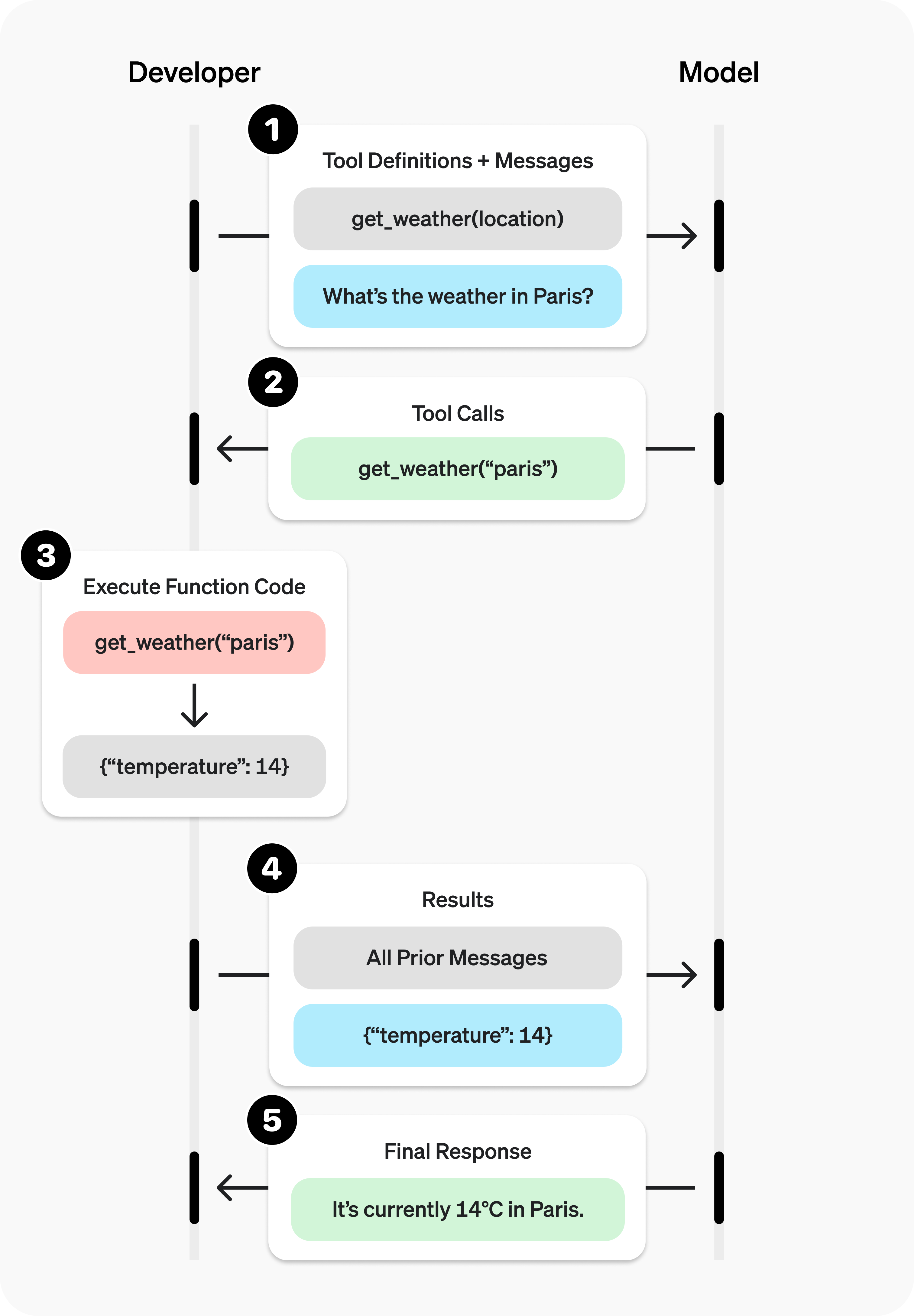
以下是完整的天氣範例:
模型可以使用 get_weather 工具 ,該工具接受 location 作為引數。
收到「巴黎的天氣如何?」這樣的提示詞後,模型會傳回 工具呼叫 ,其中包含值為 Paris 的 location 引數
工具呼叫輸出 可能傳回 JSON 物件(例如 {"temperature": "25", "unit": "C"},表示目前氣溫為 25 度)、圖像內容 或檔案內容 。 接著,我們將工具定義、原始提示詞、模型的工具呼叫及工具呼叫輸出一併傳回模型,最後便能收到如下的文字回應:
The weather in Paris today is 25C. 函式與工具的差異
函式是一種特定類型的工具,以 JSON 結構描述定義。函式定義讓模型能夠將資料傳送至你的應用程式,再由應用程式中的程式碼存取資料或執行模型建議的動作。
除了函式工具,還有支援自由格式文字輸入與輸出的自訂工具,本指南也會介紹。
OpenAI 平台也提供內建工具 ,讓模型能夠搜尋網頁 、執行程式碼 、使用 MCP 伺服器 的功能,以及執行其他操作。
工具呼叫是應用程式與模型透過 OpenAI API 進行的多步驟對話。工具呼叫流程主要分為五個步驟:
向模型傳送請求,並提供可供呼叫的工具
接收模型傳回的工具呼叫
使用工具呼叫中的輸入,在應用程式端執行程式碼
將工具輸出納入第二次請求,傳送給模型
接收模型的最終回應(或更多工具呼叫)
使用 Responses 時,應用程式可以依任務所需的工具呼叫次數,持續執行這個流程。如果你希望使用框架來封裝這個迴圈中反覆進行的編排工作,請參閱 Responses API 與 Agents SDK 的比較 。
以下以取得星座每日運勢的 get_horoscope 函式為例,示範完整的工具呼叫流程。
1
2
3
4
5
6
7
8
9
10
11
12
13
14
15
16
17
18
19
20
21
22
23
24
25
26
27
28
29
30
31
32
33
34
35
36
37
38
39
40
41
42
43
44
45
46
47
48
49
50
51
52
53
54
55
56
57
58
59
60
61
62
63
64
65
66
67
68
69
70 import OpenAI from "openai";
const openai = new OpenAI();
// 1. Define a list of callable tools for the model
const tools = [
{
type: "function",
function: {
name: "get_horoscope",
description: "Get today's horoscope for an astrological sign.",
parameters: {
type: "object",
properties: {
sign: {
type: "string",
description: "An astrological sign like Taurus or Aquarius",
},
},
required: ["sign"],
additionalProperties: false,
},
strict: true,
},
},
];
function getHoroscope(sign) {
return `${sign}: Next Tuesday you will befriend a baby otter.`;
}
const messages = [
{ role: "user", content: "What is my horoscope? I am an Aquarius." },
];
// 2. Prompt the model with tools defined
let response = await openai.chat.completions.create({
model: "gpt-5.6",
messages,
tools,
});
messages.push(response.choices[0].message);
for (const toolCall of response.choices[0].message.tool_calls ?? []) {
if (toolCall.type !== "function") continue;
if (toolCall.function.name === "get_horoscope") {
// 3. Execute the function logic for get_horoscope
const args = JSON.parse(toolCall.function.arguments);
const horoscope = getHoroscope(args.sign);
// 4. Provide function call results to the model
messages.push({
role: "tool",
tool_call_id: toolCall.id,
content: JSON.stringify({ horoscope }),
});
}
}
response = await openai.chat.completions.create({
model: "gpt-5.6",
messages,
tools,
});
// 5. The model should be able to give a response!
console.log(response.choices[0].message.content); 1
2
3
4
5
6
7
8
9
10
11
12
13
14
15
16
17
18
19
20
21
22
23
24
25
26
27
28
29
30
31
32
33
34
35
36
37
38
39
40
41
42
43
44
45
46
47
48
49
50
51
52
53
54
55
56
57
58
59
60
61
62
63
64
65
66
67 from openai import OpenAI
import json
client = OpenAI()
# 1. Define a list of callable tools for the model
tools = [
{
"type" : "function" ,
"function" : {
"name" : "get_horoscope" ,
"description" : "Get today's horoscope for an astrological sign." ,
"parameters" : {
"type" : "object" ,
"properties" : {
"sign" : {
"type" : "string" ,
"description" : "An astrological sign like Taurus or Aquarius" ,
},
},
"required" : [ "sign" ],
"additionalProperties" : False ,
},
"strict" : True ,
},
},
]
def get_horoscope (sign):
return f " { sign } : Next Tuesday you will befriend a baby otter."
messages = [{ "role" : "user" , "content" : "What is my horoscope? I am an Aquarius." }]
# 2. Prompt the model with tools defined
response = client.chat.completions.create(
model = "gpt-5.6" ,
messages = messages,
tools = tools,
)
messages.append(response.choices[ 0 ].message)
for tool_call in response.choices[ 0 ].message.tool_calls or []:
if tool_call.function.name == "get_horoscope" :
# 3. Execute the function logic for get_horoscope
args = json.loads(tool_call.function.arguments)
horoscope = get_horoscope(args[ "sign" ])
# 4. Provide function call results to the model
messages.append(
{
"role" : "tool" ,
"tool_call_id" : tool_call.id,
"content" : json.dumps({ "horoscope" : horoscope}),
}
)
response = client.chat.completions.create(
model = "gpt-5.6" ,
messages = messages,
tools = tools,
)
# 5. The model should be able to give a response!
print (response.choices[ 0 ].message.content) 1
2
3
4
5
6
7
8
9
10
11
12
13
14
15
16
17
18
19
20
21
22
23
24
25
26
27
28
29
30
31
32
33
34
35
36
37
38
39
40
41
42
43
44
45
46
47
48
49
50
51
52
53
54
55
56
57
58
59
60
61
62
63
64
65
66
67
68
69 package main
import (
"context"
"encoding/json"
"fmt"
"github.com/openai/openai-go/v3"
"github.com/openai/openai-go/v3/shared"
)
func main() {
client := openai.NewClient()
tool := horoscopeChatTool()
messages := []openai.ChatCompletionMessageParamUnion{
openai.UserMessage("What is my horoscope? I am an Aquarius."),
}
completion, err := client.Chat.Completions.New(context.Background(), openai.ChatCompletionNewParams{
Model: "gpt-5.6", Messages: messages, Tools: []openai.ChatCompletionToolUnionParam{tool},
ReasoningEffort: shared.ReasoningEffortNone,
})
if err != nil {
panic(err)
}
messages = append(messages, completion.Choices[0].Message.ToParam())
for _, call := range completion.Choices[0].Message.ToolCalls {
if call.Type != "function" || call.Function.Name != "get_horoscope" {
continue
}
var arguments struct {
Sign string `json:"sign"`
}
if err := json.Unmarshal([]byte(call.Function.Arguments), &arguments); err != nil {
panic(err)
}
horoscope := getHoroscope(arguments.Sign)
messages = append(messages, openai.ToolMessage(horoscope, call.ID))
}
completion, err = client.Chat.Completions.New(context.Background(), openai.ChatCompletionNewParams{
Model: "gpt-5.6", Messages: messages, Tools: []openai.ChatCompletionToolUnionParam{tool},
ReasoningEffort: shared.ReasoningEffortNone,
})
if err != nil {
panic(err)
}
fmt.Println(completion.Choices[0].Message.Content)
}
func horoscopeChatTool() openai.ChatCompletionToolUnionParam {
parameters := map[string]any{
"type": "object",
"properties": map[string]any{
"sign": map[string]any{"type": "string", "description": "An astrological sign like Taurus or Aquarius"},
},
"required": []string{"sign"},
"additionalProperties": false,
}
return openai.ChatCompletionToolUnionParam{OfFunction: &openai.ChatCompletionFunctionToolParam{
Function: shared.FunctionDefinitionParam{
Name: "get_horoscope", Description: openai.String("Get today's horoscope for an astrological sign."), Parameters: parameters, Strict: openai.Bool(true),
},
}}
}
func getHoroscope(sign string) string {
return fmt.Sprintf("%s: Next Tuesday you will befriend a baby otter.", sign)
} 1
2
3
4
5
6
7
8
9
10
11
12
13
14
15
16
17
18
19
20
21
22
23
24
25
26
27
28
29
30
31
32
33
34
35
36
37
38
39
40
41
42
43
44
45
46
47
48
49
50
51
52
53
54
55
56
57
58
59 import com.openai.client.OpenAIClient;
import com.openai.client.okhttp.OpenAIOkHttpClient;
import com.openai.core.JsonValue;
import com.openai.models.FunctionDefinition;
import com.openai.models.FunctionParameters;
import com.openai.models.chat.completions.ChatCompletionCreateParams;
import com.openai.models.chat.completions.ChatCompletionToolMessageParam;
import java.util.List;
import java.util.Map;
FunctionDefinition horoscope =
FunctionDefinition.builder()
.name("get_horoscope")
.description("Get today's horoscope for an astrological sign.")
.parameters(
FunctionParameters.builder()
.putAdditionalProperty("type", JsonValue.from("object"))
.putAdditionalProperty(
"properties",
JsonValue.from(
Map.of(
"sign",
Map.of(
"type", "string",
"description",
"An astrological sign like Taurus or Aquarius"))))
.putAdditionalProperty("required", JsonValue.from(List.of("sign")))
.putAdditionalProperty("additionalProperties", JsonValue.from(false))
.build())
.strict(true)
.build();
ChatCompletionCreateParams params =
ChatCompletionCreateParams.builder()
.model("gpt-5.6")
.addUserMessage("What is my horoscope? I am an Aquarius.")
.addFunctionTool(horoscope)
.build();
var assistant = client.chat().completions().create(params).choices().get(0).message();
var calls = assistant.toolCalls().orElseThrow(() -> new IllegalStateException("No tool calls"));
var followUp = params.toBuilder().addMessage(assistant);
record HoroscopeArguments(String sign) {}
for (var toolCall : calls) {
var function = toolCall.asFunction();
if (function.function().name().equals("get_horoscope")) {
String sign = function.function().arguments(HoroscopeArguments.class).sign();
followUp.addMessage(
ChatCompletionToolMessageParam.builder()
.toolCallId(function.id())
.content(sign + ": Embrace an unexpected opportunity today.")
.build());
}
}
client.chat().completions().create(followUp.build()).choices().stream()
.flatMap(choice -> choice.message().content().stream())
.forEach(System.out::println); 1
2
3
4
5
6
7
8
9
10
11
12
13
14
15
16
17
18
19
20
21
22
23
24
25
26
27
28
29
30
31
32
33
34
35
36
37
38
39
40
41
42
43
44
45
46
47
48
49
50
51
52
53
54
55
56
57
58
59
60 require "json"
require "openai"
client = OpenAI::Client.new
messages = [
{
role: :user,
content: "What is my horoscope? I am an Aquarius."
}
]
tools = [
{
type: :function,
function: {
name: "get_horoscope",
description: "Get today's horoscope for an astrological sign.",
parameters: {
type: :object,
properties: { sign: { type: :string } },
required: ["sign"],
additionalProperties: false
},
strict: true
}
}
]
first_completion = client.chat.completions.create(
model: "gpt-5.6",
messages: messages,
tools: tools
)
assistant_message = first_completion.choices.fetch(0).message
tool_calls = assistant_message.tool_calls || []
raise "The model did not call get_horoscope" if tool_calls.empty?
messages << {
role: :assistant,
content: assistant_message.content,
tool_calls: tool_calls.map(&:to_h)
}
tool_calls.each do |tool_call|
next unless tool_call.is_a?(OpenAI::Models::Chat::ChatCompletionMessageFunctionToolCall)
next unless tool_call.function.name == "get_horoscope"
arguments = JSON.parse(tool_call.function.arguments, symbolize_names: true)
sign = arguments.fetch(:sign)
messages << {
role: :tool,
tool_call_id: tool_call.id,
content: "#{sign}: Embrace an unexpected opportunity today."
}
end
final_completion = client.chat.completions.create(
model: "gpt-5.6",
messages: messages,
tools: tools
)
puts(final_completion.choices.fetch(0).message.content)
1
2
3
4
5
6
7
8
9
10
11
12
13
14
15
16
17
18
19
20
21
22
23
24
25
26
27
28
29
30
31
32
33
34
35
36
37
38
39
40
41
42
43
44
45
46
47
48
49
50
51
52
53
54
55
56
57
58
59
60
61
62
63
64
65
66
67
68
69
70
71
72
73
74
75
76
77 import OpenAI from "openai";
import { toResponseInputItems } from "openai/lib/responses/ResponseInputItems";
const openai = new OpenAI();
// 1. Define a list of callable tools for the model
const tools = [
{
type: "function",
name: "get_horoscope",
description: "Get today's horoscope for an astrological sign.",
parameters: {
type: "object",
properties: {
sign: {
type: "string",
description: "An astrological sign like Taurus or Aquarius",
},
},
required: ["sign"],
additionalProperties: false,
},
strict: true,
},
];
function getHoroscope(sign) {
return `${sign}: Next Tuesday you will befriend a baby otter.`;
}
// Create a running input list we will add to over time
let input = [
{ role: "user", content: "What is my horoscope? I am an Aquarius." },
];
// 2. Prompt the model with tools defined
let response = await openai.responses.create({
model: "gpt-6-astra",
tools,
input,
});
// Preserve model output for the next turn
input.push(...toResponseInputItems(response.output));
for (const item of response.output) {
if (item.type !== "function_call") continue;
if (item.name === "get_horoscope") {
// 3. Execute the function logic for get_horoscope
const { sign } = JSON.parse(item.arguments);
const horoscope = getHoroscope(sign);
// 4. Provide function call results to the model
input.push({
type: "function_call_output",
call_id: item.call_id,
output: horoscope,
});
}
}
console.log("Final input:");
console.log(JSON.stringify(input, null, 2));
response = await openai.responses.create({
model: "gpt-6-astra",
instructions: "Respond only with a horoscope generated by a tool.",
tools,
input,
});
// 5. The model should be able to give a response!
console.log("Final output:");
console.log(response.output_text); 1
2
3
4
5
6
7
8
9
10
11
12
13
14
15
16
17
18
19
20
21
22
23
24
25
26
27
28
29
30
31
32
33
34
35
36
37
38
39
40
41
42
43
44
45
46
47
48
49
50
51
52
53
54
55
56
57
58
59
60
61
62
63
64
65
66
67
68
69
70
71
72 from openai import OpenAI
import json
client = OpenAI()
# 1. Define a list of callable tools for the model
tools = [
{
"type" : "function" ,
"name" : "get_horoscope" ,
"description" : "Get today's horoscope for an astrological sign." ,
"parameters" : {
"type" : "object" ,
"properties" : {
"sign" : {
"type" : "string" ,
"description" : "An astrological sign like Taurus or Aquarius" ,
},
},
"required" : [ "sign" ],
},
},
]
def get_horoscope (sign):
return f " { sign } : Next Tuesday you will befriend a baby otter."
# Create a running input list we will add to over time
input_list = [{ "role" : "user" , "content" : "What is my horoscope? I am an Aquarius." }]
# 2. Prompt the model with tools defined
response = client.responses.create(
model = "gpt-6-astra" ,
tools = tools,
input = input_list,
)
# Save function call outputs for subsequent requests
input_list += response.output
for item in response.output:
if item.type == "function_call" :
if item.name == "get_horoscope" :
# 3. Execute the function logic for get_horoscope
sign = json.loads(item.arguments)[ "sign" ]
horoscope = get_horoscope(sign)
# 4. Provide function call results to the model
input_list.append(
{
"type" : "function_call_output" ,
"call_id" : item.call_id,
"output" : horoscope,
}
)
print ( "Final input:" )
print (input_list)
response = client.responses.create(
model = "gpt-6-astra" ,
instructions = "Respond only with a horoscope generated by a tool." ,
tools = tools,
input = input_list,
)
# 5. The model should be able to give a response!
print ( "Final output:" )
print (response.model_dump_json( indent = 2 ))
print ( " \n " + response.output_text) 1
2
3
4
5
6
7
8
9
10
11
12
13
14
15
16
17
18
19
20
21
22
23
24
25
26
27
28
29
30
31
32
33
34
35
36
37
38
39
40
41
42
43
44
45
46
47
48
49
50
51
52
53
54
55
56
57
58
59
60
61
62
63
64
65
66
67
68
69
70
71
72
73
74
75 package main
import (
"context"
"encoding/json"
"fmt"
"github.com/openai/openai-go/v3"
"github.com/openai/openai-go/v3/responses"
)
func main() {
client := openai.NewClient()
tool := horoscopeResponseTool()
response, err := client.Responses.New(context.Background(), responses.ResponseNewParams{
Model: "gpt-6-astra",
Input: responses.ResponseNewParamsInputUnion{OfString: openai.String("What is my horoscope? I am an Aquarius.")},
Tools: []responses.ToolUnionParam{tool},
})
if err != nil {
panic(err)
}
var functionOutput responses.ResponseInputItemUnionParam
for _, output := range response.Output {
if output.Type != "function_call" {
continue
}
call := output.AsFunctionCall()
if call.Name != "get_horoscope" {
continue
}
var arguments struct {
Sign string `json:"sign"`
}
if err := json.Unmarshal([]byte(call.Arguments), &arguments); err != nil {
panic(err)
}
functionOutput = responses.ResponseInputItemParamOfFunctionCallOutput(getHoroscope(arguments.Sign))
functionOutput.OfFunctionCallOutput.CallID = openai.String(call.CallID)
}
if functionOutput.OfFunctionCallOutput == nil {
panic("the model did not call get_horoscope")
}
response, err = client.Responses.New(context.Background(), responses.ResponseNewParams{
Model: "gpt-6-astra",
PreviousResponseID: openai.String(response.ID),
Instructions: openai.String("Respond only with a horoscope generated by a tool."),
Input: responses.ResponseNewParamsInputUnion{OfInputItemList: responses.ResponseInputParam{functionOutput}},
Tools: []responses.ToolUnionParam{tool},
})
if err != nil {
panic(err)
}
fmt.Println(response.OutputText())
}
func horoscopeResponseTool() responses.ToolUnionParam {
parameters := map[string]any{
"type": "object",
"properties": map[string]any{
"sign": map[string]any{"type": "string", "description": "An astrological sign like Taurus or Aquarius"},
},
"required": []string{"sign"},
"additionalProperties": false,
}
tool := responses.ToolParamOfFunction("get_horoscope", parameters, true)
tool.OfFunction.Description = openai.String("Get today's horoscope for an astrological sign.")
return tool
}
func getHoroscope(sign string) string {
return fmt.Sprintf("%s: Next Tuesday you will befriend a baby otter.", sign)
} 1
2
3
4
5
6
7
8
9
10
11
12
13
14
15
16
17
18
19
20
21
22
23
24
25
26
27
28
29
30
31
32
33
34
35
36
37
38
39
40
41
42
43
44
45
46
47
48
49
50
51
52
53
54
55
56
57
58
59
60
61
62
63
64
65
66
67
68
69
70
71 import com.openai.client.OpenAIClient;
import com.openai.client.okhttp.OpenAIOkHttpClient;
import com.openai.core.JsonValue;
import com.openai.models.responses.FunctionTool;
import com.openai.models.responses.ResponseCreateParams;
import com.openai.models.responses.ResponseInputItem;
import java.util.List;
import java.util.Map;
FunctionTool horoscope =
FunctionTool.builder()
.name("get_horoscope")
.description("Get today's horoscope for an astrological sign.")
.parameters(
FunctionTool.Parameters.builder()
.putAdditionalProperty("type", JsonValue.from("object"))
.putAdditionalProperty(
"properties",
JsonValue.from(
Map.of(
"sign",
Map.of(
"type", "string",
"description",
"An astrological sign like Taurus or Aquarius"))))
.putAdditionalProperty("required", JsonValue.from(List.of("sign")))
.putAdditionalProperty("additionalProperties", JsonValue.from(false))
.build())
.strict(true)
.build();
var firstResponse =
client
.responses()
.create(
ResponseCreateParams.builder()
.model("gpt-6-astra")
.input("What is my horoscope? I am an Aquarius.")
.addTool(horoscope)
.build());
var functionCall =
firstResponse.output().stream()
.flatMap(item -> item.functionCall().stream())
.filter(call -> call.name().equals("get_horoscope"))
.findFirst()
.orElseThrow(() -> new IllegalStateException("The model did not call get_horoscope"));
record HoroscopeArguments(String sign) {}
String sign = functionCall.arguments(HoroscopeArguments.class).sign();
ResponseCreateParams followUp =
ResponseCreateParams.builder()
.model("gpt-6-astra")
.instructions("Respond only with a horoscope generated by a tool.")
.previousResponseId(firstResponse.id())
.inputOfResponse(
List.of(
ResponseInputItem.ofFunctionCallOutput(
ResponseInputItem.FunctionCallOutput.builder()
.callId(functionCall.callId())
.output(sign + ": Embrace an unexpected opportunity today.")
.build())))
.addTool(horoscope)
.build();
client.responses().create(followUp).output().stream()
.flatMap(item -> item.message().stream())
.flatMap(message -> message.content().stream())
.flatMap(content -> content.outputText().stream())
.forEach(text -> System.out.println(text.text())); 1
2
3
4
5
6
7
8
9
10
11
12
13
14
15
16
17
18
19
20
21
22
23
24
25
26
27
28
29
30
31
32
33
34
35
36
37
38
39
40
41
42
43
44
45
46
47
48 require "json"
require "openai"
client = OpenAI::Client.new
tools = [
{
type: :function,
name: "get_horoscope",
description: "Get today's horoscope for an astrological sign.",
parameters: {
type: :object,
properties: { sign: { type: :string } },
required: ["sign"],
additionalProperties: false
},
strict: true
}
]
first_response = client.responses.create(
model: "gpt-6-astra",
input: "What is my horoscope? I am an Aquarius.",
tools: tools
)
function_call = first_response.output.find do |item|
item.is_a?(OpenAI::Models::Responses::ResponseFunctionToolCall) &&
item.name == "get_horoscope"
end
unless function_call.is_a?(OpenAI::Models::Responses::ResponseFunctionToolCall)
raise "The model did not call get_horoscope"
end
arguments = JSON.parse(function_call.arguments, symbolize_names: true)
sign = arguments.fetch(:sign)
response = client.responses.create(
model: "gpt-6-astra",
previous_response_id: first_response.id,
input: [
{
type: :function_call_output,
call_id: function_call.call_id,
output: "#{sign}: Embrace an unexpected opportunity today."
}
],
tools: tools
)
puts(response.output_text)
請注意,對於 GPT-5 或 o4-mini 等推理模型,模型回應中與工具呼叫一併傳回的所有推理項目,也必須連同工具呼叫輸出一起傳回模型。
函式通常在每次 API 請求的 tools 參數中宣告。使用工具搜尋 時,應用程式也可以在互動過程中稍後才載入延後載入的函式。無論採用哪種方式,每個可呼叫的函式都使用相同的結構描述格式。函式定義包含下列屬性:
欄位 說明 type此值應一律為 function name函式名稱(例如 get_weather) description詳細說明何時及如何使用此函式 parameters定義函式輸入引數的 JSON 結構描述 strict是否對函式呼叫強制實施嚴格模式
以下是 get_weather 函式的定義範例
1 2 3 4 5 6 7 8 9 10 11 12 13 14 15 16 17 18 19 20 21 22 { "type" : "function" , "name" : "get_weather" , "description" : "Retrieves current weather for the given location." , "parameters" : { "type" : "object" , "properties" : { "location" : { "type" : "string" , "description" : "City and country e.g. Bogotá, Colombia" }, "units" : { "type" : "string" , "enum" : [ "celsius" , "fahrenheit" ], "description" : "Units the temperature will be returned in." } }, "required" : [ "location" , "units" ], "additionalProperties" : false }, "strict" : true } 由於 parameters 是以 JSON 結構描述 定義,你可以運用其豐富的功能,例如屬性型別、列舉、描述、巢狀物件及遞迴物件。
使用命名空間,依領域將相關工具分組,例如 crm、billing 或 shipping。命名空間有助於整理類似的工具,尤其適合模型必須在服務不同系統或用途的工具之間做選擇時使用,例如一個用於 CRM 的搜尋工具,以及另一個用於客服工單系統的搜尋工具。
1 2 3 4 5 6 7 8 9 10 11 12 13 14 15 16 17 18 19 20 21 22 23 24 25 26 27 28 29 30 31 32 33 34 { "type" : "namespace" , "name" : "crm" , "description" : "CRM tools for customer lookup and order management." , "tools" : [ { "type" : "function" , "name" : "get_customer_profile" , "description" : "Fetch a customer profile by customer ID." , "parameters" : { "type" : "object" , "properties" : { "customer_id" : { "type" : "string" } }, "required" : [ "customer_id" ], "additionalProperties" : false } }, { "type" : "function" , "name" : "list_open_orders" , "description" : "List open orders for a customer ID." , "defer_loading" : true , "parameters" : { "type" : "object" , "properties" : { "customer_id" : { "type" : "string" } }, "required" : [ "customer_id" ], "additionalProperties" : false } } ] } 如果你需要讓模型使用龐大工具生態系中的工具,可以透過 tool_search 延後載入其中部分或全部工具。tool_search 工具讓模型能夠搜尋相關工具,將其加入模型上下文,然後使用這些工具。只有 gpt-5.4 及後續模型支援此功能。請參閱工具搜尋指南 ,瞭解更多資訊。
(選用)搭配 pydantic 與 zod 進行函式呼叫 我們建議你直接定義函式結構描述,不過 SDK 也提供輔助函式,可將 pydantic 與 zod 物件轉換為結構描述。請注意,並非所有 pydantic 與 zod 功能都受到支援。
1
2
3
4
5
6
7
8
9
10
11
12
13
14
15
16
17
18
19
20
21
22
23
24
25
26 import OpenAI from "openai";
import { z } from "zod";
import { zodFunction } from "openai/helpers/zod";
const openai = new OpenAI();
const GetWeatherParameters = z.object({
location: z.string().describe("City and country e.g. Bogotá, Colombia"),
});
const tools = [
zodFunction({ name: "getWeather", parameters: GetWeatherParameters }),
];
const messages = [
{ role: "user", content: "What's the weather like in Paris today?" },
];
const response = await openai.chat.completions.create({
model: "gpt-5.6",
messages,
tools,
store: true,
});
console.log(response.choices[0].message.tool_calls); 1
2
3
4
5
6
7
8
9
10
11
12
13
14
15
16
17
18
19 from openai import OpenAI, pydantic_function_tool
from pydantic import BaseModel, Field
client = OpenAI()
class GetWeather ( BaseModel ):
location: str = Field( ... , description = "City and country e.g. Bogotá, Colombia" )
tools = [pydantic_function_tool(GetWeather)]
completion = client.chat.completions.create(
model = "gpt-5.6" ,
messages = [{ "role" : "user" , "content" : "What's the weather like in Paris today?" }],
tools = tools,
)
print (completion.choices[ 0 ].message.tool_calls)
撰寫清楚且詳盡的函式名稱、參數說明和使用指示。
明確說明函式與各個參數的用途 (以及參數格式),並解釋輸出所代表的意義。使用系統提示詞說明何時應該(以及不應該)使用各個函式。 原則上,要 明確 告訴模型該做什麼。加入範例和邊界情況 ,尤其有助於修正反覆出現的錯誤。(注意: 加入範例可能會降低推理模型 的表現。)對於延後載入的工具,請將詳細指引放在函式說明中,並讓命名空間說明保持精簡。 命名空間可協助模型選擇要載入的工具;函式說明則協助模型正確使用已載入的工具。
採用軟體工程最佳實務。
讓函式的行為符合預期,使用方式直覺易懂 。(最小驚訝原則 )使用列舉 與物件結構來避免無效狀態。例如,toggle_light(on: bool, off: bool) 的設計容許無效的呼叫。通過實習生測試。 如果只提供你給模型的資訊,實習生或其他人能否正確使用這個函式?(如果不能,他們會問你什麼問題?把答案加入提示詞中。)
盡可能使用程式碼處理,以減輕模型的負擔。
不要讓模型填入你已知的引數值。 例如,如果你已從先前的選單取得 order_id,就不要加入 order_id 參數。請改為定義不含參數的 submit_refund(),並在你的程式碼中傳入 order_id。合併總是依序呼叫的函式。 例如,如果你總是在呼叫 query_location() 後呼叫 mark_location(),只要將標記邏輯移入查詢函式即可。
減少一開始可用的函式數量,以提高準確度。
使用不同數量的函式來評估表現 。
盡量讓每一回合開始時可用的函式少於 20 個 ,但這只是建議,並非硬性限制。使用工具搜尋 ,延後載入工具集內規模較大或不常使用的部分,而非一開始就提供所有工具。
善用 OpenAI 資源。
在底層實作中,函式會以模型訓練時學過的語法注入系統訊息。這表示可呼叫函式的定義會占用模型的上下文額度,並以輸入 Token 計費。如果遇到 Token 上限,建議減少預先載入的函式數量、盡可能縮短說明,或使用工具搜尋 ,讓延後載入的工具只在需要時才載入。
如果你的工具規格定義了許多函式,也可以透過微調 來減少 Token 用量。
當模型呼叫函式時,你必須執行該函式並傳回結果。由於模型回應可能包含零次、一次或多次呼叫,最佳實務是以可能有多次呼叫的情況來設計處理邏輯。
回應包含一個 tool_calls 陣列,每個項目都有 id(稍後用於提交函式結果),以及一個 function,其中包含 name 和以 JSON 編碼的 arguments。
1
2
3
4
5
6
7
8
9
10
11
12
13
14
15
16
17
18
19
20
21
22
23
24
25
26 [
{
"id" : "call_12345xyz" ,
"type" : "function" ,
"function" : {
"name" : "get_weather" ,
"arguments" : "{ \" location \" : \" Paris, France \" }"
}
},
{
"id" : "call_67890abc" ,
"type" : "function" ,
"function" : {
"name" : "get_weather" ,
"arguments" : "{ \" location \" : \" Bogotá, Colombia \" }"
}
},
{
"id" : "call_99999def" ,
"type" : "function" ,
"function" : {
"name" : "send_email" ,
"arguments" : "{ \" to \" : \" bob@email.com \" , \" body \" : \" Hi bob \" }"
}
}
] 1
2
3
4
5
6
7
8
9
10
11
12
13
14
15 messages.push(completion.choices[0].message);
for (const toolCall of completion.choices[0].message.tool_calls ?? []) {
if (toolCall.type !== "function") continue;
const name = toolCall.function.name;
const args = JSON.parse(toolCall.function.arguments);
const result = await callFunction(name, args);
messages.push({
role: "tool",
tool_call_id: toolCall.id,
content: result.toString(),
});
} 1
2
3
4
5
6
7
8
9
10
11
12
13
14 messages.append(completion.choices[ 0 ].message)
for tool_call in completion.choices[ 0 ].message.tool_calls or []:
name = tool_call.function.name
args = json.loads(tool_call.function.arguments)
result = call_function(name, args)
messages.append(
{
"role" : "tool" ,
"tool_call_id" : tool_call.id,
"content" : json.dumps(result),
}
) 1
2
3
4
5
6
7
8
9
10
11
12
13
14
15
16 messages = append(messages, completion.Choices[0].Message.ToParam())
for _, toolCall := range completion.Choices[0].Message.ToolCalls {
if toolCall.Type != "function" {
continue
}
var arguments functionArguments
if err := json.Unmarshal([]byte(toolCall.Function.Arguments), &arguments); err != nil {
panic(err)
}
result, err := callFunction(toolCall.Function.Name, arguments)
if err != nil {
panic(err)
}
messages = append(messages, openai.ToolMessage(result, toolCall.ID))
} 1
2
3
4
5
6
7
8
9
10
11
12
13
14
15
16
17
18
19
20
21
22
23
24
25
26
27
28
29
30
31
32
33
34
35
36 import com.openai.client.OpenAIClient;
import com.openai.client.okhttp.OpenAIOkHttpClient;
import com.openai.core.JsonValue;
import com.openai.models.FunctionDefinition;
import com.openai.models.FunctionParameters;
import com.openai.models.chat.completions.ChatCompletionCreateParams;
import com.openai.models.chat.completions.ChatCompletionToolMessageParam;
import java.util.List;
import java.util.Map;
var assistant = client.chat().completions().create(params).choices().get(0).message();
var history = params.toBuilder().addMessage(assistant);
for (var item : assistant.toolCalls().orElseThrow()) {
var call = item.asFunction();
String output;
if (call.function().name().equals("get_weather")) {
record Coordinates(double latitude, double longitude) {}
Coordinates coordinates = call.function().arguments(Coordinates.class);
output =
JsonValue.from(
Map.of(
"latitude", coordinates.latitude(),
"longitude", coordinates.longitude(),
"temperature_c", 18))
.toString();
} else if (call.function().name().equals("send_email")) {
record Email(String to, String body) {}
Email message = call.function().arguments(Email.class);
output = JsonValue.from(Map.of("to", message.to(), "status", "sent")).toString();
} else {
throw new IllegalArgumentException("Unknown function: " + call.function().name());
}
history.addMessage(
ChatCompletionToolMessageParam.builder().toolCallId(call.id()).content(output).build());
System.out.println(call.id() + " " + output);
} 1
2
3
4
5
6
7
8
9
10
11
12
13
14
15
16
17
18 message = completion.choices.fetch(0).message
messages << message
Array(message.tool_calls).each do |tool_call|
next unless tool_call.is_a?(
OpenAI::Models::Chat::ChatCompletionMessageFunctionToolCall
)
name = tool_call.function.name
arguments = JSON.parse(tool_call.function.arguments)
result = call_function(name, arguments)
messages << {
role: :tool,
tool_call_id: tool_call.id,
content: JSON.generate(result)
}
end
回應的 output 陣列包含 type 值為 function_call 的項目。每個這類項目都有 call_id(稍後用於提交函式結果)、name,以及以 JSON 編碼的 arguments。
1
2
3
4
5
6
7
8
9
10
11
12
13
14
15
16
17
18
19
20
21
22
23 [
{
"id" : "fc_12345xyz" ,
"call_id" : "call_12345xyz" ,
"type" : "function_call" ,
"name" : "get_weather" ,
"arguments" : "{ \" location \" : \" Paris, France \" }"
},
{
"id" : "fc_67890abc" ,
"call_id" : "call_67890abc" ,
"type" : "function_call" ,
"name" : "get_weather" ,
"arguments" : "{ \" location \" : \" Bogotá, Colombia \" }"
},
{
"id" : "fc_99999def" ,
"call_id" : "call_99999def" ,
"type" : "function_call" ,
"name" : "send_email" ,
"arguments" : "{ \" to \" : \" bob@email.com \" , \" body \" : \" Hi bob \" }"
}
] 如果你使用工具搜尋 ,也可能在 function_call 之前看到 tool_search_call 和 tool_search_output 項目。函式載入後,請依照此處所示的相同方式處理函式呼叫。
1
2
3
4
5
6
7
8
9
10
11
12
13
14
15
16
17
18
19 import { toResponseInputItems } from "openai/lib/responses/ResponseInputItems";
input.push(...toResponseInputItems(response.output));
for (const toolCall of response.output) {
if (toolCall.type !== "function_call") {
continue;
}
const name = toolCall.name;
const args = JSON.parse(toolCall.arguments);
const result = await callFunction(name, args);
input.push({
type: "function_call_output",
call_id: toolCall.call_id,
output: result.toString(),
});
} 1
2
3
4
5
6
7
8
9
10
11
12
13
14
15
16
17 input_messages += response.output
for tool_call in response.output:
if tool_call.type != "function_call" :
continue
name = tool_call.name
args = json.loads(tool_call.arguments)
result = call_function(name, args)
input_messages.append(
{
"type" : "function_call_output" ,
"call_id" : tool_call.call_id,
"output" : json.dumps(result),
}
) 1
2
3
4
5
6
7
8
9
10
11
12
13
14
15
16
17
18
19 input = append(input, responseOutputAsInput(response.Output)...)
for _, output := range response.Output {
if output.Type != "function_call" {
continue
}
toolCall := output.AsFunctionCall()
var arguments functionArguments
if err := json.Unmarshal([]byte(toolCall.Arguments), &arguments); err != nil {
panic(err)
}
result, err := callFunction(toolCall.Name, arguments)
if err != nil {
panic(err)
}
toolOutput := responses.ResponseInputItemParamOfFunctionCallOutput(result)
toolOutput.OfFunctionCallOutput.CallID = openai.String(toolCall.CallID)
input = append(input, toolOutput)
} 1
2
3
4
5
6
7
8
9
10
11
12
13
14
15
16
17
18
19
20
21
22
23
24
25
26
27
28
29
30
31
32
33
34
35
36
37
38
39
40
41
42
43
44
45
46
47 import com.openai.client.OpenAIClient;
import com.openai.client.okhttp.OpenAIOkHttpClient;
import com.openai.core.JsonValue;
import com.openai.models.responses.EasyInputMessage;
import com.openai.models.responses.FunctionTool;
import com.openai.models.responses.ResponseCreateParams;
import com.openai.models.responses.ResponseInputItem;
import java.util.ArrayList;
import java.util.List;
import java.util.Map;
response.output().stream()
.map(item -> JsonValue.from(item).convert(ResponseInputItem.class))
.forEach(input::add);
response.output().stream()
.flatMap(item -> item.functionCall().stream())
.forEach(
call -> {
String result;
if (call.name().equals("get_weather")) {
record Coordinates(double latitude, double longitude) {}
Coordinates coordinates = call.arguments(Coordinates.class);
result =
JsonValue.from(
Map.of(
"latitude", coordinates.latitude(),
"longitude", coordinates.longitude(),
"temperature_c", 18))
.toString();
} else if (call.name().equals("send_email")) {
record Email(String to, String body) {}
Email message = call.arguments(Email.class);
result = JsonValue.from(Map.of("to", message.to(), "status", "sent")).toString();
} else {
throw new IllegalArgumentException("Unknown function: " + call.name());
}
var output =
ResponseInputItem.ofFunctionCallOutput(
ResponseInputItem.FunctionCallOutput.builder()
.callId(call.callId())
.output(result)
.build());
input.add(output);
System.out.println(call.callId() + " " + result);
}); 1
2
3
4
5
6
7
8
9
10
11
12
13
14 input.concat(response.output)
response.output.each do |tool_call|
next unless tool_call.is_a?(OpenAI::Models::Responses::ResponseFunctionToolCall)
arguments = JSON.parse(tool_call.arguments)
result = call_function(tool_call.name, arguments)
input << {
type: :function_call_output,
call_id: tool_call.call_id,
output: JSON.generate(result)
}
end
在上面的範例中,我們假設有一個 call_function,用來將每次呼叫分派至對應函式。以下是一種可能的實作方式:
1
2
3
4
5
6
7
8
9 const callFunction = async (name, args) => {
if (name === "get_weather") {
return getWeather(args.latitude, args.longitude);
}
if (name === "send_email") {
return sendEmail(args.to, args.body);
}
throw new Error(`Unknown function: ${name}`);
}; 1
2
3
4
5
6 def call_function (name, args):
if name == "get_weather" :
return get_weather( ** args)
if name == "send_email" :
return send_email( ** args)
raise ValueError ( f "Unknown function: { name } " ) 1
2
3
4
5
6
7
8
9
10 func callFunction(name string, arguments functionArguments) (string, error) {
switch name {
case "get_weather":
return getWeather(arguments.Location), nil
case "send_email":
return sendEmail(arguments.To, arguments.Body), nil
default:
return "", fmt.Errorf("unknown function: %s", name)
}
} 1
2
3
4
5
6
7
8
9
10
11
12
13
14
15
16 def call_function(name, arguments)
case name
when "get_weather"
FunctionCallingExample.get_weather(
arguments.fetch("latitude"),
arguments.fetch("longitude")
)
when "send_email"
FunctionCallingExample.send_email(
arguments.fetch("to"),
arguments.fetch("body")
)
else
raise ArgumentError, "Unknown function: #{name}"
end
end 在 function_call_output 訊息中傳入的結果通常應為字串,格式可自行決定(JSON、錯誤碼、純文字等)。模型會視需要解讀該字串。
對於傳回圖片或檔案的函式,你可以傳入圖片或檔案物件的陣列 ,而非字串。
如果你的函式沒有傳回值(例如 send_email),請傳回表示成功或失敗的字串,例如 "success"。
將結果附加至 messages 後,就可以將其傳回模型以取得最終回應。
1
2
3
4
5
6 const completion = await openai.chat.completions.create({
model: "gpt-5.6",
messages,
tools,
store: true,
}); 1
2
3
4
5
6
7 completion = client.chat.completions.create(
model = "gpt-5.6" ,
messages = messages,
tools = chat_tools,
)
print (completion.choices[ 0 ].message.content) 1
2
3
4
5
6
7
8
9 completion, err = client.Chat.Completions.New(context.Background(), openai.ChatCompletionNewParams{
Model: "gpt-5.6",
Messages: messages,
Tools: tools,
ReasoningEffort: shared.ReasoningEffortNone,
})
if err != nil {
panic(err)
} 1
2
3
4
5
6
7
8
9
10
11
12
13
14
15
16
17
18
19
20
21
22
23
24
25
26
27
28
29
30
31
32
33
34
35
36
37
38
39
40
41
42
43
44
45
46
47
48
49
50
51
52
53
54 import com.openai.client.OpenAIClient;
import com.openai.client.okhttp.OpenAIOkHttpClient;
import com.openai.core.JsonValue;
import com.openai.models.FunctionDefinition;
import com.openai.models.FunctionParameters;
import com.openai.models.chat.completions.ChatCompletionAssistantMessageParam;
import com.openai.models.chat.completions.ChatCompletionCreateParams;
import com.openai.models.chat.completions.ChatCompletionMessageFunctionToolCall;
import com.openai.models.chat.completions.ChatCompletionToolMessageParam;
import java.util.List;
import java.util.Map;
FunctionDefinition weather =
FunctionDefinition.builder()
.name("get_weather")
.description("Get the weather for a city.")
.parameters(
FunctionParameters.builder()
.putAdditionalProperty("type", JsonValue.from("object"))
.putAdditionalProperty(
"properties", JsonValue.from(Map.of("city", Map.of("type", "string"))))
.putAdditionalProperty("required", JsonValue.from(List.of("city")))
.putAdditionalProperty("additionalProperties", JsonValue.from(false))
.build())
.strict(true)
.build();
ChatCompletionCreateParams params =
ChatCompletionCreateParams.builder()
.model("gpt-5.6")
.addUserMessage("What is the weather in Paris?")
.addMessage(
ChatCompletionAssistantMessageParam.builder()
.addToolCall(
ChatCompletionMessageFunctionToolCall.builder()
.id("call_weather")
.function(
ChatCompletionMessageFunctionToolCall.Function.builder()
.name("get_weather")
.arguments("{\"city\":\"Paris\"}")
.build())
.build())
.build())
.addMessage(
ChatCompletionToolMessageParam.builder()
.toolCallId("call_weather")
.content("{\"city\":\"Paris\",\"temperature_c\":18}")
.build())
.addFunctionTool(weather)
.build();
client.chat().completions().create(params).choices().stream()
.flatMap(choice -> choice.message().content().stream())
.forEach(System.out::println); 1
2
3
4
5
6
7
8
9
10
11
12
13
14
15
16
17
18
19
20
21
22
23
24
25
26
27
28
29
30
31
32
33
34
35
36
37
38
39
40
41
42
43
44
45
46
47
48 require "openai"
client = OpenAI::Client.new
completion = client.chat.completions.create(
model: "gpt-5.6",
messages: [
{
role: :user,
content: "What is the weather in Paris?"
},
{
role: :assistant,
tool_calls: [
{
id: "call_weather",
type: :function,
function: {
name: "get_weather",
arguments: '{"city":"Paris"}'
}
}
]
},
{
role: :tool,
tool_call_id: "call_weather",
content: '{"city":"Paris","temperature_c":18}'
}
],
tools: [
{
type: :function,
function: {
name: "get_weather",
description: "Get the weather for a city",
parameters: {
type: :object,
properties: { city: { type: :string } },
required: ["city"],
additionalProperties: false
},
strict: true
}
}
]
)
puts(completion.choices.fetch(0).message.content)
將結果附加至 input 後,就可以將其傳回模型以取得最終回應。
1
2
3
4
5 const response = await openai.responses.create({
model: "gpt-6-astra",
input,
tools,
}); 1
2
3
4
5
6
7 response = client.responses.create(
model = "gpt-6-astra" ,
input = input_messages,
tools = responses_tools,
)
print (response.output_text) 1
2
3
4
5
6
7
8 response, err = client.Responses.New(context.Background(), responses.ResponseNewParams{
Model: "gpt-6-astra",
Input: responses.ResponseNewParamsInputUnion{OfInputItemList: input},
Tools: tools,
})
if err != nil {
panic(err)
} 1
2
3
4
5
6
7
8
9
10
11
12
13
14
15
16
17
18
19
20
21
22
23
24
25
26
27
28
29
30
31
32
33
34
35
36
37
38
39
40
41
42
43
44
45
46
47
48
49
50
51
52
53
54
55 import com.openai.client.OpenAIClient;
import com.openai.client.okhttp.OpenAIOkHttpClient;
import com.openai.core.JsonValue;
import com.openai.models.responses.EasyInputMessage;
import com.openai.models.responses.FunctionTool;
import com.openai.models.responses.ResponseCreateParams;
import com.openai.models.responses.ResponseFunctionToolCall;
import com.openai.models.responses.ResponseInputItem;
import java.util.List;
import java.util.Map;
FunctionTool weather =
FunctionTool.builder()
.name("get_weather")
.description("Get the weather for a city.")
.parameters(
FunctionTool.Parameters.builder()
.putAdditionalProperty("type", JsonValue.from("object"))
.putAdditionalProperty(
"properties", JsonValue.from(Map.of("city", Map.of("type", "string"))))
.putAdditionalProperty("required", JsonValue.from(List.of("city")))
.putAdditionalProperty("additionalProperties", JsonValue.from(false))
.build())
.strict(true)
.build();
ResponseCreateParams params =
ResponseCreateParams.builder()
.model("gpt-6-astra")
.inputOfResponse(
List.of(
ResponseInputItem.ofEasyInputMessage(
EasyInputMessage.builder()
.role(EasyInputMessage.Role.USER)
.content("What is the weather like in Paris?")
.build()),
ResponseInputItem.ofFunctionCall(
ResponseFunctionToolCall.builder()
.callId("call_weather")
.name("get_weather")
.arguments("{\"city\":\"Paris\"}")
.build()),
ResponseInputItem.ofFunctionCallOutput(
ResponseInputItem.FunctionCallOutput.builder()
.callId("call_weather")
.output("{\"city\":\"Paris\",\"temperature_c\":18}")
.build())))
.addTool(weather)
.build();
client.responses().create(params).output().stream()
.flatMap(item -> item.message().stream())
.flatMap(message -> message.content().stream())
.flatMap(content -> content.outputText().stream())
.forEach(text -> System.out.println(text.text())); 1
2
3
4
5
6
7
8
9
10
11
12
13
14
15
16
17
18
19
20
21
22
23
24
25
26
27
28
29
30
31
32
33
34
35
36
37
38
39
40
41 require "openai"
client = OpenAI::Client.new
input = [
{
role: :user,
content: "What is the weather like in Paris?"
},
{
type: :function_call,
call_id: "call_weather",
name: "get_weather",
arguments: '{"city":"Paris"}'
},
{
type: :function_call_output,
call_id: "call_weather",
output: '{"city":"Paris","temperature_c":18}'
}
]
tools = [
{
type: :function,
name: "get_weather",
description: "Get the weather for a city",
parameters: {
type: :object,
properties: { city: { type: :string } },
required: ["city"],
additionalProperties: false
},
strict: true
}
]
response = client.responses.create(
model: "gpt-6-astra",
input: input,
tools: tools
)
puts(response.output_text)
"It's about 15°C in Paris, 18°C in Bogotá, and I've sent that email to Bob." 預設情況下,模型會自行決定何時使用工具,以及使用多少個工具。你可以透過 tool_choice 參數強制指定行為。
自動: (預設 )呼叫零個、一個或多個函式。tool_choice: "auto"必要: 呼叫一個或多個函式。
tool_choice: "required"強制指定函式: 只呼叫一個指定的函式。
tool_choice: {"type": "function", "name": "get_weather"}允許的工具: 將模型可呼叫的工具限制為
所有可用工具中的一部分。
何時使用 allowed_tools
如果你希望在不同模型請求中只開放部分工具,
又不想修改傳入的工具清單,以充分利用提示詞快取 節省成本,可以設定 allowed_tools 清單。
1 2 3 4 5 6 7 8 9 "tool_choice" : { "type" : "allowed_tools" , "mode" : "auto" , "tools" : [ { "type" : "function" , "name" : "get_weather" }, { "type" : "function" , "name" : "search_docs" } ] } } 你也可以將 tool_choice 設為 "none",模擬未傳入任何函式的行為。
使用工具搜尋時,tool_choice 仍適用於目前回合中可呼叫的工具。當你載入部分工具後,希望將模型的使用範圍限制在這些工具內,這項設定尤其有用。
從 GPT-5 起,支援此功能的模型即使同時有內建工具 可用,
也能平行呼叫函式。
內建工具無法納入同一批平行函式呼叫。
模型可能會選擇在單一回合中呼叫多個函式。你可以將 parallel_tool_calls 設為 false 來避免這種情況,確保只呼叫零個或一個工具。
注意: 目前,如果你使用微調模型,而模型在同一回合中呼叫多個函式,這些呼叫的嚴格模式 就會停用。
gpt-4.1-nano-2025-04-14 注意事項:gpt-4.1-nano 的這個快照版本有時會對同一工具產生多次呼叫。建議使用此快照版本時停用這項功能。
將 strict 設為 true 可確保函式呼叫確實遵循函式結構描述,而不只是盡力符合。我們建議一律啟用嚴格模式。
嚴格模式底層採用我們的結構化輸出 功能,因此有以下幾項要求:
parameters 中每個物件的 additionalProperties 都必須設為 false。properties 中的所有欄位都必須標記為 required。
你可以將 null 加入 type 選項,藉此表示選填欄位(請參閱下方範例)。
如果你傳送 strict: true,但結構描述不符合上述要求,
請求就會遭到拒絕,並附上缺少哪些限制條件的詳細資訊。
如果省略 strict,預設行為會因 API 而異:Responses 請求會
盡可能嘗試將結構描述正規化為嚴格模式。
如果無法使結構描述與嚴格模式相容,
則會退回以非嚴格模式盡力執行函式呼叫。發生這種情況時,回應中的工具會顯示
strict: false。Chat Completions 請求預設仍採用非嚴格模式。
若要在 Responses 中停用嚴格模式,並維持以非嚴格模式盡力執行函式呼叫,
請明確設定 strict: false。
嚴格模式已啟用
1
2
3
4
5
6
7
8
9
10
11
12
13
14
15
16
17
18
19
20
21
22
23
24 {
"type" : "function" ,
"function" : {
"name" : "get_weather" ,
"description" : "Retrieves current weather for the given location." ,
"strict" : true ,
"parameters" : {
"type" : "object" ,
"properties" : {
"location" : {
"type" : "string" ,
"description" : "City and country e.g. Bogotá, Colombia"
},
"units" : {
"type" : [ "string" , "null" ],
"enum" : [ "celsius" , "fahrenheit" ],
"description" : "Units the temperature will be returned in."
}
},
"required" : [ "location" , "units" ],
"additionalProperties" : false
}
}
} 嚴格模式已停用
1
2
3
4
5
6
7
8
9
10
11
12
13
14
15
16
17
18
19
20
21
22 {
"type" : "function" ,
"function" : {
"name" : "get_weather" ,
"description" : "Retrieves current weather for the given location." ,
"parameters" : {
"type" : "object" ,
"properties" : {
"location" : {
"type" : "string" ,
"description" : "City and country e.g. Bogotá, Colombia"
},
"units" : {
"type" : "string" ,
"enum" : [ "celsius" , "fahrenheit" ],
"description" : "Units the temperature will be returned in."
}
},
"required" : [ "location" ],
}
}
}
嚴格模式已啟用
1
2
3
4
5
6
7
8
9
10
11
12
13
14
15
16
17
18
19
20
21
22 {
"type" : "function" ,
"name" : "get_weather" ,
"description" : "Retrieves current weather for the given location." ,
"strict" : true ,
"parameters" : {
"type" : "object" ,
"properties" : {
"location" : {
"type" : "string" ,
"description" : "City and country e.g. Bogotá, Colombia"
},
"units" : {
"type" : [ "string" , "null" ],
"enum" : [ "celsius" , "fahrenheit" ],
"description" : "Units the temperature will be returned in."
}
},
"required" : [ "location" , "units" ],
"additionalProperties" : false
}
} 嚴格模式已停用
1
2
3
4
5
6
7
8
9
10
11
12
13
14
15
16
17
18
19
20 {
"type" : "function" ,
"name" : "get_weather" ,
"description" : "Retrieves current weather for the given location." ,
"parameters" : {
"type" : "object" ,
"properties" : {
"location" : {
"type" : "string" ,
"description" : "City and country e.g. Bogotá, Colombia"
},
"units" : {
"type" : "string" ,
"enum" : [ "celsius" , "fahrenheit" ],
"description" : "Units the temperature will be returned in."
}
},
"required" : [ "location" ],
}
}
雖然我們建議啟用嚴格模式,但它仍有幾項限制:
不支援 JSON 結構描述的部分功能。(請參閱支援的結構描述 。)
微調模型另有以下限制:
結構描述會在首次請求時經過額外處理,之後便會快取。如果每次請求的結構描述都不同,可能會導致延遲增加。
為提升效能,結構描述會被快取,因此不適用於零資料保留 。
你可以使用串流顯示進度,在模型填入引數時顯示正在呼叫哪個函式,甚至即時顯示引數內容。
函式呼叫的串流處理與一般回應非常相似:將 stream 設為 true,就能收到含有 delta 物件的資料區塊。
1
2
3
4
5
6
7
8
9
10
11
12
13
14
15
16
17
18
19
20
21
22
23
24
25
26
27
28
29
30
31
32
33
34
35
36
37
38
39
40 import { OpenAI } from "openai";
const openai = new OpenAI();
const tools = [
{
type: "function",
function: {
name: "get_weather",
description: "Get current temperature for a given location.",
parameters: {
type: "object",
properties: {
location: {
type: "string",
description: "City and country e.g. Bogotá, Colombia",
},
},
required: ["location"],
additionalProperties: false,
},
strict: true,
},
},
];
const stream = await openai.chat.completions.create({
model: "gpt-5.6",
messages: [
{ role: "user", content: "What's the weather like in Paris today?" },
],
tools,
stream: true,
store: true,
});
for await (const chunk of stream) {
const delta = chunk.choices[0].delta;
console.log(delta.tool_calls);
} 1
2
3
4
5
6
7
8
9
10
11
12
13
14
15
16
17
18
19
20
21
22
23
24
25
26
27
28
29
30
31
32
33
34
35
36 from openai import OpenAI
client = OpenAI()
tools = [
{
"type" : "function" ,
"function" : {
"name" : "get_weather" ,
"description" : "Get current temperature for a given location." ,
"parameters" : {
"type" : "object" ,
"properties" : {
"location" : {
"type" : "string" ,
"description" : "City and country e.g. Bogotá, Colombia" ,
}
},
"required" : [ "location" ],
"additionalProperties" : False ,
},
"strict" : True ,
},
}
]
stream = client.chat.completions.create(
model = "gpt-5.6" ,
messages = [{ "role" : "user" , "content" : "What's the weather like in Paris today?" }],
tools = tools,
stream = True ,
)
for chunk in stream:
delta = chunk.choices[ 0 ].delta
print (delta.tool_calls) 1
2
3
4
5
6
7
8
9
10
11
12
13
14
15
16
17
18
19
20
21
22
23
24
25
26
27
28
29
30
31
32
33
34
35
36
37
38
39
40 package main
import (
"context"
"fmt"
"github.com/openai/openai-go/v3"
"github.com/openai/openai-go/v3/shared"
)
func main() {
client := openai.NewClient()
parameters := map[string]any{
"type": "object",
"properties": map[string]any{
"location": map[string]any{"type": "string", "description": "City and country e.g. Bogotá, Colombia"},
},
"required": []string{"location"},
"additionalProperties": false,
}
tool := openai.ChatCompletionToolUnionParam{OfFunction: &openai.ChatCompletionFunctionToolParam{
Function: shared.FunctionDefinitionParam{Name: "get_weather", Parameters: parameters, Strict: openai.Bool(true)},
}}
stream := client.Chat.Completions.NewStreaming(context.Background(), openai.ChatCompletionNewParams{
Model: "gpt-5.6",
Messages: []openai.ChatCompletionMessageParamUnion{
openai.UserMessage("What's the weather like in Paris today?"),
},
Tools: []openai.ChatCompletionToolUnionParam{tool},
ReasoningEffort: shared.ReasoningEffortNone,
})
for stream.Next() {
if len(stream.Current().Choices) > 0 {
fmt.Println(stream.Current().Choices[0].Delta.ToolCalls)
}
}
if err := stream.Err(); err != nil {
panic(err)
}
} 1
2
3
4
5
6
7
8
9
10
11
12
13
14
15
16
17
18
19
20
21
22
23
24
25
26
27
28
29
30
31
32
33
34
35
36
37
38
39
40 import com.openai.client.OpenAIClient;
import com.openai.client.okhttp.OpenAIOkHttpClient;
import com.openai.core.JsonValue;
import com.openai.core.http.StreamResponse;
import com.openai.models.FunctionDefinition;
import com.openai.models.FunctionParameters;
import com.openai.models.chat.completions.ChatCompletionChunk;
import com.openai.models.chat.completions.ChatCompletionCreateParams;
import java.util.List;
import java.util.Map;
FunctionDefinition weather =
FunctionDefinition.builder()
.name("get_weather")
.description("Get the weather for a city.")
.parameters(
FunctionParameters.builder()
.putAdditionalProperty("type", JsonValue.from("object"))
.putAdditionalProperty(
"properties", JsonValue.from(Map.of("city", Map.of("type", "string"))))
.putAdditionalProperty("required", JsonValue.from(List.of("city")))
.putAdditionalProperty("additionalProperties", JsonValue.from(false))
.build())
.strict(true)
.build();
ChatCompletionCreateParams params =
ChatCompletionCreateParams.builder()
.model("gpt-5.6")
.addUserMessage("What is the weather in Paris?")
.addFunctionTool(weather)
.build();
try (StreamResponse<ChatCompletionChunk> stream =
client.chat().completions().createStreaming(params)) {
stream.stream()
.flatMap(chunk -> chunk.choices().stream())
.flatMap(choice -> choice.delta().toolCalls().stream())
.flatMap(List::stream)
.forEach(System.out::println);
} 1
2
3
4
5
6
7
8
9
10
11
12
13
14
15
16
17
18
19
20
21
22
23
24
25
26
27
28
29
30
31
32
33
34 require "openai"
client = OpenAI::Client.new
stream = client.chat.completions.stream(
model: "gpt-5.6",
messages: [
{
role: :user,
content: "What is the weather in Paris?"
}
],
tools: [
{
type: :function,
function: {
name: "get_weather",
description: "Get the weather for a city",
parameters: {
type: :object,
properties: { city: { type: :string } },
required: ["city"],
additionalProperties: false
},
strict: true
}
}
]
)
stream.each do |event|
next unless event.is_a?(OpenAI::Helpers::Streaming::ChatChunkEvent)
puts(event.chunk.choices.first&.delta&.tool_calls)
end 1
2
3
4
5
6
7
8
9 [{ "index" : 0 , "id" : "call_DdmO9pD3xa9XTPNJ32zg2hcA" , "function" : { "arguments" : "" , "name" : "get_weather" }, "type" : "function" }]
[{ "index" : 0 , "id" : null , "function" : { "arguments" : "{ \" " , "name" : null }, "type" : null }]
[{ "index" : 0 , "id" : null , "function" : { "arguments" : "location" , "name" : null }, "type" : null }]
[{ "index" : 0 , "id" : null , "function" : { "arguments" : " \" : \" " , "name" : null }, "type" : null }]
[{ "index" : 0 , "id" : null , "function" : { "arguments" : "Paris" , "name" : null }, "type" : null }]
[{ "index" : 0 , "id" : null , "function" : { "arguments" : "," , "name" : null }, "type" : null }]
[{ "index" : 0 , "id" : null , "function" : { "arguments" : " France" , "name" : null }, "type" : null }]
[{ "index" : 0 , "id" : null , "function" : { "arguments" : " \" }" , "name" : null }, "type" : null }]
null 不過,你要將資料區塊彙整成編碼後的 arguments JSON 物件,而不是單一 content 字串。
模型呼叫一個或多個函式時,每個 delta 的 tool_calls 欄位都會填入資料。每個 tool_call 都包含以下欄位:
欄位 說明 index識別 delta 所屬的函式呼叫 id工具呼叫 ID。 function函式呼叫的增量資料(name 和 arguments) typetool_call 的類型(函式呼叫一律為 function)
其中許多欄位只會在每個工具呼叫的第一個 delta 中設定,例如 id、function.name 和 type。
以下程式碼片段示範如何將各個 delta 彙整為最終的 tool_calls 物件。
1
2
3
4
5
6
7
8
9
10
11
12
13
14
15
16
17
18 const finalToolCalls = {};
for await (const chunk of stream) {
const toolCalls = chunk.choices[0].delta.tool_calls || [];
for (const toolCall of toolCalls) {
const { index } = toolCall;
const accumulated = (finalToolCalls[index] ??= {
id: toolCall.id,
type: toolCall.type,
function: { name: toolCall.function?.name, arguments: "" },
});
accumulated.id ??= toolCall.id;
accumulated.type ??= toolCall.type;
accumulated.function.name ??= toolCall.function?.name;
accumulated.function.arguments += toolCall.function?.arguments ?? "";
}
} 1
2
3
4
5
6
7
8
9
10 final_tool_calls = {}
for chunk in stream:
for tool_call in chunk.choices[ 0 ].delta.tool_calls or []:
index = tool_call.index
if index not in final_tool_calls:
final_tool_calls[index] = tool_call
final_tool_calls[index].function.arguments += tool_call.function.arguments 1
2
3
4
5
6
7
8
9
10
11
12
13
14
15
16
17
18
19
20
21
22
23
24
25
26
27
28
29
30
31
32
33
34
35
36
37
38
39
40
41
42
43
44
45
46
47
48
49
50
51
52
53 package main
import (
"context"
"fmt"
"github.com/openai/openai-go/v3"
"github.com/openai/openai-go/v3/shared"
)
func main() {
client := openai.NewClient()
parameters := map[string]any{
"type": "object",
"properties": map[string]any{
"location": map[string]any{"type": "string"},
},
"required": []string{"location"},
"additionalProperties": false,
}
tool := openai.ChatCompletionToolUnionParam{OfFunction: &openai.ChatCompletionFunctionToolParam{
Function: shared.FunctionDefinitionParam{Name: "get_weather", Parameters: parameters, Strict: openai.Bool(true)},
}}
stream := client.Chat.Completions.NewStreaming(context.Background(), openai.ChatCompletionNewParams{
Model: "gpt-5.6",
Messages: []openai.ChatCompletionMessageParamUnion{
openai.UserMessage("What's the weather like in Paris today?"),
},
Tools: []openai.ChatCompletionToolUnionParam{tool},
ReasoningEffort: shared.ReasoningEffortNone,
})
finalToolCalls := map[int64]openai.ChatCompletionChunkChoiceDeltaToolCall{}
for stream.Next() {
chunk := stream.Current()
if len(chunk.Choices) == 0 {
continue
}
for _, toolCall := range chunk.Choices[0].Delta.ToolCalls {
finalToolCall, ok := finalToolCalls[toolCall.Index]
if !ok {
finalToolCalls[toolCall.Index] = toolCall
continue
}
finalToolCall.Function.Arguments += toolCall.Function.Arguments
finalToolCalls[toolCall.Index] = finalToolCall
}
}
if err := stream.Err(); err != nil {
panic(err)
}
fmt.Println(finalToolCalls)
} 1
2
3
4
5
6
7
8
9
10
11
12
13
14
15
16
17
18
19
20
21
22
23
24
25
26
27
28
29
30
31
32
33
34
35
36
37
38
39
40
41
42
43
44
45
46
47
48
49
50
51
52
53
54
55
56
57
58
59 import com.openai.client.OpenAIClient;
import com.openai.client.okhttp.OpenAIOkHttpClient;
import com.openai.core.JsonValue;
import com.openai.core.http.StreamResponse;
import com.openai.models.FunctionDefinition;
import com.openai.models.FunctionParameters;
import com.openai.models.chat.completions.ChatCompletionChunk;
import com.openai.models.chat.completions.ChatCompletionCreateParams;
import java.util.LinkedHashMap;
import java.util.List;
import java.util.Map;
FunctionDefinition weather =
FunctionDefinition.builder()
.name("get_weather")
.description("Get the weather for a city.")
.parameters(
FunctionParameters.builder()
.putAdditionalProperty("type", JsonValue.from("object"))
.putAdditionalProperty(
"properties", JsonValue.from(Map.of("location", Map.of("type", "string"))))
.putAdditionalProperty("required", JsonValue.from(List.of("location")))
.putAdditionalProperty("additionalProperties", JsonValue.from(false))
.build())
.strict(true)
.build();
ChatCompletionCreateParams params =
ChatCompletionCreateParams.builder()
.model("gpt-5.6")
.addUserMessage("What is the weather in Paris?")
.addFunctionTool(weather)
.build();
record ToolCall(String id, String type, String name, StringBuilder arguments) {}
Map<Long, ToolCall> toolCalls = new LinkedHashMap<>();
try (StreamResponse<ChatCompletionChunk> stream =
client.chat().completions().createStreaming(params)) {
stream.stream()
.flatMap(chunk -> chunk.choices().stream())
.flatMap(choice -> choice.delta().toolCalls().stream())
.flatMap(List::stream)
.forEach(
delta -> {
ToolCall toolCall =
toolCalls.computeIfAbsent(
delta.index(),
ignored ->
new ToolCall(
delta.id().orElseThrow(),
delta.type().orElseThrow().asString(),
delta.function().flatMap(function -> function.name()).orElseThrow(),
new StringBuilder()));
delta
.function()
.flatMap(function -> function.arguments())
.ifPresent(toolCall.arguments()::append);
});
}
toolCalls.values().forEach(System.out::println); 1
2
3
4
5
6
7
8
9
10
11
12
13
14
15
16
17
18
19
20
21
22
23
24
25
26
27
28
29
30
31
32
33
34
35
36
37
38
39
40
41
42
43
44
45
46
47
48 require "openai"
client = OpenAI::Client.new
stream = client.chat.completions.stream(
model: "gpt-5.6",
messages: [
{
role: :user,
content: "What is the weather in Paris?"
}
],
tools: [
{
type: :function,
function: {
name: "get_weather",
parameters: {
type: :object,
properties: { location: { type: :string } },
required: ["location"],
additionalProperties: false
},
strict: true
}
}
]
)
tool_calls = {}
stream.each do |event|
next unless event.is_a?(OpenAI::Helpers::Streaming::ChatChunkEvent)
(event.chunk.choices.first&.delta&.tool_calls || []).each do |delta|
tool_call = tool_calls[delta.index] ||= {
id: nil,
type: nil,
function: {
name: nil,
arguments: +""
}
}
tool_call[:id] ||= delta.id
tool_call[:type] ||= delta.type
tool_call[:function][:name] ||= delta.function&.name
tool_call[:function][:arguments] << delta.function&.arguments.to_s
end
end
puts(tool_calls.sort.to_h.values) 1
2
3
4
5
6
7
8 {
"index" : 0 ,
"id" : "call_RzfkBpJgzeR0S242qfvjadNe" ,
"function" : {
"name" : "get_weather" ,
"arguments" : "{ \" location \" : \" Paris, France \" }"
}
}
透過串流,你可以在模型填入引數時顯示正在呼叫的函式,甚至即時顯示引數,讓使用者掌握進度。
以串流方式傳送函式呼叫與傳送一般回應非常相似:將 stream 設為 true,即可取得不同的 event 物件。
1
2
3
4
5
6
7
8
9
10
11
12
13
14
15
16
17
18
19
20
21
22
23
24
25
26
27
28
29
30
31
32
33 import { OpenAI } from "openai";
const openai = new OpenAI();
const tools = [
{
type: "function",
name: "get_weather",
description: "Get current temperature for provided coordinates in celsius.",
parameters: {
type: "object",
properties: {
latitude: { type: "number" },
longitude: { type: "number" },
},
required: ["latitude", "longitude"],
additionalProperties: false,
},
strict: true,
},
];
const stream = await openai.responses.create({
model: "gpt-6-astra",
input: [{ role: "user", content: "What's the weather like in Paris today?" }],
tools,
stream: true,
store: true,
});
for await (const event of stream) {
console.log(event);
} 1
2
3
4
5
6
7
8
9
10
11
12
13
14
15
16
17
18
19
20
21
22
23
24
25
26
27
28
29
30
31
32 from openai import OpenAI
client = OpenAI()
tools = [
{
"type" : "function" ,
"name" : "get_weather" ,
"description" : "Get current temperature for a given location." ,
"parameters" : {
"type" : "object" ,
"properties" : {
"location" : {
"type" : "string" ,
"description" : "City and country e.g. Bogotá, Colombia" ,
}
},
"required" : [ "location" ],
"additionalProperties" : False ,
},
}
]
stream = client.responses.create(
model = "gpt-6-astra" ,
input = [{ "role" : "user" , "content" : "What's the weather like in Paris today?" }],
tools = tools,
stream = True ,
)
for event in stream:
print (event) 1
2
3
4
5
6
7
8
9
10
11
12
13
14
15
16
17
18
19
20
21
22
23
24
25
26
27
28
29
30
31
32
33 package main
import (
"context"
"fmt"
"github.com/openai/openai-go/v3"
"github.com/openai/openai-go/v3/responses"
)
func main() {
client := openai.NewClient()
parameters := map[string]any{
"type": "object",
"properties": map[string]any{
"location": map[string]any{"type": "string", "description": "City and country e.g. Bogotá, Colombia"},
},
"required": []string{"location"},
"additionalProperties": false,
}
tool := responses.ToolParamOfFunction("get_weather", parameters, true)
stream := client.Responses.NewStreaming(context.Background(), responses.ResponseNewParams{
Model: "gpt-6-astra",
Input: responses.ResponseNewParamsInputUnion{OfString: openai.String("What's the weather like in Paris today?")},
Tools: []responses.ToolUnionParam{tool},
})
for stream.Next() {
fmt.Println(stream.Current().Type)
}
if err := stream.Err(); err != nil {
panic(err)
}
} 1
2
3
4
5
6
7
8
9
10
11
12
13
14
15
16
17
18
19
20
21
22
23
24
25
26
27
28
29
30
31
32
33
34
35
36
37
38
39
40
41
42
43
44
45
46 import com.openai.client.OpenAIClient;
import com.openai.client.okhttp.OpenAIOkHttpClient;
import com.openai.core.JsonValue;
import com.openai.core.http.StreamResponse;
import com.openai.models.responses.FunctionTool;
import com.openai.models.responses.ResponseCreateParams;
import com.openai.models.responses.ResponseStreamEvent;
import java.util.List;
import java.util.Map;
FunctionTool weather =
FunctionTool.builder()
.name("get_weather")
.description("Get the weather for a city.")
.parameters(
FunctionTool.Parameters.builder()
.putAdditionalProperty("type", JsonValue.from("object"))
.putAdditionalProperty(
"properties", JsonValue.from(Map.of("city", Map.of("type", "string"))))
.putAdditionalProperty("required", JsonValue.from(List.of("city")))
.putAdditionalProperty("additionalProperties", JsonValue.from(false))
.build())
.strict(true)
.build();
ResponseCreateParams params =
ResponseCreateParams.builder()
.model("gpt-6-astra")
.input("What is the weather in Paris?")
.addTool(weather)
.build();
try (StreamResponse<ResponseStreamEvent> stream = client.responses().createStreaming(params)) {
stream.stream()
.forEach(
event -> {
System.out.println(event);
event
.outputItemAdded()
.ifPresent(added -> System.out.println("response.output_item.added: " + added));
event
.functionCallArgumentsDelta()
.ifPresent(
delta ->
System.out.println("response.function_call_arguments.delta: " + delta));
});
} 1
2
3
4
5
6
7
8
9
10
11
12
13
14
15
16
17
18
19
20
21
22
23 require "openai"
client = OpenAI::Client.new
stream = client.responses.stream(
model: "gpt-6-astra",
input: "What is the weather in Paris?",
tools: [
{
type: :function,
name: "get_weather",
description: "Get the weather for a city",
parameters: {
type: :object,
properties: { city: { type: :string } },
required: ["city"],
additionalProperties: false
},
strict: true
}
]
)
stream.each { |event| puts(event.type) } 1
2
3
4
5
6
7
8
9
10 { "type" : "response.output_item.added" , "response_id" : "resp_1234xyz" , "output_index" : 0 , "item" :{ "type" : "function_call" , "id" : "fc_1234xyz" , "call_id" : "call_1234xyz" , "name" : "get_weather" , "arguments" : "" }}
{ "type" : "response.function_call_arguments.delta" , "response_id" : "resp_1234xyz" , "item_id" : "fc_1234xyz" , "output_index" : 0 , "delta" : "{ \" " }
{ "type" : "response.function_call_arguments.delta" , "response_id" : "resp_1234xyz" , "item_id" : "fc_1234xyz" , "output_index" : 0 , "delta" : "location" }
{ "type" : "response.function_call_arguments.delta" , "response_id" : "resp_1234xyz" , "item_id" : "fc_1234xyz" , "output_index" : 0 , "delta" : " \" : \" " }
{ "type" : "response.function_call_arguments.delta" , "response_id" : "resp_1234xyz" , "item_id" : "fc_1234xyz" , "output_index" : 0 , "delta" : "Paris" }
{ "type" : "response.function_call_arguments.delta" , "response_id" : "resp_1234xyz" , "item_id" : "fc_1234xyz" , "output_index" : 0 , "delta" : "," }
{ "type" : "response.function_call_arguments.delta" , "response_id" : "resp_1234xyz" , "item_id" : "fc_1234xyz" , "output_index" : 0 , "delta" : " France" }
{ "type" : "response.function_call_arguments.delta" , "response_id" : "resp_1234xyz" , "item_id" : "fc_1234xyz" , "output_index" : 0 , "delta" : " \" }" }
{ "type" : "response.function_call_arguments.done" , "response_id" : "resp_1234xyz" , "item_id" : "fc_1234xyz" , "output_index" : 0 , "arguments" : "{ \" location \" : \" Paris, France \" }" }
{ "type" : "response.output_item.done" , "response_id" : "resp_1234xyz" , "output_index" : 0 , "item" :{ "type" : "function_call" , "id" : "fc_1234xyz" , "call_id" : "call_1234xyz" , "name" : "get_weather" , "arguments" : "{ \" location \" : \" Paris, France \" }" }} 不過,此時你要將各個區塊彙整為編碼後的 arguments JSON 物件,而非單一 content 字串。
當模型呼叫一或多個函式時,每個函式呼叫都會發出一個類型為 response.output_item.added 的事件,其中包含下列欄位:
欄位 說明 response_id函式呼叫所屬回應的 ID output_index輸出項目在回應中的索引,用來識別回應中的個別函式呼叫。 item進行中的函式呼叫項目,包含 name、arguments 和 id 欄位
接著,你會收到一連串類型為 response.function_call_arguments.delta 的事件,其中包含 arguments 欄位的 delta。這些事件包含下列欄位:
欄位 說明 response_id函式呼叫所屬回應的 ID item_id增量所屬函式呼叫項目的 ID output_index輸出項目在回應中的索引,用來識別回應中的個別函式呼叫。 deltaarguments 欄位的增量。
以下程式碼片段示範如何將各個 delta 彙整為最終的 tool_call 物件。
1
2
3
4
5
6
7
8
9
10
11
12
13
14
15
16 const finalToolCalls = {};
for await (const event of stream) {
if (
event.type === "response.output_item.added" &&
event.item.type === "function_call"
) {
finalToolCalls[event.output_index] = event.item;
} else if (event.type === "response.function_call_arguments.delta") {
const index = event.output_index;
if (finalToolCalls[index]) {
finalToolCalls[index].arguments += event.delta;
}
}
} 1
2
3
4
5
6
7
8
9
10 final_tool_calls = {}
for event in stream:
if event.type == "response.output_item.added" :
final_tool_calls[event.output_index] = event.item
elif event.type == "response.function_call_arguments.delta" :
index = event.output_index
if final_tool_calls[index]:
final_tool_calls[index].arguments += event.delta 1
2
3
4
5
6
7
8
9
10
11
12
13
14
15
16
17
18
19
20
21
22
23
24
25
26
27
28
29
30
31
32
33
34
35
36
37
38
39
40
41
42
43
44
45
46
47
48
49 package main
import (
"context"
"fmt"
"github.com/openai/openai-go/v3"
"github.com/openai/openai-go/v3/responses"
)
func main() {
client := openai.NewClient()
parameters := map[string]any{
"type": "object",
"properties": map[string]any{
"location": map[string]any{"type": "string"},
},
"required": []string{"location"},
"additionalProperties": false,
}
tool := responses.ToolParamOfFunction("get_weather", parameters, true)
stream := client.Responses.NewStreaming(context.Background(), responses.ResponseNewParams{
Model: "gpt-6-astra",
Input: responses.ResponseNewParamsInputUnion{
OfString: openai.String("What's the weather like in Paris today?"),
},
Tools: []responses.ToolUnionParam{tool},
})
finalToolCalls := map[int64]responses.ResponseFunctionToolCall{}
for stream.Next() {
event := stream.Current()
if event.Type == "response.output_item.added" && event.Item.Type == "function_call" {
finalToolCalls[event.OutputIndex] = event.Item.AsFunctionCall()
}
if event.Type == "response.function_call_arguments.delta" {
finalToolCall, ok := finalToolCalls[event.OutputIndex]
if !ok {
continue
}
finalToolCall.Arguments += event.Delta
finalToolCalls[event.OutputIndex] = finalToolCall
}
}
if err := stream.Err(); err != nil {
panic(err)
}
fmt.Println(finalToolCalls)
} 1
2
3
4
5
6
7
8
9
10
11
12
13
14
15
16
17
18
19
20
21
22
23
24
25
26
27
28
29
30
31
32
33
34
35
36
37
38
39
40
41
42
43
44
45
46
47
48
49
50
51
52
53
54
55
56
57
58
59 import com.openai.client.OpenAIClient;
import com.openai.client.okhttp.OpenAIOkHttpClient;
import com.openai.core.JsonValue;
import com.openai.core.http.StreamResponse;
import com.openai.models.responses.FunctionTool;
import com.openai.models.responses.ResponseCreateParams;
import com.openai.models.responses.ResponseFunctionToolCall;
import com.openai.models.responses.ResponseStreamEvent;
import java.util.LinkedHashMap;
import java.util.List;
import java.util.Map;
FunctionTool weather =
FunctionTool.builder()
.name("get_weather")
.description("Get the weather for a city.")
.parameters(
FunctionTool.Parameters.builder()
.putAdditionalProperty("type", JsonValue.from("object"))
.putAdditionalProperty(
"properties", JsonValue.from(Map.of("location", Map.of("type", "string"))))
.putAdditionalProperty("required", JsonValue.from(List.of("location")))
.putAdditionalProperty("additionalProperties", JsonValue.from(false))
.build())
.strict(true)
.build();
ResponseCreateParams params =
ResponseCreateParams.builder()
.model("gpt-6-astra")
.input("What is the weather in Paris?")
.addTool(weather)
.build();
Map<Long, ResponseFunctionToolCall> toolCalls = new LinkedHashMap<>();
try (StreamResponse<ResponseStreamEvent> stream = client.responses().createStreaming(params)) {
stream.stream()
.forEach(
event -> {
event
.outputItemAdded()
.ifPresent(
added ->
added
.item()
.functionCall()
.ifPresent(call -> toolCalls.put(added.outputIndex(), call)));
event
.functionCallArgumentsDelta()
.ifPresent(
delta ->
toolCalls.computeIfPresent(
delta.outputIndex(),
(ignored, call) ->
call.toBuilder()
.arguments(call.arguments() + delta.delta())
.build()));
});
}
toolCalls.values().forEach(System.out::println); 1
2
3
4
5
6
7
8
9
10
11
12
13
14
15
16
17
18
19
20
21
22
23
24
25
26
27
28
29
30
31
32
33
34
35
36
37
38
39
40
41
42 require "openai"
client = OpenAI::Client.new
stream = client.responses.stream(
model: "gpt-6-astra",
input: "What is the weather in Paris?",
tools: [
{
type: :function,
name: "get_weather",
parameters: {
type: :object,
properties: { location: { type: :string } },
required: ["location"],
additionalProperties: false
},
strict: true
}
]
)
final_tool_calls = {}
stream.each do |event|
case event
when OpenAI::Models::Responses::ResponseOutputItemAddedEvent
item = event.item
next unless item.is_a?(OpenAI::Models::Responses::ResponseFunctionToolCall)
final_tool_calls[event.output_index] = {
id: item.id,
call_id: item.call_id,
name: item.name,
type: item.type,
arguments: item.arguments.dup
}
when OpenAI::Models::Responses::ResponseFunctionCallArgumentsDeltaEvent
tool_call = final_tool_calls[event.output_index]
tool_call[:arguments] << event.delta if tool_call
end
end
puts(final_tool_calls.sort.to_h.values) 1
2
3
4
5
6
7 {
"type" : "function_call" ,
"id" : "fc_1234xyz" ,
"call_id" : "call_2345abc" ,
"name" : "get_weather" ,
"arguments" : "{ \" location \" : \" Paris, France \" }"
} 當模型完成函式呼叫時,會發出一個類型為 response.function_call_arguments.done 的事件。此事件包含完整的函式呼叫,其中有下列欄位:
欄位 說明 response_id函式呼叫所屬回應的 ID output_index輸出項目在回應中的索引,用來識別回應中的個別函式呼叫。 item函式呼叫項目,包含 name、arguments 和 id 欄位。
自訂工具的運作方式與採用 JSON 結構描述的函式工具大致相同。不過,你不必明確指示模型工具需要哪些輸入,模型可以將任意字串傳回工具作為輸入。這樣可以避免不必要地將回應包裝成 JSON,也能對回應套用自訂文法(下文將進一步說明)。
以下程式碼範例示範如何建立自訂工具,預期接收包含 Python 程式碼的文字字串作為回應。
1
2
3
4
5
6
7
8
9
10
11
12
13
14
15
16 import OpenAI from "openai";
const client = new OpenAI();
const response = await client.responses.create({
model: "gpt-6-astra",
input: "Use the code_exec tool to print hello world to the console.",
tools: [
{
type: "custom",
name: "code_exec",
description: "Executes arbitrary Python code.",
},
],
});
console.log(response.output); 1
2
3
4
5
6
7
8
9
10
11
12
13
14
15
16 from openai import OpenAI
client = OpenAI()
response = client.responses.create(
model = "gpt-6-astra" ,
input = "Use the code_exec tool to print hello world to the console." ,
tools = [
{
"type" : "custom" ,
"name" : "code_exec" ,
"description" : "Executes arbitrary Python code." ,
}
],
)
print (response.output) 1
2
3
4
5
6
7
8
9
10
11
12
13
14
15
16
17
18
19
20
21
22
23
24
25 package main
import (
"context"
"fmt"
"github.com/openai/openai-go/v3"
"github.com/openai/openai-go/v3/responses"
)
func main() {
client := openai.NewClient()
tool := responses.ToolParamOfCustom("code_exec")
tool.OfCustom.Description = openai.String("Executes arbitrary Python code.")
response, err := client.Responses.New(context.Background(), responses.ResponseNewParams{
Model: "gpt-6-astra",
Input: responses.ResponseNewParamsInputUnion{OfString: openai.String("Use the code_exec tool to print hello world to the console.")},
Tools: []responses.ToolUnionParam{tool},
})
if err != nil {
panic(err)
}
fmt.Println(response.Output)
} 1
2
3
4
5
6
7
8
9
10
11
12
13
14
15
16
17 import com.openai.client.OpenAIClient;
import com.openai.client.okhttp.OpenAIOkHttpClient;
import com.openai.models.responses.CustomTool;
import com.openai.models.responses.ResponseCreateParams;
ResponseCreateParams params =
ResponseCreateParams.builder()
.model("gpt-6-astra")
.input("Use code_exec to print hello world.")
.addTool(
CustomTool.builder()
.name("code_exec")
.description("Executes arbitrary Python code.")
.build())
.build();
client.responses().create(params).output().forEach(System.out::println); 1
2
3
4
5
6
7
8
9
10
11
12
13
14
15
16 require "openai"
client = OpenAI::Client.new
response = client.responses.create(
model: "gpt-6-astra",
input: "Use code_exec to print hello world.",
tools: [
{
type: :custom,
name: "code_exec",
description: "Executes arbitrary Python code."
}
]
)
puts(response.output) 與先前相同,output 陣列會包含模型產生的工具呼叫。不過,這次工具呼叫的輸入會以純文字提供。
1 2 3 4 5 6 7 8 9 10 11 12 13 14 15 16 [ { "id" : "rs_6890e972fa7c819ca8bc561526b989170694874912ae0ea6" , "type" : "reasoning" , "content" : [], "summary" : [] }, { "id" : "ctc_6890e975e86c819c9338825b3e1994810694874912ae0ea6" , "type" : "custom_tool_call" , "status" : "completed" , "call_id" : "call_aGiFQkRWSWAIsMQ19fKqxUgb" , "input" : "print( \" hello world \" )" , "name" : "code_exec" } ] 上下文無關文法 上下文無關文法 (CFG)是一組規則,定義如何產生符合指定格式的有效文字。對於自訂工具,你可以提供 CFG,限制模型傳給自訂工具的文字輸入。
設定自訂工具時,你可以透過 grammar 參數提供自訂 CFG。目前定義文法時支援兩種 CFG 語法形式:lark 和 regex。
1
2
3
4
5
6
7
8
9
10
11
12
13
14
15
16
17
18
19
20
21
22
23
24
25
26
27
28
29
30
31
32
33
34 import OpenAI from "openai";
const client = new OpenAI();
const grammar = `
start: expr
expr: term (SP ADD SP term)* -> add
| term
term: factor (SP MUL SP factor)* -> mul
| factor
factor: INT
SP: " "
ADD: "+"
MUL: "*"
%import common.INT
`;
const response = await client.responses.create({
model: "gpt-6-astra",
input: "Use the math_exp tool to add four plus four.",
tools: [
{
type: "custom",
name: "math_exp",
description: "Creates valid mathematical expressions",
format: {
type: "grammar",
syntax: "lark",
definition: grammar,
},
},
],
});
console.log(response.output); 1
2
3
4
5
6
7
8
9
10
11
12
13
14
15
16
17
18
19
20
21
22
23
24
25
26
27
28
29
30
31
32
33
34 from openai import OpenAI
client = OpenAI()
grammar = """
start: expr
expr: term (SP ADD SP term)* -> add
| term
term: factor (SP MUL SP factor)* -> mul
| factor
factor: INT
SP: " "
ADD: "+"
MUL: "*"
%i mport common.INT
"""
response = client.responses.create(
model = "gpt-6-astra" ,
input = "Use the math_exp tool to add four plus four." ,
tools = [
{
"type" : "custom" ,
"name" : "math_exp" ,
"description" : "Creates valid mathematical expressions" ,
"format" : {
"type" : "grammar" ,
"syntax" : "lark" ,
"definition" : grammar,
},
}
],
)
print (response.output) 1
2
3
4
5
6
7
8
9
10
11
12
13
14
15
16
17
18
19
20
21
22
23
24
25
26
27
28
29
30
31
32
33
34
35
36
37 package main
import (
"context"
"fmt"
"github.com/openai/openai-go/v3"
"github.com/openai/openai-go/v3/responses"
"github.com/openai/openai-go/v3/shared"
)
func main() {
client := openai.NewClient()
grammar := `start: expr
expr: term (SP ADD SP term)* -> add
| term
term: factor (SP MUL SP factor)* -> mul
| factor
factor: INT
SP: " "
ADD: "+"
MUL: "*"
%import common.INT`
tool := responses.ToolParamOfCustom("math_exp")
tool.OfCustom.Description = openai.String("Creates valid mathematical expressions")
tool.OfCustom.Format = shared.CustomToolInputFormatParamOfGrammar(grammar, "lark")
response, err := client.Responses.New(context.Background(), responses.ResponseNewParams{
Model: "gpt-6-astra",
Input: responses.ResponseNewParamsInputUnion{OfString: openai.String("Use the math_exp tool to add four plus four.")},
Tools: []responses.ToolUnionParam{tool},
})
if err != nil {
panic(err)
}
fmt.Println(response.Output)
} 1
2
3
4
5
6
7
8
9
10
11
12
13
14
15
16
17
18
19
20
21
22
23
24
25
26
27
28
29
30
31
32
33 import com.openai.client.OpenAIClient;
import com.openai.client.okhttp.OpenAIOkHttpClient;
import com.openai.models.CustomToolInputFormat;
import com.openai.models.responses.CustomTool;
import com.openai.models.responses.ResponseCreateParams;
String grammar =
"""
start: expr
expr: term (SP ADD SP term)*
term: INT
SP: " "
ADD: "+"
%import common.INT
""";
ResponseCreateParams params =
ResponseCreateParams.builder()
.model("gpt-6-astra")
.input("Use math_exp to add four plus four.")
.addTool(
CustomTool.builder()
.name("math_exp")
.description("Creates valid mathematical expressions.")
.format(
CustomToolInputFormat.Grammar.builder()
.syntax(CustomToolInputFormat.Grammar.Syntax.LARK)
.definition(grammar)
.build())
.build())
.build();
client.responses().create(params).output().forEach(System.out::println); 1
2
3
4
5
6
7
8
9
10
11
12
13
14
15
16
17
18
19
20
21
22
23
24
25
26
27
28
29 require "openai"
client = OpenAI::Client.new
grammar = <<~LARK
start: expr
expr: term (SP ADD SP term)*
term: INT
SP: " "
ADD: "+"
%import common.INT
LARK
response = client.responses.create(
model: "gpt-6-astra",
input: "Use math_exp to add four plus four.",
tools: [
{
type: :custom,
name: "math_exp",
description: "Creates valid mathematical expressions.",
format: {
type: :grammar,
syntax: :lark,
definition: grammar
}
}
]
)
puts(response.output) 接著,工具的輸出應符合你定義的 Lark CFG:
1 2 3 4 5 6 7 8 9 10 11 12 13 14 15 16 [ { "id" : "rs_6890ed2b6374819dbbff5353e6664ef103f4db9848be4829" , "type" : "reasoning" , "content" : [], "summary" : [] }, { "id" : "ctc_6890ed2f32e8819daa62bef772b8c15503f4db9848be4829" , "type" : "custom_tool_call" , "status" : "completed" , "call_id" : "call_pmlLjmvG33KJdyVdC4MVdk5N" , "input" : "4 + 4" , "name" : "math_exp" } ] 文法使用 Lark 的變體指定,並透過 LLGuidance 限制模型取樣。部分 Lark 功能尚不支援:
詞法分析器正規表示式中的環視斷言
詞法分析器正規表示式中的非貪婪修飾符(*?、+?、??)
終結符號的優先順序
範本
匯入(內建的 %import common 除外)
%declare
建議使用 Lark IDE 試驗自訂文法。
文法應僅包含工具所需的規則與模式。文法過於複雜時,OpenAI API 可能會傳回錯誤,因此在 API 中使用前,應先確認所需文法與 API 相容。
要將 Lark 文法調整到完善可能並不容易。較簡單的文法運作最可靠;複雜的文法則通常需要反覆調整文法定義本身、提示詞及工具描述,確保模型不會偏離訓練資料的分布。
正確(單一、有界的終結符號):
start: SENTENCE
SENTENCE: /[A-Za-z, ]*(the hero|a dragon|an old man|the princess)[A-Za-z, ]*(fought|saved|found|lost)[A-Za-z, ]*(a treasure|the kingdom|a secret|his way)[A-Za-z, ]*\./
請勿這樣做(拆分到多個規則或終結符號)。這種做法試圖讓規則將自由文字分配給不同的終結符號。詞法分析器會以貪婪方式比對自由文字片段,讓你無法控制切分結果:
start: sentence
sentence: /[A-Za-z, ]+/ subject /[A-Za-z, ]+/ verb /[A-Za-z, ]+/ object /[A-Za-z, ]+/
以小寫命名的規則不會影響如何從輸入切分出終結符號,只有終結符號定義會影響。若需要比對「錨點之間的自由文字」,請將整段內容定義為單一大型正規表示式終結符號,讓詞法分析器依照你預期的結構一次完成比對。
Lark 使用終結符號定義詞法分析器的 Token(慣例採用 UPPERCASE),並使用規則定義語法分析器的產生式(慣例採用 lowercase)。若要確保文法僅使用受支援的功能子集並避免意外行為,最實用的做法是明確定義文法、避免不必要的複雜度,並讓終結符號與規則各司其職。
終結符號使用的正規表示式語法是 Rust regex crate 語法 ,而非 Python 的 re 模組 語法。
詞法分析器先於語法分析器執行
在套用任何 CFG 規則邏輯之前,詞法分析器會先比對終結符號(採貪婪比對,以最長的符合項目為準)。如果你試圖將終結符號拆分到多個規則中,以此控制它的形式,這些規則並無法引導詞法分析器;只有終結符號的正規表示式才能決定其行為。
從自由格式的文字片段中擷取內容時,優先使用單一終結符號
如果需要辨識任意文字中嵌入的模式(例如,錨點之間可以包含「任何內容」的自然語言),請將整個模式表示為單一終結符號。不要嘗試將自由文字的終結符號與語法分析規則交錯使用;採用貪婪比對的詞法分析器不會遵循你預期的邊界,而且極有可能讓模型偏離訓練資料的分布。
使用規則組合各個獨立的 Token
若要將邊界明確的終結符號(數字、關鍵字、標點符號)組合成較大的結構,規則非常適合。但規則不適合用來限制兩個終結符號「之間的內容」。
讓終結符號用途明確、範圍有限,且定義完整獨立
優先使用明確的字元類別與有界量詞(例如 {0,10},而非到處使用無界的 *)。如果需要比對「直到句點為止的任意文字」,請優先採用類似 /[^.\n]{0,10}*\./ 的寫法,而非 /.+\./,以免比對範圍無限制地擴大。
使用規則組合 Token,而非控制正規表示式的內部行為
規則的良好用法範例:
start: expr
NUMBER: /[0-9]+/
PLUS: "+"
MINUS: "-"
expr: term (("+"|"-") term)*
term: NUMBER
明確處理空白字元
不要依賴無界的 %ignore 指令。使用無界的忽略指令可能導致文法過於複雜,也可能使模型偏離分布。建議在每個允許空白字元的位置明確加入對應的終結符號。
如果 API 因文法過於複雜而拒絕接受,請簡化規則和終結符號,並移除無界的 %ignore 指令。
如果呼叫自訂工具時出現非預期的 Token,請確認終結符號的比對範圍沒有重疊,並檢查詞法分析器的貪婪比對行為。
當模型「偏離分布」時(表現為產生過長或重複的輸出,語法有效但語意錯誤):
收緊文法限制。
反覆調整提示詞(加入少樣本範例)和工具描述(說明文法,並指示模型進行推理且遵循文法)。
嘗試提高推理程度(例如從「中」調高至「高」)。
1
2
3
4
5
6
7
8
9
10
11
12
13
14
15
16
17
18
19
20
21
22
23
24
25 import OpenAI from "openai";
const client = new OpenAI();
const grammar =
"^(?P<month>January|February|March|April|May|June|July|August|September|October|November|December)\\s+(?P<day>\\d{1,2})(?:st|nd|rd|th)?\\s+(?P<year>\\d{4})\\s+at\\s+(?P<hour>0?[1-9]|1[0-2])(?P<ampm>AM|PM)$";
const response = await client.responses.create({
model: "gpt-6-astra",
input:
"Use the timestamp tool to save a timestamp for August 7th 2025 at 10AM.",
tools: [
{
type: "custom",
name: "timestamp",
description: "Saves a timestamp in date + time in 24-hr format.",
format: {
type: "grammar",
syntax: "regex",
definition: grammar,
},
},
],
});
console.log(response.output); 1
2
3
4
5
6
7
8
9
10
11
12
13
14
15
16
17
18
19
20
21
22
23 from openai import OpenAI
client = OpenAI()
grammar = r " ^( ?P<month> January | February | March | April | May | June | July | August | September | October | November | December )\s + ( ?P<day> \d {1,2} )(?: st | nd | rd | th ) ? \s + ( ?P<year> \d {4} )\s + at \s + ( ?P<hour> 0 ? [1-9] | 1 [0-2])( ?P<ampm> AM | PM )$ "
response = client.responses.create(
model = "gpt-6-astra" ,
input = "Use the timestamp tool to save a timestamp for August 7th 2025 at 10AM." ,
tools = [
{
"type" : "custom" ,
"name" : "timestamp" ,
"description" : "Saves a timestamp in date + time in 24-hr format." ,
"format" : {
"type" : "grammar" ,
"syntax" : "regex" ,
"definition" : grammar,
},
}
],
)
print (response.output) 1
2
3
4
5
6
7
8
9
10
11
12
13
14
15
16
17
18
19
20
21
22
23
24
25
26
27
28 package main
import (
"context"
"fmt"
"github.com/openai/openai-go/v3"
"github.com/openai/openai-go/v3/responses"
"github.com/openai/openai-go/v3/shared"
)
func main() {
client := openai.NewClient()
grammar := `^(?P<month>January|February|March|April|May|June|July|August|September|October|November|December)\s+(?P<day>\d{1,2})(?:st|nd|rd|th)?\s+(?P<year>\d{4})\s+at\s+(?P<hour>0?[1-9]|1[0-2])(?P<ampm>AM|PM)$`
tool := responses.ToolParamOfCustom("timestamp")
tool.OfCustom.Description = openai.String("Saves a timestamp in date and time format.")
tool.OfCustom.Format = shared.CustomToolInputFormatParamOfGrammar(grammar, "regex")
response, err := client.Responses.New(context.Background(), responses.ResponseNewParams{
Model: "gpt-6-astra",
Input: responses.ResponseNewParamsInputUnion{OfString: openai.String("Use the timestamp tool to save a timestamp for August 7th 2025 at 10AM.")},
Tools: []responses.ToolUnionParam{tool},
})
if err != nil {
panic(err)
}
fmt.Println(response.Output)
} 1
2
3
4
5
6
7
8
9
10
11
12
13
14
15
16
17
18
19
20
21
22
23
24
25
26
27 import com.openai.client.OpenAIClient;
import com.openai.client.okhttp.OpenAIOkHttpClient;
import com.openai.models.CustomToolInputFormat;
import com.openai.models.responses.CustomTool;
import com.openai.models.responses.ResponseCreateParams;
String grammar =
"^(January|February|March|April|May|June|July|August|September|October|November|December) "
+ "\\d{1,2}(st|nd|rd|th)? \\d{4} at (0?[1-9]|1[0-2])(AM|PM)$";
ResponseCreateParams params =
ResponseCreateParams.builder()
.model("gpt-6-astra")
.input("Use timestamp to save August 7th 2025 at 10AM.")
.addTool(
CustomTool.builder()
.name("timestamp")
.description("Saves a timestamp in date and time format.")
.format(
CustomToolInputFormat.Grammar.builder()
.syntax(CustomToolInputFormat.Grammar.Syntax.REGEX)
.definition(grammar)
.build())
.build())
.build();
client.responses().create(params).output().forEach(System.out::println); 1
2
3
4
5
6
7
8
9
10
11
12
13
14
15
16
17
18
19
20
21
22 require "openai"
client = OpenAI::Client.new
grammar = "^(January|February|March|April|May|June|July|August|September|October|November|December) \\d{1,2}(st|nd|rd|th)? \\d{4} at (0?[1-9]|1[0-2])(AM|PM)$"
response = client.responses.create(
model: "gpt-6-astra",
input: "Use timestamp to save August 7th 2025 at 10AM.",
tools: [
{
type: :custom,
name: "timestamp",
description: "Saves a timestamp in date and time format.",
format: {
type: :grammar,
syntax: :regex,
definition: grammar
}
}
]
)
puts(response.output) 工具的輸出接著應符合你定義的正規表示式 CFG:
1 2 3 4 5 6 7 8 9 10 11 12 13 14 15 16 [ { "id" : "rs_6894f7a3dd4c81a1823a723a00bfa8710d7962f622d1c260" , "type" : "reasoning" , "content" : [], "summary" : [] }, { "id" : "ctc_6894f7ad7fb881a1bffa1f377393b1a40d7962f622d1c260" , "type" : "custom_tool_call" , "status" : "completed" , "call_id" : "call_8m4XCnYvEmFlzHgDHbaOCFlK" , "input" : "August 7th 2025 at 10AM" , "name" : "timestamp" } ] 與 Lark 語法一樣,正規表示式使用的是 Rust regex crate 語法 ,而非 Python 的 re 模組 語法。
不支援下列正規表示式功能:
模式必須寫在同一行
如果需要比對輸入中的換行字元,請使用跳脫序列 \n。請勿使用允許模式跨越多行的詳細/擴充模式。
以純模式字串提供正規表示式
不要用 // 包住模式。