
Why you would want this
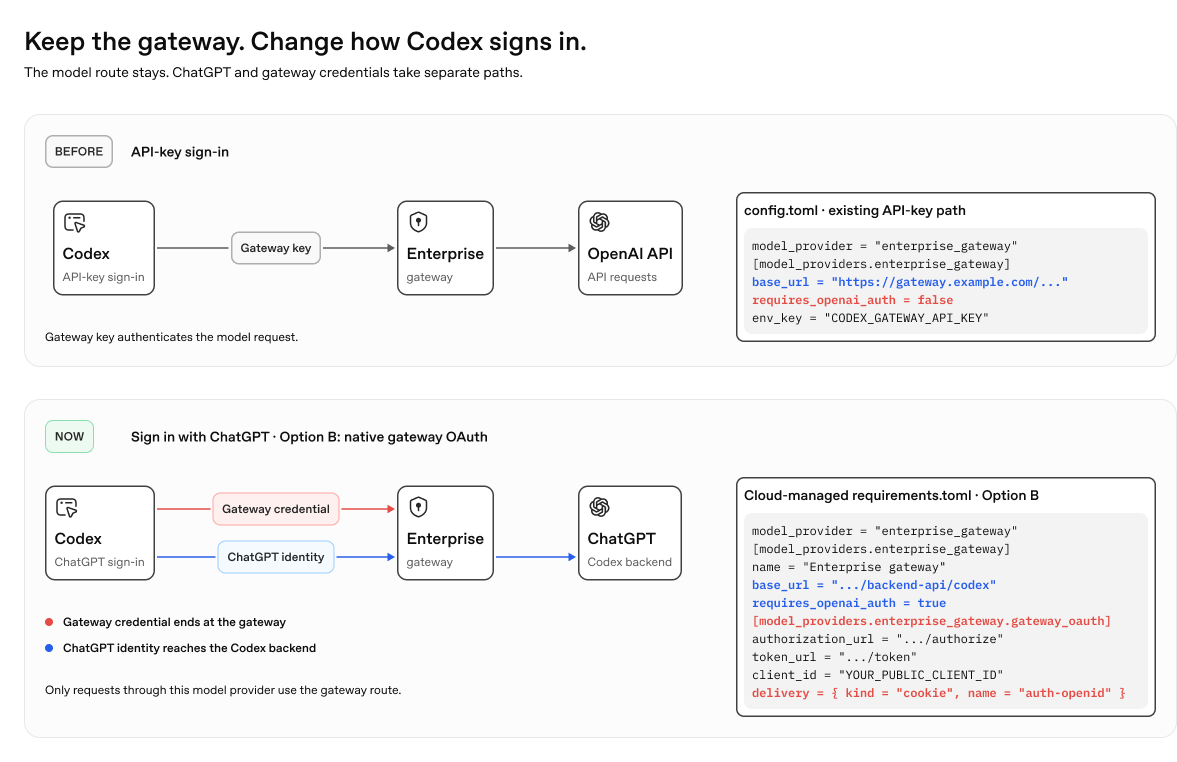
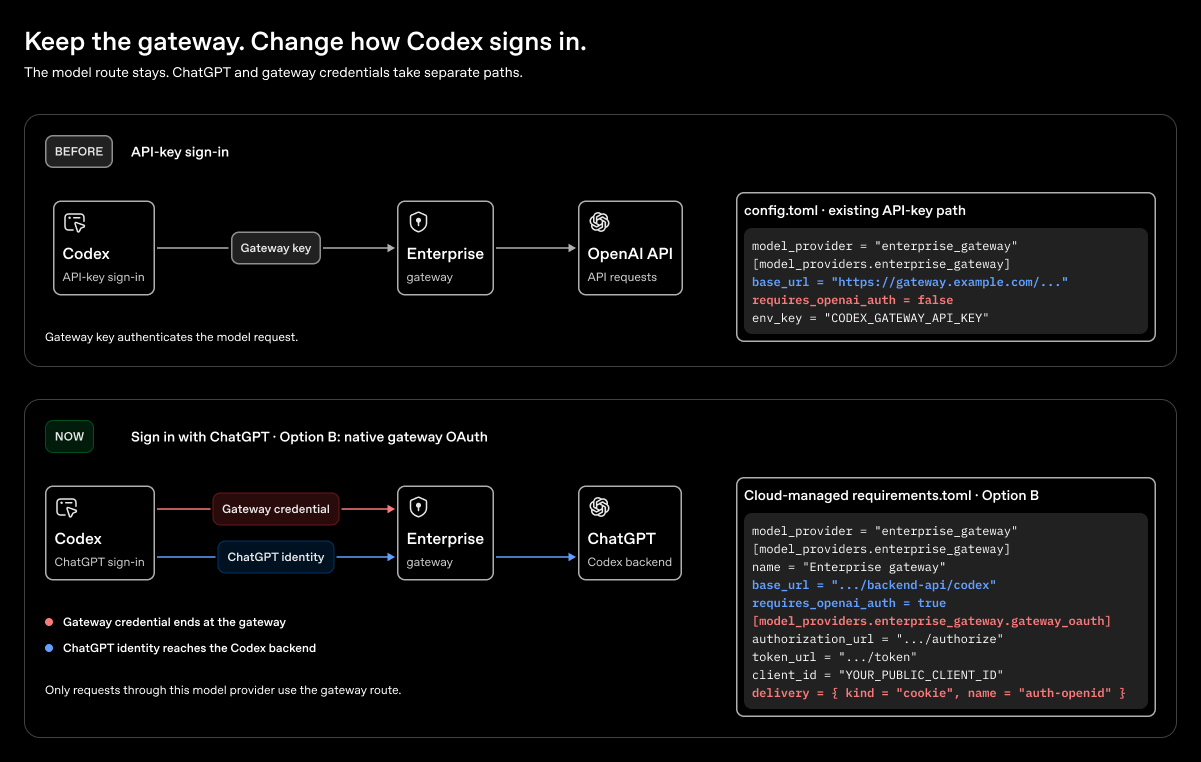
If you already have a model gateway and use Codex with the API Platform, you can keep your gateway while moving to Sign in with ChatGPT. This gives you access to eligible ChatGPT workspace features and controls, including voice mode, while keeping your model gateway. Compare the sign-in methods in Feature availability.
How to set it up
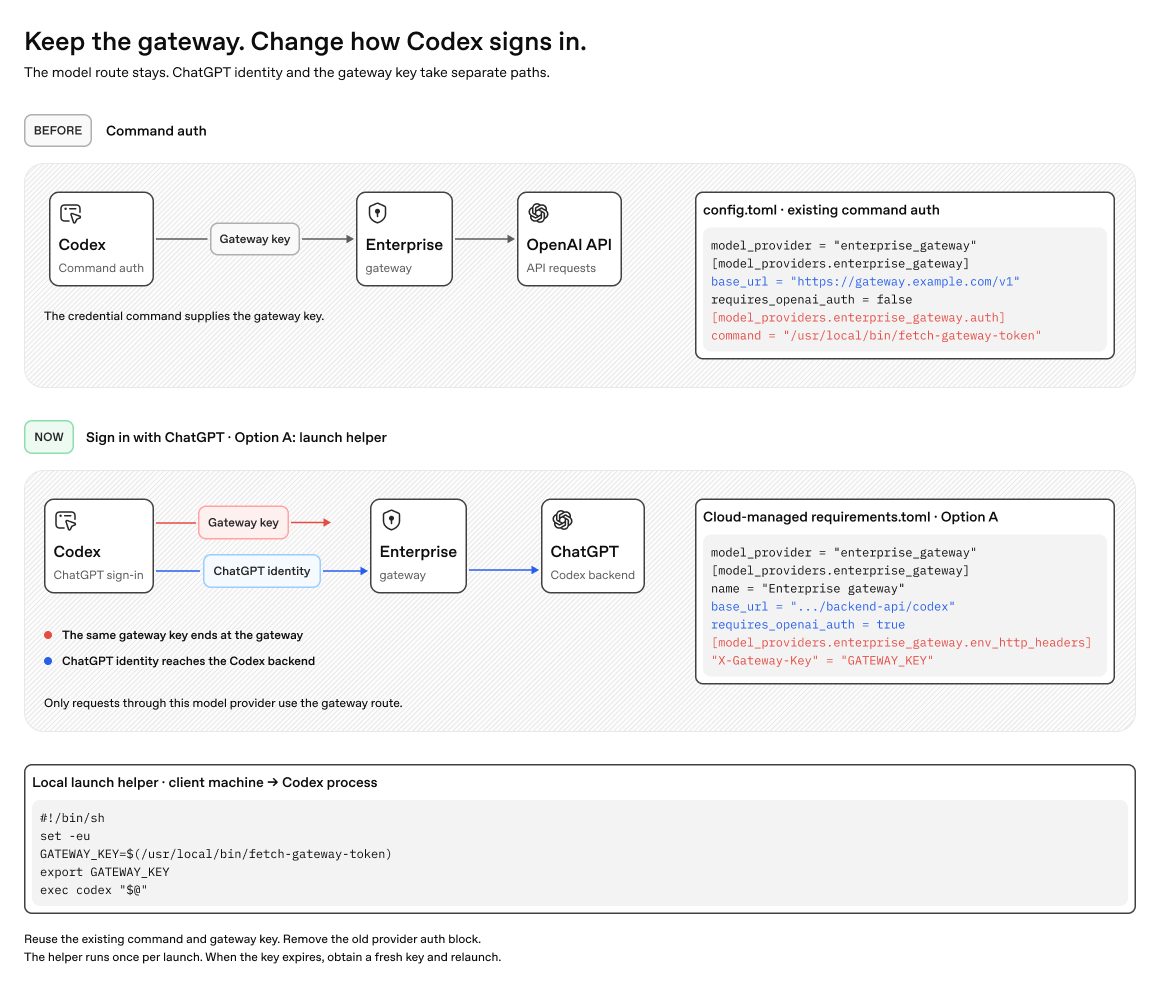
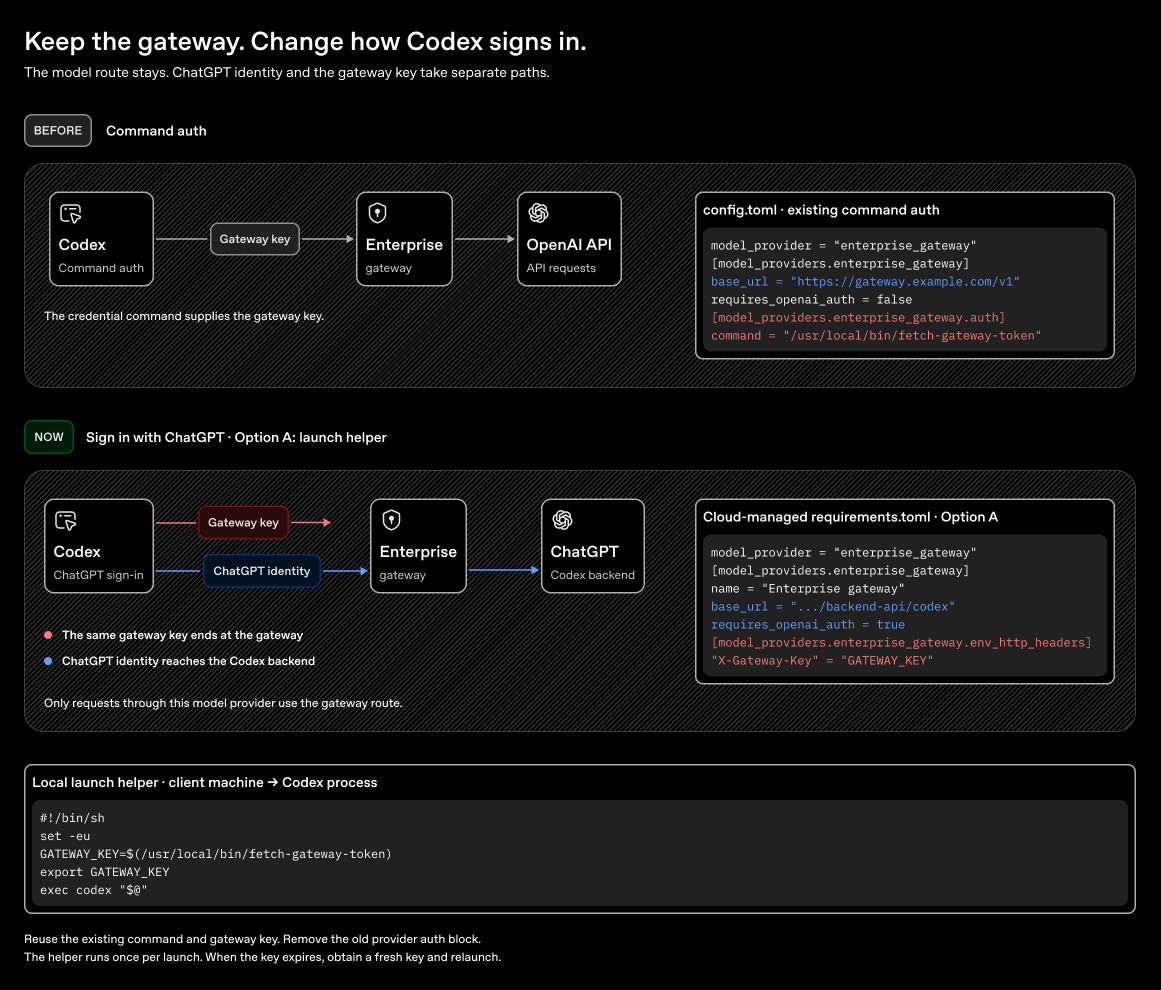
Existing command-backed authentication places the gateway key in Authorization. With ChatGPT sign-in, that header carries the ChatGPT token. Choose how to supply the separate gateway credential:
- Option A: Reuse your credential command through a small launch helper. Send the same gateway key in a separate header.
- Option B: Let Codex obtain the gateway credential through native OAuth.
Add the selected provider configuration to your workspace’s cloud-managed requirements.toml in Managed configuration. These requirements apply after users sign in with ChatGPT; they do not restrict other sign-in methods. The gateway’s Codex-compatible base URL must proxy /models and /responses to https://chatgpt.com/backend-api/codex.
Option A: Reuse your credential command with a helper
Keep your existing credential command. A small helper runs it before launching Codex and exports its output as GATEWAY_KEY. This is the same gateway key you use today; only its delivery header changes.
For example, your existing API/provider configuration might contain:
# config.toml — existing API/provider setup
model_provider = "enterprise_gateway"

[model_providers.enterprise_gateway]
name = "Enterprise gateway"
base_url = "https://gateway.example.com/v1"
requires_openai_auth = false

[model_providers.enterprise_gateway.auth]
command = "/usr/local/bin/fetch-gateway-token"
For ChatGPT sign-in, replace that provider with the following managed configuration. Remove its auth block: command-backed provider auth cannot be combined with requires_openai_auth = true.
# requirements.toml
model_provider = "enterprise_gateway"

[model_providers.enterprise_gateway]
name = "Enterprise gateway"
base_url = "https://gateway.example.com/backend-api/codex" # Keep the gateway route.
requires_openai_auth = true # Use the ChatGPT credential for OpenAI.
env_http_headers = { "X-Gateway-Key" = "GATEWAY_KEY" } # Send the same gateway key separately.
Use a launch helper such as this shell function for the CLI. Replace the command and arguments with those from your existing auth block:
codex_with_gateway() (
  set -eu
  GATEWAY_KEY=$(/usr/local/bin/fetch-gateway-token)
  test -n "$GATEWAY_KEY"
  export GATEWAY_KEY
  exec codex "$@"
)

codex_with_gateway
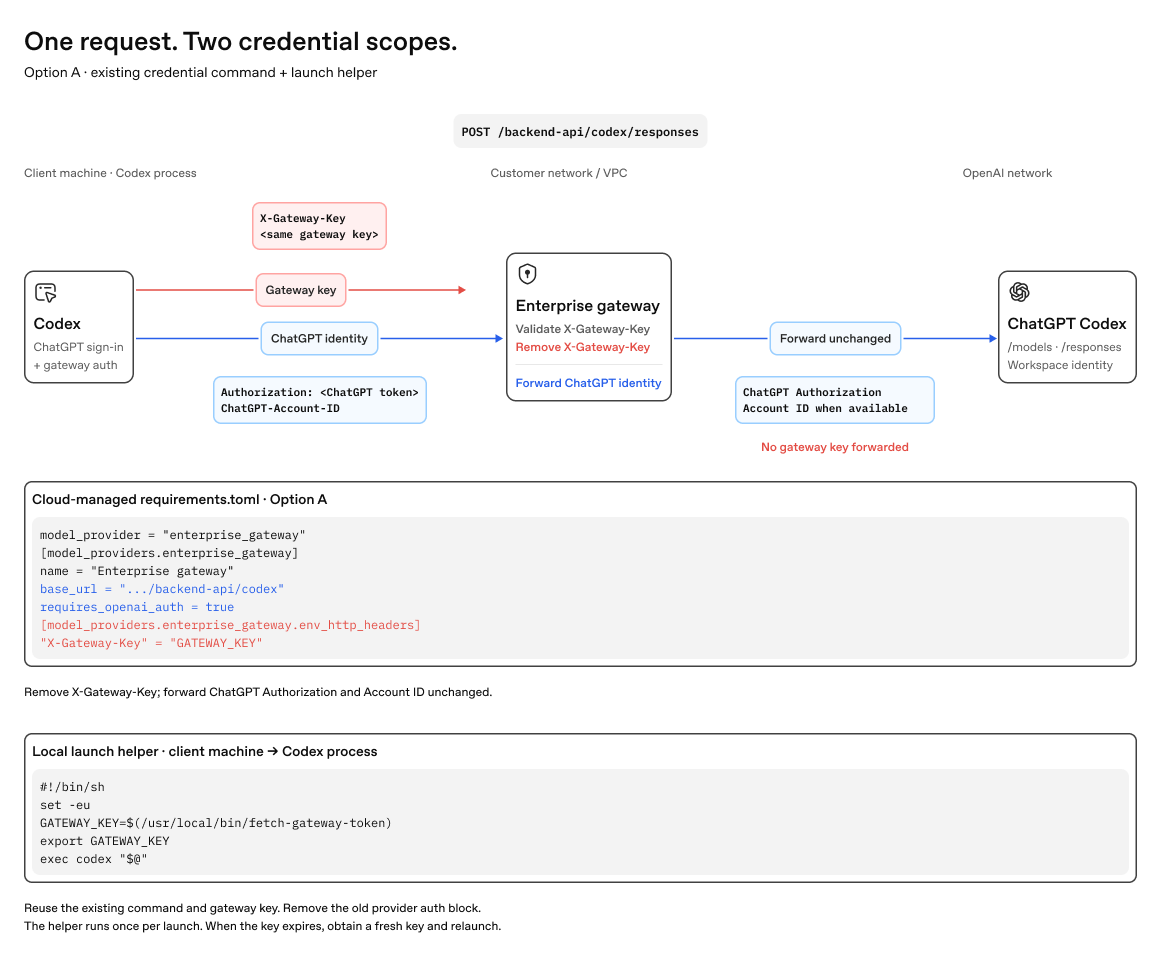
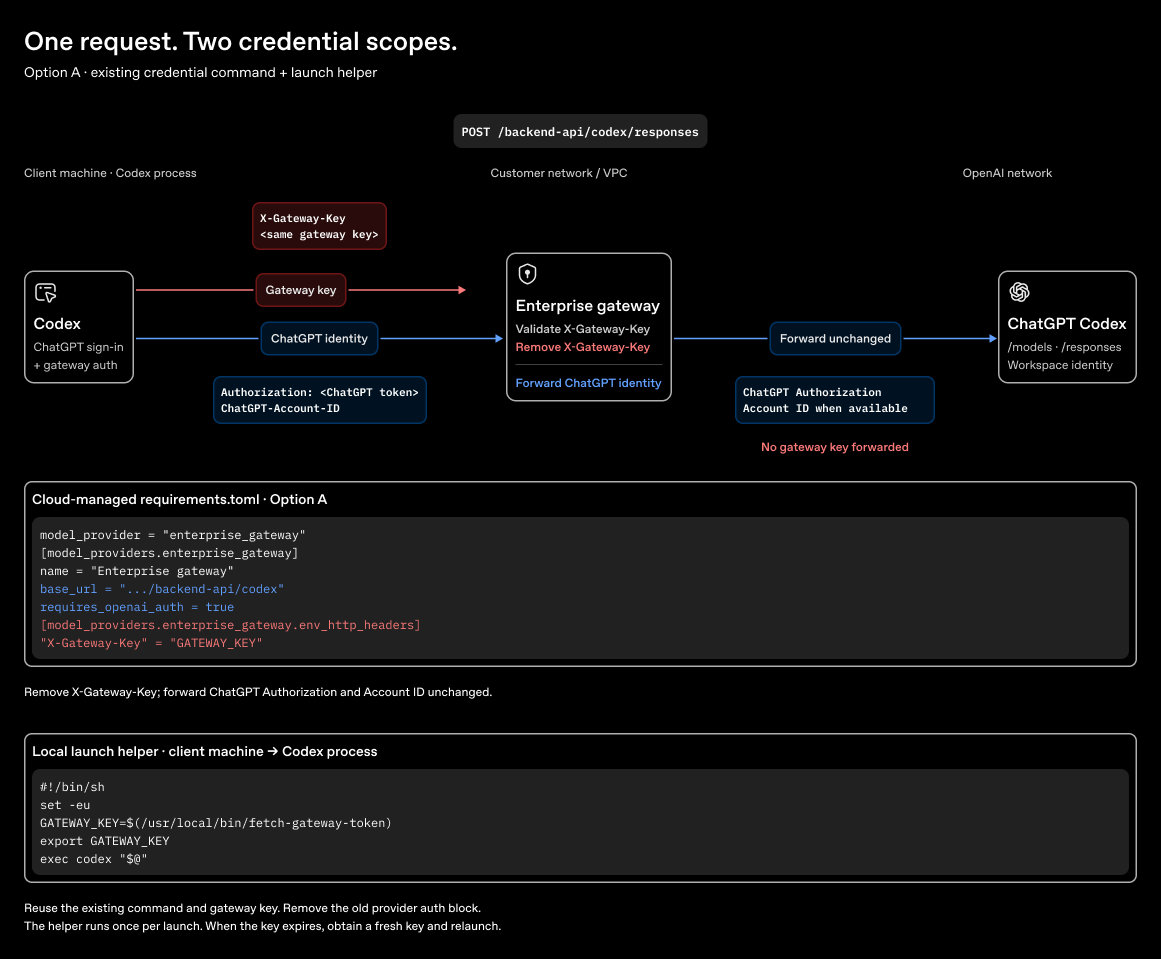
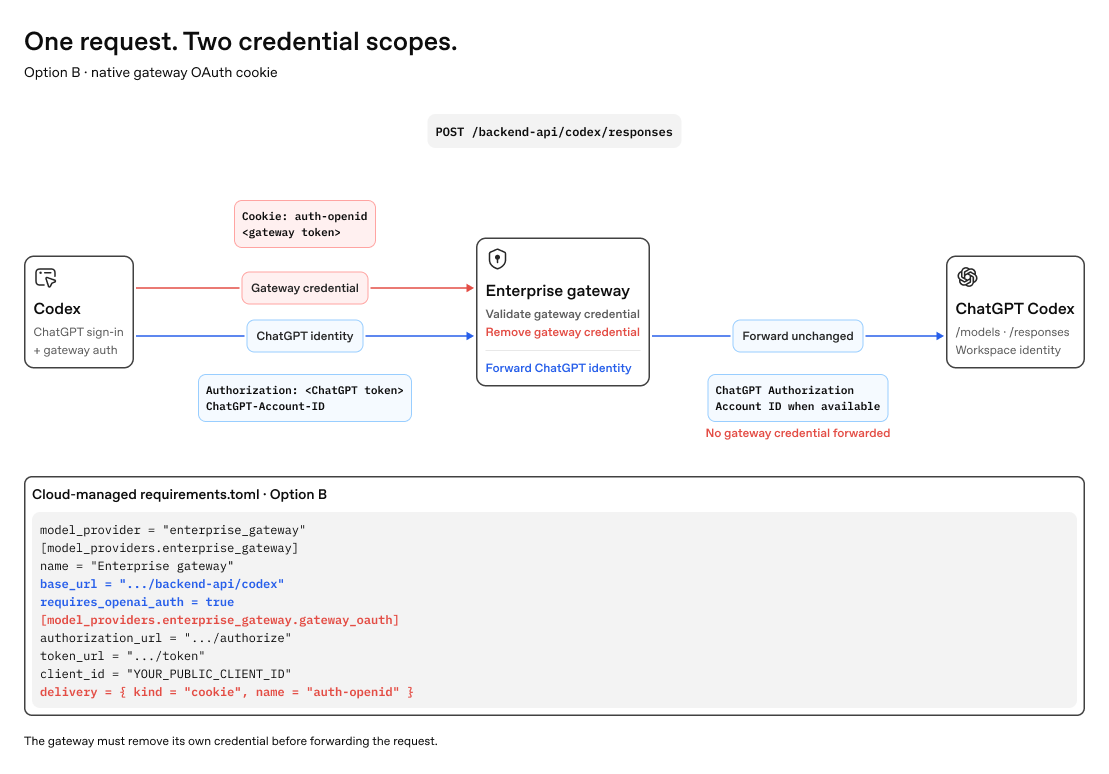
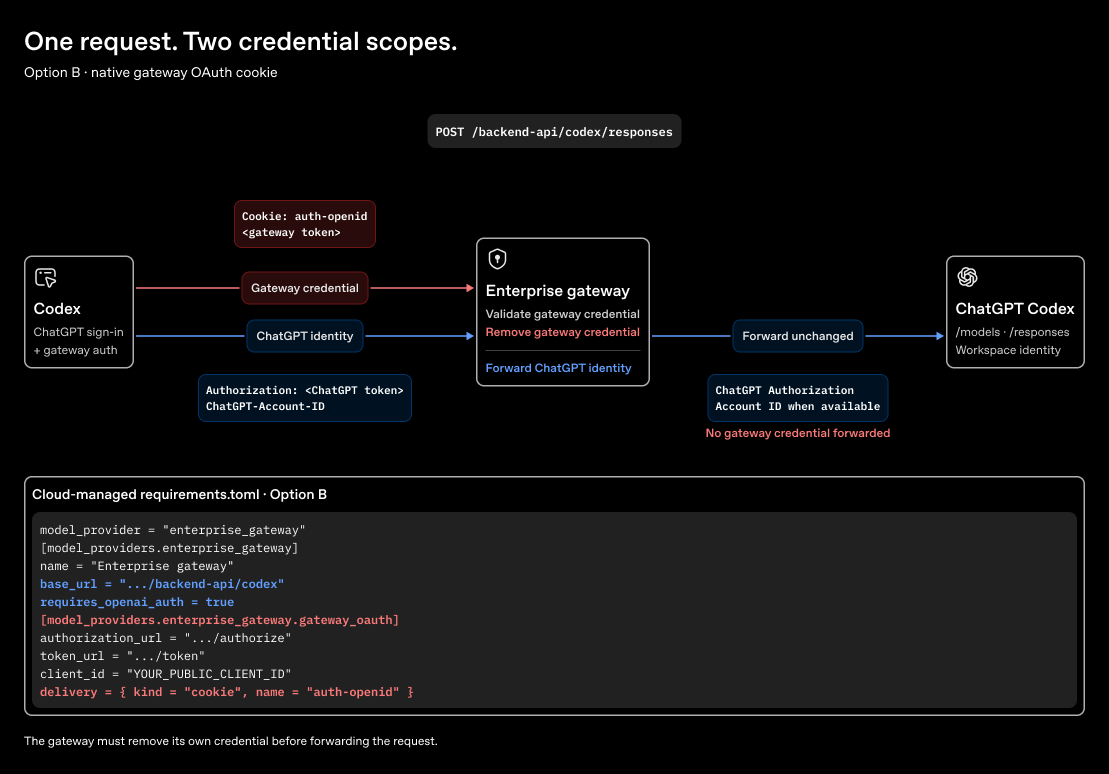
Configure your gateway to accept X-Gateway-Key, validate the key, and remove that header before forwarding the request. The request now carries:
Authorization: Bearer <ChatGPT token>
ChatGPT-Account-ID: <workspace ID, when available>
X-Gateway-Key: <same gateway key returned by your command>
The helper runs once per launch. Codex does not rerun it or refresh this header; when the key expires, obtain a new key and relaunch. For desktop, your launch integration must supply GATEWAY_KEY to the app process. Choose Option B if you want Codex to manage gateway sign-in and token renewal.
The diagrams abbreviate the request headers and launch helper. Use Authorization: Bearer <ChatGPT token> and keep the helper’s empty-key check from the examples above. If GATEWAY_KEY is empty, Codex omits X-Gateway-Key.
Option B: Use native gateway OAuth
Use this option to replace the command and launch helper with Codex-managed gateway sign-in. Your gateway must have an OAuth authorization server. Register a public client that supports authorization code with PKCE, then replace the example URLs and client ID. Remove the existing provider’s auth block and use the following managed configuration.
# requirements.toml
model_provider = "enterprise_gateway"

[model_providers.enterprise_gateway]
name = "Enterprise gateway"
base_url = "https://gateway.example.com/backend-api/codex" # Keep the gateway route.
requires_openai_auth = true # Use the ChatGPT credential for OpenAI.

[model_providers.enterprise_gateway.gateway_oauth] # Add gateway OAuth.
authorization_url = "https://login.example.com/oauth/authorize"
token_url = "https://login.example.com/oauth/token"
client_id = "YOUR_PUBLIC_CLIENT_ID"
delivery = { kind = "cookie", name = "auth-openid" } # Add gateway auth as a cookie.
# redirect_port = 43127
Codex uses a free loopback port by default. If your identity provider requires a fixed redirect URI, set redirect_port and register http://127.0.0.1:43127/callback for this example.
Add routing headers (optional)
With either option, Codex can send custom routing headers to the gateway. For example, add these headers to the same enterprise_gateway provider in your cloud-managed requirements.toml:
[model_providers.enterprise_gateway.http_headers]
x-portkey-config = "<gateway-routing-config-id>"
x-portkey-metadata = '{"tool_id":"codex"}'
Codex sends the headers on model-provider requests; the gateway applies the routing rules. Use env_http_headers for values read from the Codex process environment. Test a request to confirm the gateway receives both headers and selects the intended route. See Custom model providers for more header options.
Keep the credentials on their own paths
Codex sends the ChatGPT Authorization header, any ChatGPT-Account-ID header, and the gateway header or cookie. Have the gateway verify and remove its credential, then forward the ChatGPT headers unchanged.
Caveats and limitations
- Use a Codex build that supports managed model-provider requirements and, for Option B, native gateway OAuth. Older builds may ignore or reject unsupported fields.
- This route covers requests through the selected model provider. ChatGPT sign-in, MCP, plugins, and other app connections can use different paths.
- Your gateway can see request data and both credentials. Redact them in logs; never forward gateway credentials upstream.
- Native gateway OAuth needs a browser and a reachable loopback callback. It has no device-code fallback. Without a refresh token, users must repeat browser sign-in when the access token expires.
- A generic OpenAI
/v1/modelsresponse is insufficient: Codex expects amodelsarray. Test the model list, a prompt, and each feature your deployment uses.
Voice through a gateway
This setup routes Codex model-provider requests; it does not enable ChatGPT Voice. For WebRTC voice sessions, call creation and the sideband connection use separate routes. The experimental experimental_realtime_webrtc_call_base_url setting in ~/.codex/config.toml changes only the HTTP base URL for call creation. It does not redirect the sideband connection, media, or ordinary model requests. Work with OpenAI to verify the call destination and credential handling before using this override, then test a complete voice session.
For the API/provider credential path, see Gateway compatibility and Roll out a gateway. For these managed settings, see Managed configuration and the Configuration Reference.