
Use this page when your organization routes Codex to Amazon Bedrock through LiteLLM. If a LiteLLM gateway already exists, connect Codex first. Deploy LiteLLM only when your organization needs a new gateway.
To use an existing gateway, start with Connect to an existing gateway. To deploy LiteLLM on AWS, start with Prepare a gateway. For access without a gateway, see Amazon Bedrock.
Other gateway products follow the same gateway requirements and Codex connection flow.
Connect to an existing gateway
Get these values from your gateway administrator:
- The HTTPS base URL, such as
https://gateway.example.com/v1. - The model alias that LiteLLM routes to an approved Bedrock model.
- The provider ID to use in Codex configuration.
- A scoped gateway credential or an authentication helper that returns it.
- Any model catalog distributed with your organization’s configuration.
Then complete the connection in this order:
- Ask your gateway team to confirm that the gateway serves
POST /v1/responses, streams responses, preserves follow-up turns and tool calls, and routes the approved alias. See Gateway compatibility. - Follow Connect to a gateway to configure the provider, model, and credential.
- Verify the active provider and alias, send the short
gateway-okprompt from the connection guide, and confirm that the LiteLLM record shows the expected user and alias. - For organization-wide distribution, continue with Deploy Codex through a gateway.
Your gateway credential authenticates you to LiteLLM. The gateway manages its own Bedrock credentials; you don’t need to copy those credentials to your workstation.
Prepare a gateway
Use this section only when you need to create a LiteLLM gateway before connecting Codex.
Before you deploy
Confirm that you have:
- Permission to deploy the approved LiteLLM architecture in your AWS environment.
- Bedrock access to the models or inference profiles you will route.
- A reviewed LiteLLM image and deployment pattern.
- A trusted HTTPS host name and certificate.
- A restricted client network range.
For the Runtime example below, the gateway’s AWS identity needs bedrock:InvokeModel for the selected inference profile and the account’s default project. See AWS’s GPT-6 Sol setup instructions for the required permissions.
Architecture
The deployment keeps LiteLLM between Codex and Bedrock, with HTTPS at the client boundary. The load balancer and LiteLLM are inside your organization’s gateway boundary; the provider credential stays on the gateway.
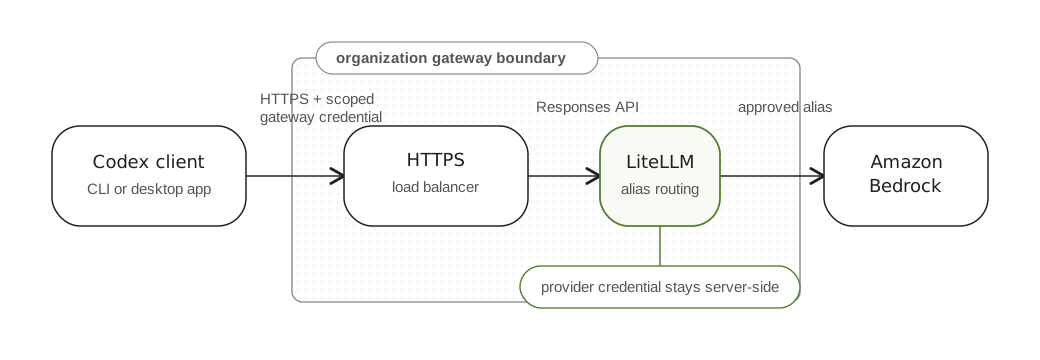
Restrict inbound access to approved clients, keep database and cache ports private, and grant the gateway only the Bedrock permissions it needs. Pin the deployed image by digest so that a restart doesn’t silently change the implementation.
Prompts, source excerpts, and tool results pass through the gateway and may enter its logs. Decide retention, access, and redaction before enabling request logging. MCP servers and plugins have separate connections and authentication; this gateway configuration doesn’t configure them.
Deployment checkpoints
Complete these checkpoints in order before handing the gateway to developers:
| Checkpoint | Output |
|---|---|
| Deploy the proxy with private database and cache dependencies. | A stable HTTPS base URL ending in /v1, with gateway-managed Bedrock authentication. |
| Configure a model route and its matching client catalog. | A stable Codex-facing alias mapped to the intended Bedrock target. |
| Verify Responses support. | A streamed POST /v1/responses response ending with response.completed. |
| Issue a test credential. | A per-user virtual key restricted to the alias, with expiration, budget, and rate limits. |
| Connect one developer. | Codex provider configuration and a verified short prompt through the gateway. |
The sections below cover each checkpoint. For production rollout, also test follow-up turns, tools, and credential revocation.
Choose the Bedrock route
The LiteLLM upstream route determines the Bedrock endpoint, model identifier, and authentication method. Keep these choices together when you deploy or change the gateway.
Use Bedrock Runtime for new configurations. The example below uses its OpenAI-compatible Responses endpoint.
Hosted web search isn’t available on Bedrock Runtime. If you need it, use Mantle and confirm that your gateway preserves the tool request and response.
See LiteLLM’s Bedrock Mantle integration for the alternative route.
For an AWS deployment example, use the pinned LiteLLM on ECS reference. That implementation uses Bedrock Runtime and refreshes authentication from the ECS task role. Follow its deployment and authentication steps together, and review its production requirements against your networking, TLS, logging, and resource-retention policies.
Whichever route you choose, verify the deployed combination of gateway version, upstream endpoint, and model against Gateway compatibility. An upstream model appearing in the gateway’s model list doesn’t establish that its streaming, continuation, and tool behavior work with Codex.
Configure a Runtime model route
Map a stable Codex-facing alias to the approved upstream model. Confirm access in your AWS account and Region before using this Runtime example.
model_list:
  - model_name: company-coding-model
    litellm_params:
      model: openai/global.openai.gpt-6-sol
      api_key: os.environ/AWS_BEARER_TOKEN_BEDROCK
      api_base: https://bedrock-runtime.us-east-1.amazonaws.com/openai/v1
Supply a valid Bedrock API key as AWS_BEARER_TOKEN_BEDROCK through your secret-management system. For a short-lived key, issue a replacement before it expires, update the gateway process environment, and restart or redeploy the workers that use it. The ECS reference instead refreshes credentials in-process from its task role; use its configuration and entrypoint together.
The openai/ prefix selects LiteLLM’s OpenAI-compatible adapter; the configured api_base sends requests to Bedrock Runtime. The Global inference profile can route requests outside the source Region. Choose a profile and Region that meet your AWS permissions and data-residency requirements, and replace both values as needed.
The client sends company-coding-model; LiteLLM uses the configured upstream route. This custom alias requires the matching client catalog described next. A generic gateway does not inherit the built-in Bedrock provider’s metadata adjustments.
Prepare the client catalog
For this GPT-6 Sol/Runtime example with Codex 0.158.0, start with the complete gpt-6-sol entry from that version’s model catalog. Apply all of these edits to that entry:
| Field | Required edit |
|---|---|
slug |
Set to "company-coding-model", matching the LiteLLM alias. |
visibility |
Set to "list". |
availability_nux |
Set to null. |
upgrade |
Set to null. |
use_responses_lite |
Set to false. |
tool_mode |
Set to null. |
supported_reasoning_levels |
Remove the entry whose effort is "ultra"; retain the other entries. |
additional_speed_tiers |
Set to []. |
service_tiers |
Set to []. |
default_service_tier |
Set to null. |
web_search_tool_type |
Set to "text". |
multi_agent_version |
Set to "v1". |
supports_search_tool |
Set to false for Runtime. |
Preserve the remaining fields, including the model’s instructions and context limits. Keep the edited entry in the catalog’s top-level models array. These changes mirror the released Bedrock metadata adjustments and Runtime search restriction. Recheck them against the matching source when changing the client version or upstream model.
Distribute the complete JSON file and configure model_catalog_json using Deploy Codex through a gateway. Keep web_search = "disabled" in the Runtime client configuration. Verify the edited catalog through the gateway before distributing it to more users.
Verify Responses support
Expose POST /v1/responses at the client-facing HTTPS endpoint. Configure the load balancer and any reverse proxy to pass streaming events without buffering. Preserve follow-up turns and function-call results. A working Chat Completions endpoint alone isn’t sufficient for this connection.
Complete the checks in Gateway compatibility before distributing client configuration. Test through the same host name, network controls, and authentication path your users will use.
Issue a test credential
Create a scoped LiteLLM virtual key for one test user. Restrict it to the approved alias and configure expiration, rate limits, and a budget. See LiteLLM’s virtual-key documentation for the applicable controls.
Distribute the key through your secret-management process or an authentication helper. Don’t give users the LiteLLM administrative key or embed gateway credentials in config.toml.
Verify the user connection
Complete these checks before expanding access:
- Confirm that the HTTPS certificate matches the gateway host name and the service is healthy.
- Connect one user through Connect to a gateway.
- Run a short prompt, a follow-up turn, and a read-only tool task.
- Confirm that gateway records show the expected identity, alias, and upstream route without exposing credentials or sensitive prompt content.
- Test credential expiration or revocation and confirm that unauthorized model aliases are rejected.
Keep the deployed image version, route configuration, and test results with your rollout record. Continue with Deploy Codex through a gateway for team distribution and ongoing operations.
Troubleshoot the connection
Use the failing layer to narrow the problem:
| Symptom | What to check |
|---|---|
| HTTPS fails before inference | DNS, certificate host name, load-balancer health, and allowed client networks. |
Gateway returns 401 or 403 |
Distinguish a rejected user credential from an upstream Bedrock authentication or permission failure using gateway logs. |
| Requested model isn’t found | Confirm the exact client-facing alias and its upstream model or inference-profile mapping. |
| Request is blocked before reaching LiteLLM | Check load-balancer and web application firewall logs, including request-body limits. Preserve your security controls while testing representative Codex requests. |
| Text works, but a turn doesn’t finish | Check streaming buffers, timeouts, terminal events, and the follow-up and tool-call checks in Gateway compatibility. |
| Upstream request times out | Check model availability in the source Region, routing configuration, quotas, and gateway logs before changing timeouts. |
Retest the same user path after a fix. A successful gateway health check doesn’t verify an authenticated inference request or a complete Codex turn.