
When you find a possible issue in a security backlog, you still need to determine whether it affects your software, gather evidence, and land a safe fix. That gets harder as code, alerts, and vulnerability reports keep coming in.
We’ve recently added more ways to work through that process with ChatGPT, Codex Security, and the open-source Codex Security CLI. You can review a pull request before it merges, investigate a repository or an existing vulnerability backlog, and add recurring checks to CI. These capabilities are part of OpenAI Daybreak, which brings together models, security tools, responsible access, and the security ecosystem for approved defenders.
In previously reported results, Codex Security Cloud had analyzed more than 30 million commits across more than 30,000 codebases. Here’s how I’d choose a starting point, gather evidence, and review fixes while keeping access scoped and people responsible for consequential decisions.
Adapt these workflows to your organization, use case, risk profile, and data-handling practices. Choose the configuration, safeguards, and deployment appropriate for your environment.
Start with an investigation in ChatGPT
If you already have a log excerpt, an advisory, or an incident timeline, ChatGPT is a useful place to start reasoning through it. A few things to try:
- Investigate a suspicious log excerpt and identify what evidence is still missing.
- Summarize a vulnerability advisory and map its likely impact on your systems.
- Reconstruct an incident timeline or draft a detection rule.
- Prepare a threat model for a new feature and compare remediation options.
- Turn a technical finding into guidance for engineering or leadership.
Check the underlying evidence, follow your organization’s data-handling policies, and decide what actions to take. Use Codex Security when you need to examine a repository, pull request, security backlog, or proposed patch.
Review security issues before code is merged
Codex Security Review brings focused security analysis into GitHub pull requests, so it’s a natural starting point when you’re already reviewing a change there. Once your workspace has access and a connected repository, you can request a review by commenting:
@codex security reviewIf that fits your team’s workflow, configure automatic reviews when a pull request opens, after every push, or whenever an existing Codex code review runs. A repository threat model or other security guidance is useful context here: it helps the review account for your application’s assets, trust boundaries, and assumptions.
Codex considers the pull-request diff and relevant repository context. The associated Codex task’s Security Report has severity, supporting evidence, attack paths, validation details, and remediation guidance. Check the reporting threshold: findings posted to GitHub inherit the pull request’s visibility.
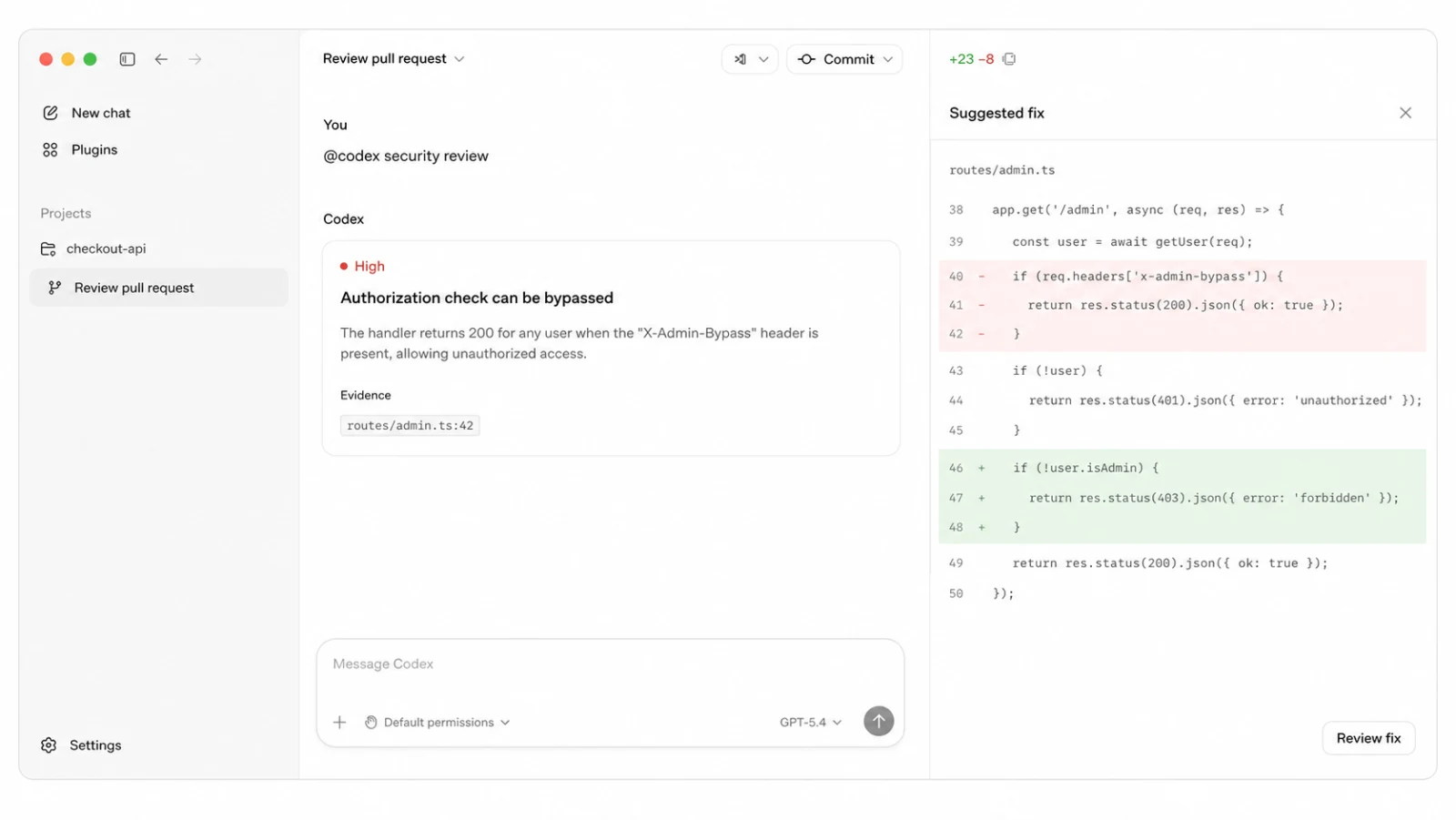
A pull-request review connects a finding to evidence and a proposed fix. Illustrative interface.
Codex Security Review is available to ChatGPT Enterprise, Business, Edu, and Pro accounts.
Investigate a repository with Codex Security
When the question is broader than one pull request, the Codex Security plugin can assess an entire repository, a component, a branch, a commit, or local changes. For a first assessment or routine review, I’d start with a standard scan. A deep scan makes more sense for a critical system or scoped directory where broader, repeated analysis justifies more time and compute.
The Security workbench brings scans, findings, and repositories together in the Codex desktop experience. Before accepting a finding, look at its source evidence, severity, confidence, attack paths, and coverage. You can also compare findings across runs and move an accepted finding toward a proposed patch.
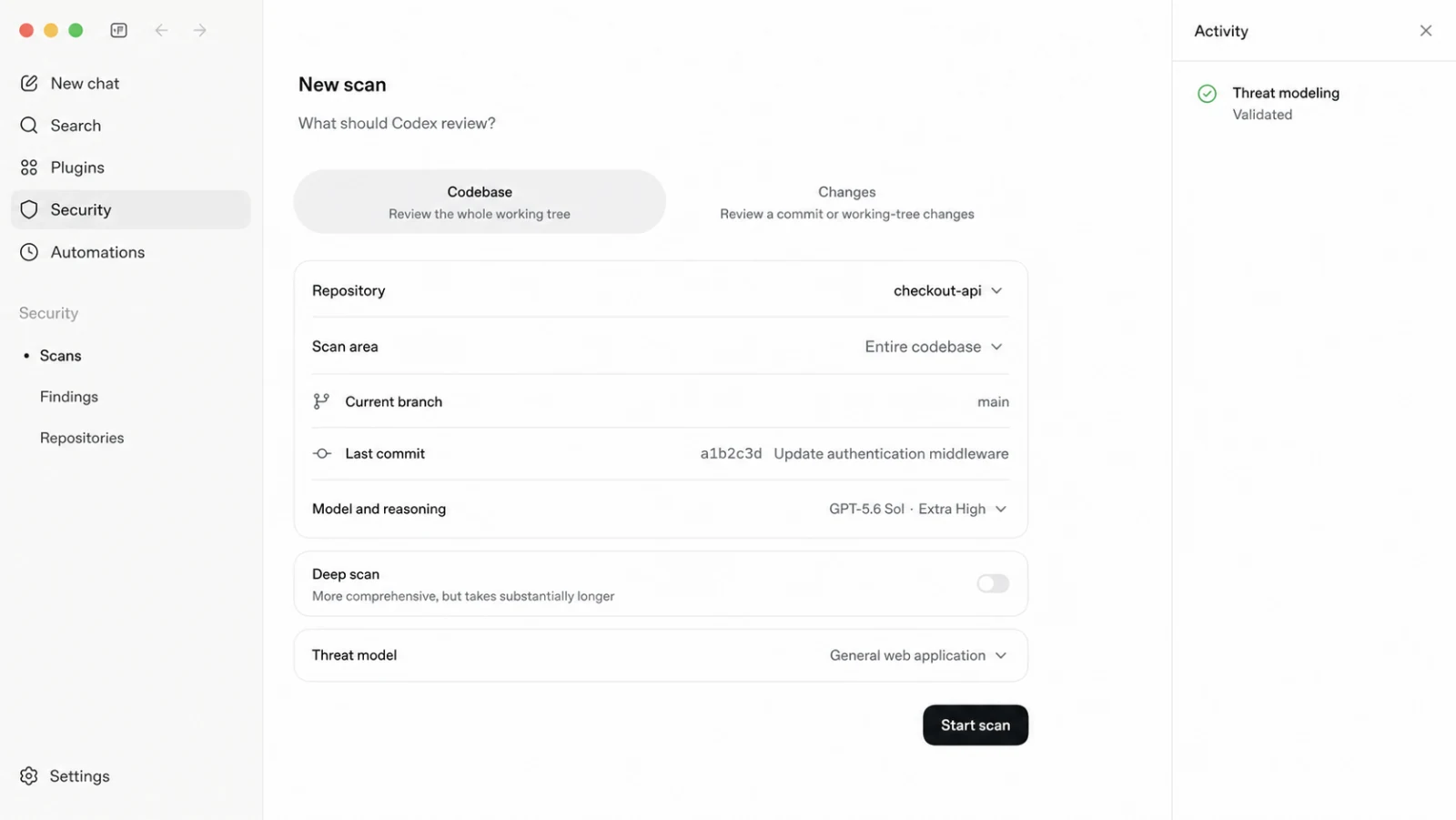
Choose a repository, scope, and threat model before starting a scan. Illustrative interface.
Recent workbench updates show live scan phases, reviewed files, active workers, elapsed time, and measured token usage. Interrupted deep scans can resume without repeating completed work, and reusable summaries reduce overhead.
Keep important repositories under continuous review
If a repository needs ongoing attention, install Codex Security Cloud from the plugin marketplace and connect your GitHub repository. Choose Repository for a scan that runs once, or Commit changes for ongoing monitoring. Select a Codex cloud environment, then review scan progress and findings in the plugin.
Where practical, likely issues are validated in an isolated environment. Review the code excerpts, call paths, reproduction output, and remediation guidance. Keep the threat model up to date as your architecture and priorities change, and inspect suggested patches before opening a pull request.
Codex Security Cloud is available in research preview. A scan may take several hours for a larger repository. With commit monitoring enabled, Codex continues to review new commits; you can change the history window and threat model in the repository’s Monitoring settings.
Turn existing alerts into an actionable queue
You may already have plenty of findings to investigate. If your team has static-analysis results, dependency alerts, bug-bounty reports, advisories, or tickets, you can triage that backlog against the current repository without starting another scan.
Codex Security can work with SARIF reports, GitHub code-scanning and Dependabot findings, security advisories, Jira or Linear tickets, and other vulnerability reports. It examines each claim, traces relevant inputs and code paths, checks existing controls, and explains whether the evidence supports action, suggests the issue is not applicable, or requires further review.
That evidence helps you focus on issues that affect the software you actually run. I’d keep the established scanners in the picture: Codex Security complements deterministic scanning with repository-specific investigation and additional validation where appropriate.
Move from a credible finding to a verified fix
Once a finding looks credible, the next question is whether you can fix it safely. For an accepted finding, ask Codex Security to prepare a fix. Where safe and practical, it can reproduce the issue, generate a focused patch, and provide evidence that the change addresses the original problem.
When feasible, the workflow adds a regression test that fails before the fix and passes afterward. If a reliable test can’t be created safely, it records what remains unverified.
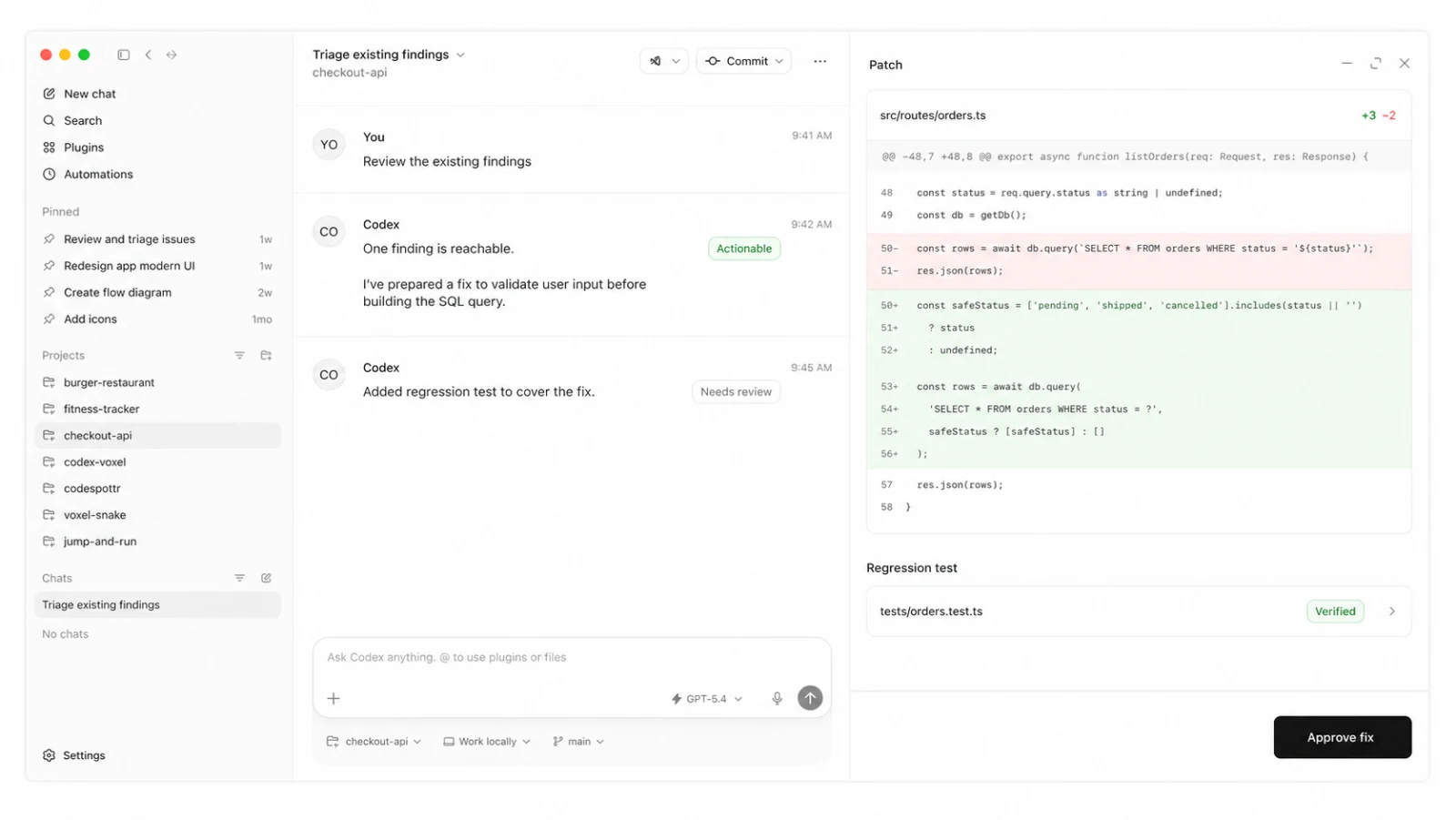
Existing findings move through evidence-backed triage, a reviewed patch, and regression verification. Illustrative interface.
The decision to apply the change still belongs to an engineer. Inspect the finding and proposed diff, decide whether to apply it, and verify the result. You can also export findings and reports or route them into existing issue-management workflows with explicit approval.
Build security checks into existing tools
If you’d rather work from a terminal, a CI pipeline, or an internal tool, the open-source Codex Security CLI and TypeScript SDK support those workflows. The @openai/codex-security package is public, but running scans requires Codex Security access.
For a first run, follow the CLI prerequisites and sign-in steps, then start a scan from a repository you own or have permission to assess:
npx @openai/codex-security login
npx @openai/codex-security scan .
Before scanning, review the local scan permissions. Local scans use your operating-system permissions and don’t pause for approval. Remove unrelated credentials from the environment, and keep results in a private location: reports can contain source excerpts and vulnerability details.
Once the local workflow is useful, you can make it repeatable with GitHub Actions or GitLab CI/CD checks. You can review pull requests or merge requests, export SARIF, retain security evidence, and optionally fail a check when findings meet a selected severity threshold. If you’re building your own application, the TypeScript SDK exposes scanning, progress reporting, cancellation, and cost controls.
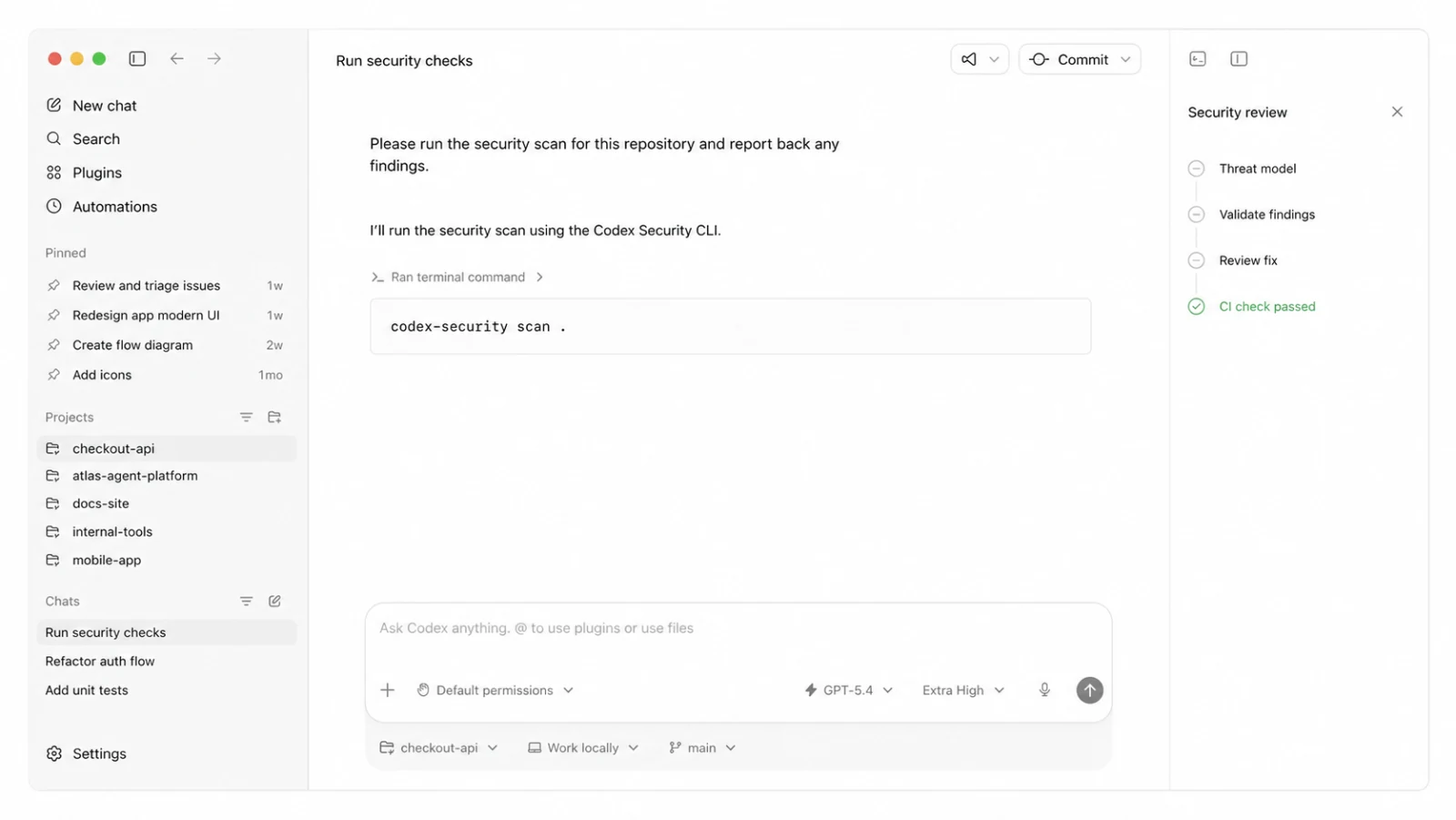
Repository analysis, validation, human-reviewed fixes, and CI checks form one workflow. Illustrative interface.
Scan multiple repositories and large codebases
When the same review needs to cover a repository portfolio, the CLI’s bulk-scanning workflow is a useful next step. You can discover repositories from an authorized GitHub account or organization, or prepare a CSV inventory with repository URLs or local paths, pinned revisions, optional scopes, and a standard or deep scan mode for each target.
After preparing the inventory, run a campaign with a private output directory outside the repositories:
npx @openai/codex-security bulk-scan repositories.csv \
  --output-dir /path/outside/repositories/security-portfolio \
  --workers 4 --max-attempts 3
Campaigns preserve progress and results separately for each repository. You can resume interrupted work, tune concurrency and retries, provide shared architecture documents or security policies, and retain findings, coverage, and portable SARIF results. Supported models, reasoning effort, scan depth, and estimated cost limits let you choose how much analysis each target warrants. Treat estimated cost limits as estimates, not hard spending caps.
For a large monorepo, I’d scope the first scan to an owned service, package, or another meaningful security boundary. Start with a standard scan, then apply deep scans selectively to sensitive services or complex components. For connected GitHub repositories, Codex Security Cloud can review a selected commit-history window and continue reviewing new commits.
Use the initial campaign as a baseline. Update threat models, track findings in your existing systems, and verify reviewed fixes to make the process repeatable.
Work with the security ecosystem you already use
Codex Security works alongside existing scanners, vulnerability-management systems, issue trackers, service providers, and open-source projects. You can bring in existing findings, export portable results, and route reviewed issues back into those workflows.
Through OpenAI Daybreak, we also work with security organizations, researchers, open-source maintainers, and partners to make model-assisted defense available in more tools and services. Access to advanced cyber capabilities is limited to approved users conducting authorized work, with safeguards matched to the activity.
Match access and safeguards to the work
Most defensive work can begin with general-purpose models and Codex Security. For approved defenders, Daybreak Blue supports authorized work such as vulnerability triage, malware analysis, detection engineering, security investigations, and patch validation. Daybreak Red is intended for a narrower set of specialized, authorized activities, including advanced vulnerability research, controlled exploit validation, and red teaming. It requires separate approval and safeguards.
Use the current model and Trusted Access guidance to choose the right offering and confirm that your identity, workspace or API organization, model, and product surface are approved. Access approval doesn’t configure your environment for you. Define the systems and actions in scope, use least-privilege permissions and isolated execution where appropriate, and keep human review in place for consequential decisions.
Choose a starting point
If you’re deciding what to try first, I’d start wherever your team already has work to do:
- Open ChatGPT for an initial investigation.
- Install the Codex Security plugin to assess a repository or triage an existing backlog.
- Configure Codex Security Review to check pull requests before they merge.
- Connect a repository to Codex Security Cloud for ongoing analysis.
- Explore the CLI and TypeScript SDK to add checks to existing tools.
- Review Trusted Access for Cyber and OpenAI Daybreak for advanced, authorized work.
Whichever workflow you try, establish whether the risk is real, inspect the evidence, review the proposed change, and verify the fix.